
Quarterly Tax Calculator for Freelancers: Stop Guessing and Start Spending
August 17, 2026 · 16 min read
Your bank balance is lying to you. It shows a number that looks like profit, but a massive chunk of that cash belongs to the IRS. Most people waste hours buried in a complex quarterly tax calculator for freelancers just to end up with a guess that still keeps them up at night. You're a founder, not a math professor. You shouldn't have to choose between a surprise tax bill in April or living in a state of constant financial paralysis because you're afraid to spend a single dollar.
We know the drill. You check your account, feel a brief moment of success, and then remember the 15.3% self-employment tax rate looming over your head. It's exhausting. This guide strips away the jargon and gives you total clarity on your spendable income. You'll learn exactly how to calculate your 2026 obligations without the spreadsheet headache. Even better, we'll show you how to move from manual calculations to an automated system that tells you exactly how much is yours to keep, spend, or invest right now. No more guessing. No more tax season panic. Just the facts you need to run your business with confidence.
Key Takeaways
- Discover why a static quarterly tax calculator for freelancers is a snapshot of the past and how it creates a dangerous bank balance trap.
- Break down the 15.3% self-employment tax into a simple, visceral reserve strategy that protects your real profit.
- Learn to navigate the federal and state tax hurdles that turn your revenue into a liability if left unmanaged.
- Adopt a radical five-step workflow to isolate your business cash and automate your savings before you even see the money.
- Unlock the morning number concept to gain total clarity on your spendable income without ever touching a spreadsheet.
Why Your Quarterly Tax Calculator is Lying to You
A quarterly tax calculator for freelancers is a tool designed to estimate the IRS's cut of your hustle. It sounds helpful. It's actually a trap. These tools are static snapshots of a moving target. They ask you for a number, you type it in, and they spit out a result. But your business doesn't work in snapshots. It works in real-time. By the time you finish your calculation, the data is already old news.
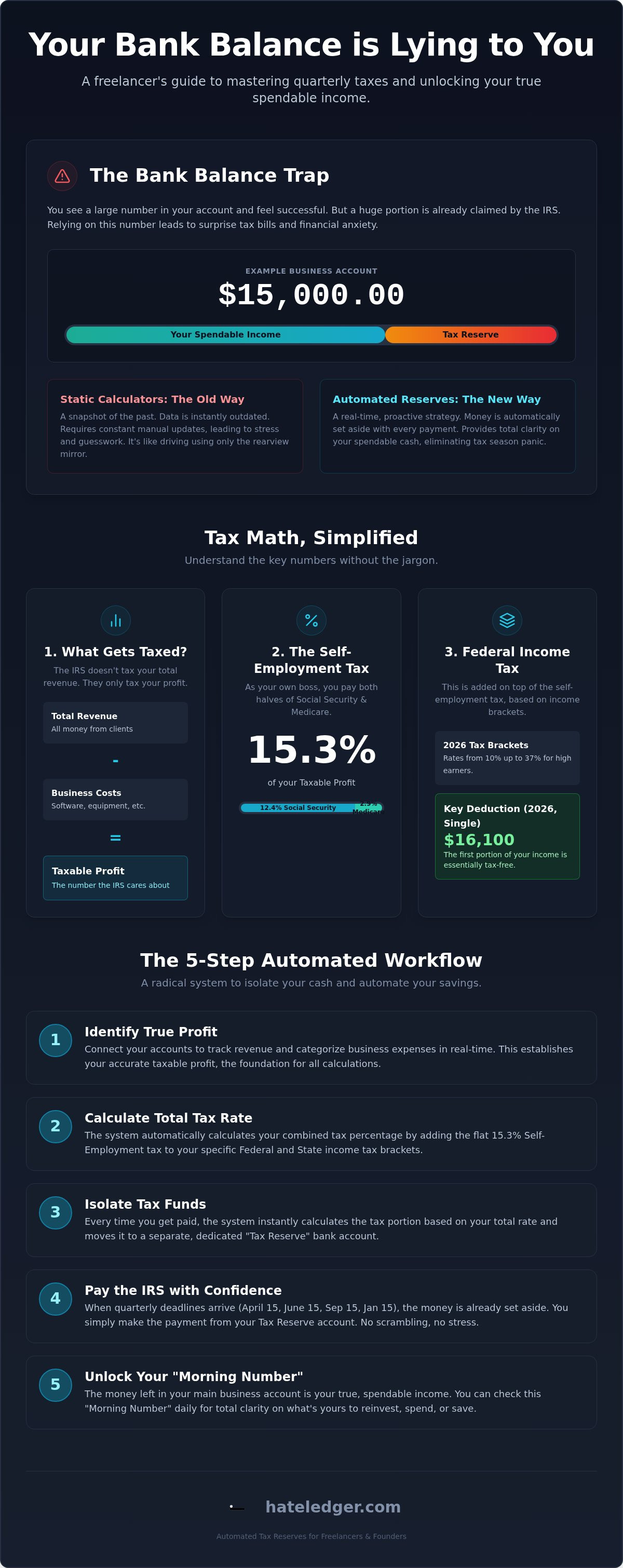
This leads straight into the "Bank Balance Trap." You look at your business account and see $15,000. It feels like profit. You start thinking about new gear or a vacation. But that number is a lie. The IRS already owns a chunk of that cash. When you rely on manual entry and spreadsheets, you're gambling with money that isn't yours. This creates a cycle of tax season dread. You avoid the math because it's tedious, you miss a payment, and then you're hit with a 7% interest penalty. Using a manual quarterly tax calculator for freelancers is like trying to drive a car while looking only at the rearview mirror.
The Problem with Static Math
Freelance income is a roller coaster. You might make $2,000 one month and $12,000 the next. Static calculators fail the moment you land a new client or lose an old one. They require you to manually update your projections every single time your situation changes. The mental load of "remembering to calculate" is a hidden cost that drains your creative energy. You shouldn't have to be a part-time accountant just to know if you can afford dinner tonight. Manual math is an anchor on your growth.
The Difference Between Estimating and Reserving
There's a massive gap between knowing a number and having the cash ready. Estimating is just a guess based on what you think you'll earn. Reserving is a proactive strategy. When you understand the reality of self-employment taxes, you realize that knowing the number is only half the battle. The real goal is establishing tax reserves for small business in real-time. You need a system that moves money automatically so you never have to "find" the cash when the deadline hits. A calculator tells you what you owe; a reserve ensures you can actually pay it.
The Math Behind Estimated Taxes (Without the Jargon)
Most people treat taxes like a mystery. It isn't. It's just a set of rules the IRS uses to take a slice of your pie. If you're using a quarterly tax calculator for freelancers, you're trying to find that slice. But you need to know what you're actually measuring. The IRS doesn't tax every dollar that hits your bank. They tax your profit. If you don't know the difference, you're overpaying or setting yourself up for a penalty. You want clarity, not a math degree.
Revenue vs. Profit: What Actually Gets Taxed
Revenue is the total amount clients pay you. Profit is what stays in your pocket after you pay for your laptop, your software, and your office space. Taxable profit is revenue minus necessary business costs. That's the only number the IRS cares about. For 2026, the standard deduction for single filers is $16,100. This means the first $16,100 of your income is essentially invisible to the taxman. Every dollar after that is fair game. Understanding this helps you stop fearing your bank balance and start managing your cash flow. It's about knowing exactly what is yours to keep.
The 15.3% Self-Employment Tax Explained
When you work for a boss, they pay half your Social Security and Medicare taxes. When you're the boss, you pay both halves. This is the 15.3% self-employment tax hit. It breaks down into 12.4% for Social Security and 2.9% for Medicare. It feels like a gut punch because it is. You can eyeball this by setting aside 15 cents of every dollar you earn, but that ignores your income tax brackets. Those brackets start at 10% and climb all the way to 37% for high earners in 2026.
To get a rough idea of your total obligation, you can use the IRS Tax Withholding Estimator. It's a solid starting point for a manual check. However, aiming for the "Safe Side" is better than being exactly right. The IRS safe harbor rule generally means you won't get penalized if you pay 100% of last year's tax bill. It's a safety net, not a ceiling. If you're tired of doing this math every week, you can automate your tax reserves and focus on actually growing your business instead of just counting its costs. Automation turns a scary unknown into a solved problem.
Federal vs. State: Calculating Your Real Tax Reserve
Federal taxes are the big hurdle. State taxes are the trip-wire. Most people obsess over the 15.3% self-employment tax but forget that their state wants a cut too. If you rely on a basic quarterly tax calculator for freelancers, you might only be seeing half the picture. You need a total percentage rule of thumb to stay safe. For most, setting aside 30% of every profit dollar is the "safe zone." It covers the feds, the state, and leaves you with cash that is actually yours to spend. Anything less is a gamble with your business's future.
The Federal Tiered System
The federal system is tiered. This means your income is sliced up. The first $16,100 is protected by the 2026 standard deduction for single filers. After that, your first $12,400 of taxable income is only taxed at 10%. You only pay the higher rates, like 22% or 24%, on the dollars that fall into those specific brackets. Earning more never means you take home less. It just means the new dollars are taxed differently. Knowing your bracket based on last year’s performance helps you set a realistic reserve rate today.
State Tax Nuances
State taxes vary wildly. If you live in Texas or Florida, you have a 0% state income tax rate. If you're in California or New York, you could be looking at an additional 5% to 13%. The real danger is the "Flat Tax" state trap. States like Illinois or North Carolina charge a flat rate on every dollar of profit. There is no standard deduction buffer there. You owe from dollar one. Some states also have specific deadlines or forms that don't perfectly align with the IRS schedule. Missing a state payment is just as expensive as missing a federal one.
Your business needs a system that sees the whole board. This is why your small business tax estimation software must handle both federal and state obligations simultaneously. If it only tracks the IRS, it’s only doing half the job. You don't want a tool that gives you a partial answer. You want a quarterly tax calculator for freelancers that factors in your specific location and your specific income level. That is the only way to achieve total clarity on your spendable income.
5 Steps to Stop Fearing the IRS Every Quarter
Taxes shouldn't be a quarterly panic attack. You deserve a system that works as hard as you do. Most people fail because they treat tax prep as a once-a-year event or a once-a-quarter math problem. It's not. It's a daily habit. If you want to stop guessing, you need a workflow that makes your quarterly tax calculator for freelancers actually useful. Follow these five steps to take control of your cash flow immediately.
- Step 1: Separate your accounts. This is non-negotiable. Mixing business and personal funds makes your data messy. If your data is messy, your calculations will be wrong.
- Step 2: Track every cent. Record revenue the moment it hits your bank. Don't wait for the end of the month. Don't wait for tax season.
- Step 3: Apply your tax percentage. Take that 30% reserve rule we discussed and apply it to every invoice. If a client pays you $1,000, $300 of that is already gone.
- Step 4: Move the money. Put your tax reserve in a separate, untouchable account. If it stays in your main business account, you'll eventually spend it on a "business emergency" that isn't an emergency.
- Step 5: Get a Morning Number. Use a tool that tells you exactly what is safe to spend every single morning. This is your bank balance minus your tax debt and fixed costs.
Automating the Reserve Process
Manual transfers are the first thing to break when your business gets busy. You land a high-paying project, your schedule fills up, and you forget to do the math. This is how you end up with a surprise bill. Using year round tax planning software removes the friction of manual math. It watches your income and builds your reserve while you focus on your clients. The psychological relief of knowing your taxes are already funded is worth more than any spreadsheet can calculate.
Setting Your "Safe to Spend" Rules
Your "Safe to Spend" number is the only number that matters. It's your actual bank balance minus your tax reserves and your fixed overhead like software or rent. If you want to buy a new $2,500 workstation, you check this number first. If the cash isn't there, you don't buy it. This rule protects you from the Bank Balance Trap and ensures you never dip into money that belongs to the IRS. A daily financial check-in keeps you grounded and prevents impulse spending that leads to April anxiety. Ready to stop guessing and start spending with confidence? Get your morning number now.
Beyond Calculators: Automated Tax Reserves for Freelancers
A standard quarterly tax calculator for freelancers is a rearview mirror. It tells you what happened, not what is happening. Hate Ledger is the anti-accounting software for 2026 because it stops looking back. It's built for people who want to run a business, not a ledger. Instead of a spreadsheet full of "what-ifs," you get a platform that treats your taxes as an invisible, automated background process. It's the difference between a tool you have to manage and a system that manages itself.
The centerpiece of this system is the "Morning Number." You wake up, check your phone, and see exactly what you can safely spend today. This isn't your bank balance. It's your bank balance with the tax debt already subtracted. This is radical simplification. It removes the mental load of "can I afford this?" because the math is already done. You get the protection of professional, double-entry bookkeeping without ever seeing a debit or credit column. It's invisible. It's silent. It just works. If you're still doing this manually, check out our free guide to simple bookkeeping to see how much time you're actually wasting.
The Hate Ledger Decision Engine
Business growth requires fast decisions. Should you buy that new $3,000 laptop? Can you afford to hire a contractor for that big project? A static quarterly tax calculator for freelancers can't answer that. The Hate Ledger Decision Engine can. By syncing directly with your bank, it ends the manual entry nightmare. No more typing in transactions. No more missed receipts. We promise a 90-day setup to a totally headache-free financial life. You do the work. The software handles the safety. It's about utility over tradition.
Why "Simple" Beats "Sophisticated"
Spreadsheets are the enemy of scaling. They are fragile, manual, and prone to human error. Every minute you spend wrestling with a cell formula is a minute you aren't billing a client. Sophisticated accounting suites are built for accountants. Simple systems are built for founders. You started your business to practice your craft, not to become a tax clerk. It's time to automate your tax reserve and join the community of pragmatic operators who value their time above all else. Stop counting your money. Start making it.
Take Back Your Financial Freedom
The days of staring at your bank balance and guessing how much belongs to the IRS are over. You now know that a manual quarterly tax calculator for freelancers is just a snapshot of the past. It doesn't account for your next big invoice or your shifting business expenses. Real financial clarity comes from moving beyond static math and into a system that works in real-time. By separating your accounts and automating your reserves, you protect your profit and your sanity.
You shouldn't have to be an accountant to run a successful business. You deserve a tool that speaks plain English and handles the tedious details while you focus on your craft. With automated tax reserves calculated for every transaction and a daily "Morning Number" that shows your actual spendable cash, you can finally stop living in fear of April. It's time to treat your taxes as a solved problem rather than a quarterly crisis.
Stop guessing and start spending. Try Hate Ledger for free today.
Your business is growing. Your bank account should reflect that reality without the hidden tax trap. Take the leap, automate the boring stuff, and get back to the work you actually love.
Frequently Asked Questions
How do I calculate my quarterly taxes as a freelancer in 2026?
Start by estimating your total profit for the year. For 2026, you must account for the 15.3% self-employment tax and your specific federal income tax bracket, which starts at 10% for income up to $12,400. Subtract your standard deduction of $16,100 for single filers first. Divide the total expected tax by four to find your payment. Using a quarterly tax calculator for freelancers helps, but daily tracking is more accurate for fluctuating incomes.
What happens if I miss a quarterly tax payment deadline?
You'll face an underpayment penalty and interest charges from the IRS. For the first quarter of 2026, the interest rate is 7%, dropping to 6% for the second quarter. The IRS calculates this penalty based on how much you underpaid and how many days the payment is late. It's always better to pay a partial amount on time than to skip the deadline entirely. Consistent saving prevents these avoidable costs from draining your profit.
Do I have to pay quarterly taxes if I have a W-2 job as well?
You only need to pay if you expect to owe $1,000 or more in taxes after subtracting your W-2 withholdings. You can often avoid quarterly payments by increasing the withholding on your W-2 paycheck to cover your freelance income. This pay-as-you-go strategy keeps the IRS happy without extra paperwork. If your side hustle profit is high, a quarterly tax calculator for freelancers can determine if your employer's withholding is actually enough.
Can I use a simple percentage like 30% for all my quarterly taxes?
Yes, 30% is a safe and effective rule of thumb for most freelancers. It typically covers the 15.3% self-employment tax and leaves room for state and federal income taxes. If you live in a high-tax state like California or New York, you might need to increase that to 35%. This flat-rate approach is simpler than complex spreadsheets and ensures you always have a funded tax reserve ready for the next deadline.
What is the safe harbor rule for estimated tax payments?
The safe harbor rule protects you from penalties if you pay at least 90% of your current year's tax or 100% of last year's total tax. If your income jumped significantly in 2026, paying 100% of your 2025 tax bill is the easiest way to stay safe. High-income earners making over $150,000 must pay 110% of last year's tax. This strategy provides a predictable target regardless of how fast your business is currently growing.
How do business deductions affect my quarterly tax calculation?
Ductions lower your taxable profit, which directly reduces the amount of tax you owe. Every dollar you spend on ordinary and necessary business expenses, like software or equipment, is a dollar the IRS cannot tax. You should subtract these costs from your total revenue before applying your tax percentage. Keeping an accurate, real-time record of expenses is the only way to avoid overpaying your quarterly estimates and keeping more cash in your pocket.
Is there a free quarterly tax calculator that actually works?
Most free tools are basic math templates that require manual data entry. They work for a single point in time but fail as your income fluctuates throughout the year. While these calculators provide a quick estimate, they don't help you manage the actual cash. For a truly effective system, you need a solution that automates the calculation and reserves the money every time a client pays an invoice. Automation beats manual entry every time.
What information do I need to use the IRS tax withholding estimator?
You'll need your most recent pay stubs, your last tax return, and an estimate of your total 2026 freelance profit. The tool asks for your filing status, the number of dependents, and any other sources of income. It's a comprehensive way to see your total tax picture. However, it's a one-time checkup. It doesn't provide the daily spending clarity required to run a fast-moving freelance business without the constant fear of overspending.
Frequently Asked Questions
Start by estimating your total profit for the year. For 2026, you must account for the 15.3% self-employment tax and your specific federal income tax bracket, which starts at 10% for income up to $12,400. Subtract your standard deduction of $16,100 for single filers first. Divide the total expected tax by four to find your payment. Using a quarterly tax calculator for freelancers helps, but daily tracking is more accurate for fluctuating incomes.
You'll face an underpayment penalty and interest charges from the IRS. For the first quarter of 2026, the interest rate is 7%, dropping to 6% for the second quarter. The IRS calculates this penalty based on how much you underpaid and how many days the payment is late. It's always better to pay a partial amount on time than to skip the deadline entirely. Consistent saving prevents these avoidable costs from draining your profit.
You only need to pay if you expect to owe $1,000 or more in taxes after subtracting your W-2 withholdings. You can often avoid quarterly payments by increasing the withholding on your W-2 paycheck to cover your freelance income. This pay-as-you-go strategy keeps the IRS happy without extra paperwork. If your side hustle profit is high, a quarterly tax calculator for freelancers can determine if your employer's withholding is actually enough.
Yes, 30% is a safe and effective rule of thumb for most freelancers. It typically covers the 15.3% self-employment tax and leaves room for state and federal income taxes. If you live in a high-tax state like California or New York, you might need to increase that to 35%. This flat-rate approach is simpler than complex spreadsheets and ensures you always have a funded tax reserve ready for the next deadline.
The safe harbor rule protects you from penalties if you pay at least 90% of your current year's tax or 100% of last year's total tax. If your income jumped significantly in 2026, paying 100% of your 2025 tax bill is the easiest way to stay safe. High-income earners making over $150,000 must pay 110% of last year's tax. This strategy provides a predictable target regardless of how fast your business is currently growing.
Ductions lower your taxable profit, which directly reduces the amount of tax you owe. Every dollar you spend on ordinary and necessary business expenses, like software or equipment, is a dollar the IRS cannot tax. You should subtract these costs from your total revenue before applying your tax percentage. Keeping an accurate, real-time record of expenses is the only way to avoid overpaying your quarterly estimates and keeping more cash in your pocket.
Most free tools are basic math templates that require manual data entry. They work for a single point in time but fail as your income fluctuates throughout the year. While these calculators provide a quick estimate, they don't help you manage the actual cash. For a truly effective system, you need a solution that automates the calculation and reserves the money every time a client pays an invoice. Automation beats manual entry every time.
You'll need your most recent pay stubs, your last tax return, and an estimate of your total 2026 freelance profit. The tool asks for your filing status, the number of dependents, and any other sources of income. It's a comprehensive way to see your total tax picture. However, it's a one-time checkup. It doesn't provide the daily spending clarity required to run a fast-moving freelance business without the constant fear of overspending.