
Automated Tax Reserve for Self-Employed: Stop Guessing What You Can Spend
August 13, 2026 · 17 min read
What if that $10,000 sitting in your business account is actually a lie? It happens every time a client pays. You see a high balance and feel a surge of confidence. Then the math starts. You wonder if $3,000 of that is already spoken for. You worry about underpayment penalties. You feel the weight of a tax bill you haven't even received yet. It is an exhausting way to run a business.
You shouldn't have to be a part-time accountant just to know if you can afford dinner. Building an automated tax reserve for self employed life is the only way to kill the mental load for good. It stops the manual transfers. It ends the guessing games. Most importantly, it ensures you never accidentally spend money that belongs to the IRS. You deserve to look at your bank account and see the truth, not a math problem.
We are going to show you how to make your tax savings invisible and automatic. You will learn how to reach a state where your "safe-to-spend" number is the only one you see. By the end of this, you will have a system that handles the 15.3% self-employment tax and quarterly deadlines without you lifting a finger. Tax season isn't coming for you. It's already paid for.
Key Takeaways
- Stop letting your bank balance lie to you. Learn why a high balance leads to accidental overspending and exhausting mental math.
- Discover how an automated tax reserve for self employed professionals removes the guesswork by hiding your tax debt in real-time.
- Ditch manual spreadsheets and the risk of human error for a system that calculates your obligations with algorithmic accuracy.
- Master a simple setup strategy to sync your business accounts and define your tax profile for total financial clarity.
- Wake up to a Morning Number that tells you exactly what is safe to spend so you never have to worry about tax season again.
The Bank Balance Trap: Why Your Current Account Is Lying to You
Most banking apps show you a number that feels like a victory. It is actually a mirage. If you have $15,000 in your account, you likely only own about $10,500 of it. The rest is a "Tax Trap" waiting to spring. Traditional accounting software is built to look backward. It tells you what you spent last month. It tells you how much you made last quarter. It is completely useless at telling you what you can safely spend today. This gap between your balance and your reality is where business owners go broke.
The Hidden Partner in Your Business
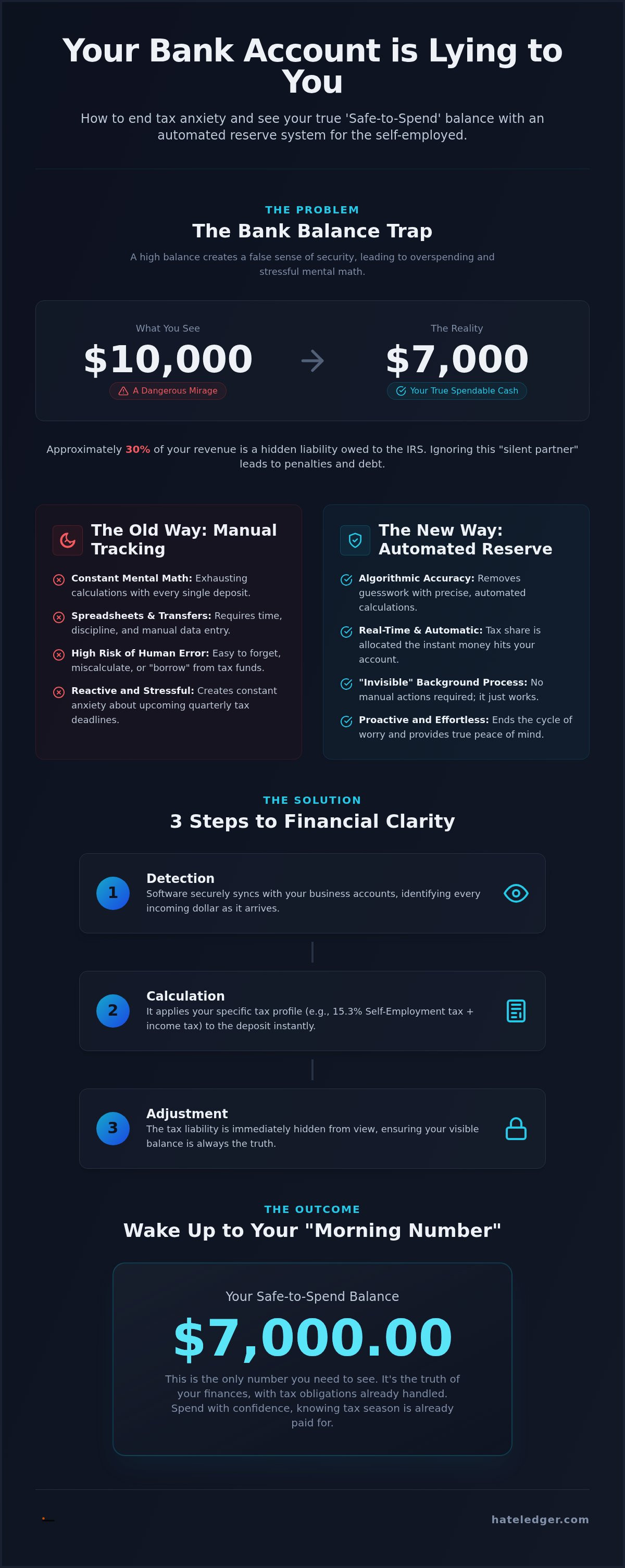
Every time a client pays you, a silent partner takes a seat at the table. That partner is the IRS. Part of what it means to be self-employed is acting as your own tax collector. You are responsible for the 15.3% self-employment tax plus your standard income tax. If you ignore this partner, they do not just go away. They wait until your quarterly deadline and hit you with underpayment penalties. You must distinguish between Revenue and Spendable Cash. Revenue is the total on the invoice. Spendable Cash is what remains after the tax man takes his 30% cut. Without an automated tax reserve for self employed operations, you are essentially borrowing money from the government at a high interest rate. It is a dangerous game that ends in high-interest debt or a depleted emergency fund.
The Mental Load of Manual Tracking
Doing mental math every time a deposit hits is a recipe for burnout. You open your app, see the cash, and start the internal calculation. You tell yourself to move $600 to a separate account. Then a subscription renews. Or a client payment is late. You "borrow" from your tax fund just to cover the gap. Spreadsheets usually fail after three months because they require manual data entry that you simply do not have time for. The industry loves to hide this simplicity behind jargon like "liabilities" and "accruals." This is the accountant’s lie. You do not need to understand complex terminology to stay safe. You just need a system that removes the temptation. An automated tax reserve for self employed workers turns a stressful math problem into a silent background process. It replaces the anxiety of "maybe" with the confidence of "done."
What is an Automated Tax Reserve?
An automated tax reserve is not just a separate savings account. It is a piece of software that acts as a real-time filter for your bank balance. Most people try to manage their Self-Employment Tax obligations by moving money manually once a month. This is reactive. It relies on your memory and your willpower. An automated tax reserve for self employed professionals is proactive. It calculates what you owe the second the money hits your account and hides that amount from your view.
The key is secure bank syncing. By connecting directly to your business accounts, the software watches every transaction. It doesn't wait for you to update a spreadsheet or log into a portal. Real-time tracking is the only way to kill quarterly anxiety. If you wait until the end of the month to set aside tax money, you have already spent thirty days looking at an inflated balance. You have likely already made spending decisions based on money that isn't yours. This delay is where the bank balance trap becomes dangerous.
How the Math Works (Without You Doing It)
The process is mechanical and clinical. It removes the emotion from your finances by following three simple steps:
- Detection: The software identifies every incoming dollar as it arrives in your synced account.
- Calculation: It applies your specific tax profile, including self-employment and income tax rates, to that specific deposit.
- Adjustment: It immediately subtracts that liability from your spendable balance view.
You don't need to know the current percentage for Social Security or Medicare. The software does. It treats your tax debt as a bill that is paid instantly, even if the cash hasn't left your bank yet. This ensures your visible balance is always the truth.
Invisible Protection
The best system is one you don't have to think about. This is the core of "Invisible Bookkeeping." You shouldn't be clicking "transfer" every Friday. You shouldn't be second-guessing your math. An automated tax reserve for self employed creators creates a psychological barrier that manual systems cannot match. An automated tax reserve is the firewall between your revenue and the IRS.
This approach turns your accounting from a chore into a background utility. It provides a sense of radical simplification and relief. You can get this level of clarity with a simple tax automation tool that does the heavy lifting while you focus on your work. By making the reserve invisible, you remove the temptation to "borrow" from your future self. You stay safe because the math is handled before you even see the money. You stop being a victim of your own bank balance and start being a pragmatic operator.
Manual vs. Automated Tax Reserves: The Real Cost
Manual tax reserves are a hidden tax on your time. You think you are saving money by doing it yourself. You are actually spending your most valuable asset: billable hours. A manual spreadsheet requires constant attention. It demands data entry. It relies entirely on your discipline to move funds after every payment. When you are busy, the spreadsheet is the first thing you ignore. This is the "I'll do it later" fallacy. Later never comes. By the time you finally look at the numbers, you are three months behind and thousands of dollars short. The real cost isn't just the math. It is the dread that builds up every time you think about your bank account.
The difference between manual tracking and an automated tax reserve for self employed professionals is the difference between panic and peace. Manual math is prone to human error. One typo in a cell formula can leave you underfunded by April. Automation uses algorithmic accuracy to ensure every penny is accounted for. It turns tax season from a looming crisis into a total non-event. You stop worrying about underpayment penalties because the money is already set aside. Consistency is the only way to win this game.
The Spreadsheet Nightmare
Manual entries are the primary cause of tax-time gaps. Most business owners lose two to four hours of billable time every month just managing their books. That is time you could spend on high-value client work. Instead, you are fighting a spreadsheet that doesn't care about your actual bank balance. If you follow a standard guide to filing self-employment taxes, you will see that the IRS expects precision. Spreadsheets offer the opposite. They offer a false sense of security that vanishes the moment you forget to log an invoice. This manual friction creates a psychological barrier that makes you avoid your finances altogether.
Automation as a Growth Strategy
Switching to an automated tax reserve for self employed work is a strategic move for your business growth. It frees up the mental bandwidth you currently waste on "mental math." You stop playing defense and start playing offense. When your tax reserve is handled, you know exactly when you can afford to hire help or invest in new equipment. You aren't guessing. You are operating on facts. This is the core philosophy behind Accounting Software for People Who Hate Accounting. It turns your financial data into a tool for expansion rather than a source of stress. You gain the confidence to scale because you know your foundations are secure. You are no longer just a freelancer surviving day to day. You are a pragmatic operator building a sustainable business.
How to Set Up Your Automated Tax Strategy
Legacy accounting software expects you to be a technician. It asks for a "chart of accounts" and "opening balances" before you can even see your cash flow. This is a waste of your energy. Setting up an automated tax reserve for self employed professionals is a five-step process that prioritizes speed over formality. You don't need a degree in finance to get this right. You just need to follow a logical path from your bank account to your dashboard.
- Step 1: Connect your business bank accounts via secure sync. This is the foundation of the entire system.
- Step 2: Define your tax profile. Enter your estimated annual income and filing status to set the baseline.
- Step 3: Set your Target Reserve percentage. For most, 25-30% is the gold standard for total safety.
- Step 4: Enable the Safe to Spend view. This hides the tax money so you only see what is actually yours.
- Step 5: Review your Morning Number daily. This is your single source of truth every morning.
Syncing Your Reality
Bank syncing is the engine of your automated reserve. It is not enough to just connect a checking account. You must capture every revenue stream. If you get paid via Stripe or PayPal, those need to be synced too. Legacy systems often miss these "hidden" accounts; leaving you to do the manual math anyway. By syncing everything, you ensure that every dollar is filtered the moment it arrives. This also forces you to separate business and personal expenses early. If your groceries are mixed with your client payments, the math will always be wrong. Clean data leads to a clean conscience.
Fine-Tuning Your Reserve
Your business is not a static entity. Your tax strategy shouldn't be either. As your income grows, your effective tax rate might shift. You can adjust your reserve percentage in seconds to stay ahead of higher brackets. You should also account for business deductions. Every legitimate expense lowers your taxable income, which means you can eventually lower your reserve needs. Your tax reserve is a living number, not a static rule. You can start building your automated tax reserve for free and adjust it as you scale. This flexibility ensures you are never over-saving at the expense of your growth, nor under-saving at the risk of an IRS penalty. You remain in control while the software handles the tedious details.
The Hate Ledger Solution: Spend Safely Every Day
Legacy software loves charts. It loves Profit and Loss statements that require a degree to decode. You don't need a graph to know if you are winning. You need a single figure. Hate Ledger provides the Morning Number. This is the only number that matters because it is the only one that is actually yours. It hides the complexity of federal and state tax laws behind a simple interface. You don't see the calculations. You only see the result. This is the year to stop playing Accountant and start being a Founder. You have a business to build. You don't have time to be a data entry clerk.
Most competitors treat tax as a year-end event. We treat it as a daily cash-flow reality. By utilizing an automated tax reserve for self employed professionals, you transform your bookkeeping into a background utility. It is invisible. It is accurate. It is the only way to ensure that your business growth is based on real money, not a temporary balance that belongs to the government. We've built the anti-accounting software for people who value their mental energy above all else.
Beyond Taxes: The Decision Engine
An automated tax reserve for self employed operators is about more than just staying out of jail. It is about making better moves. When you know your tax bill is already covered, you can use your remaining balance to fuel growth. You can decide to hire a virtual assistant or invest in a new workstation without checking with a spreadsheet first. This is how you maximize your Human Capital ROI Engine. We offer a 90-day setup promise to get your life back from spreadsheets forever. You stop guessing. You start executing. Safety isn't just about protection. It is about the freedom to take risks.
Your New Daily Habit
Your financial routine shouldn't take more than sixty seconds. Check the number. Spend the money. Get back to work. There are no journals to balance. There is no jargon to learn. We've built a system that works in the background so you don't have to. Whether you are just starting with our Free Forever Tier or scaling with a Pro Plan, the result is the same: absolute clarity. You deserve to work without the weight of an invisible debt hanging over your head. You deserve a system that values your time as much as you do. Stop playing defense with your bank account. Start for free today and see your true spendable balance for the first time. It is time to run your business like you mean it.
Stop Guessing and Start Growing
Your bank balance should never be a source of anxiety. You have seen how the traditional way of tracking money leads to the bank balance trap and unnecessary mental math. An automated tax reserve for self employed professionals is the bridge between seeing revenue and knowing your reality. By making your tax savings invisible and automatic, you remove the temptation to spend money that isn't yours. You replace the dread of tax season with the confidence of a non-event. It is time to stop playing defense with your finances.
Real-time clarity is a choice you can make today. You don't need to learn accounting jargon or manage complex journals to stay safe. Our platform handles the math so you can focus on building your business. Stop the tax panic; get your Morning Number for free today. There is no credit card required for the Free Forever tier. You will finally know exactly what you can safely spend every single morning. Take back your mental bandwidth and run your business like the founder you are. You deserve a system that works as hard as you do.
Frequently Asked Questions
How much should a self-employed person set aside for taxes in 2026?
You should set aside at least 25% to 30% of your gross income. The self-employment tax rate is 15.3% in 2026, which covers Social Security and Medicare. This doesn't include your standard federal or state income taxes. Setting aside a flat 30% ensures you have a safety net for higher brackets or unexpected revenue spikes. It is better to have too much in your reserve than to scramble for cash in April.
Does automated tax software actually pay the IRS for me?
No, automated tax software generally does not send payments to the IRS for you. It acts as a financial filter that calculates and separates your tax debt from your spendable cash. You are still responsible for making the actual quarterly payments by the 2026 deadlines. The software's job is to ensure that when those deadlines arrive, the money is sitting in your account ready to be sent.
Can I use an automated tax reserve if I have multiple income streams?
Yes, you can and should use a reserve for every revenue stream you own. An automated tax reserve for self employed founders is most effective when it syncs with all your accounts, including bank transfers, Stripe, and PayPal. The software aggregates this data to give you a single, unified view of your total tax liability. This prevents money from slipping through the cracks if you juggle various clients or platforms.
What happens if I under-reserve my taxes?
Under-reserving leads to underpayment penalties and high-interest debt. The IRS operates on a "pay-as-you-go" system, requiring quarterly payments if you expect to owe $1,000 or more. If you miss the mark, you will face interest charges on the balance you failed to pay. Beyond the financial cost, the stress of a surprise bill can paralyze your business growth. Automation eliminates this risk by calculating your debt in real-time.
Is it better to use a separate bank account or software for tax reserves?
Software is superior because it provides a real-time "Safe to Spend" number without manual effort. A separate bank account still requires you to do the math and move the money yourself. If you forget a transfer, your system breaks. An automated tax reserve for self employed operators removes the human element. It hides the tax money digitally, so you aren't tempted to borrow from your future self during a tight month.
How does an automated tax reserve handle business deductions?
The reserve handles deductions by allowing you to adjust your target percentage based on your typical expenses. While the software tracks gross revenue, it doesn't know your specific write-offs until you account for them. Most users set a conservative reserve and then lower it once their deductions are verified. This creates a "forced savings" effect that often results in a tax refund or a surplus in your business account at year-end.
Is automated tax software safe to link to my bank account?
Modern tax automation tools use bank-level security and read-only access to your data. They cannot move your money or change your account settings. They simply watch the transactions to calculate your tax debt. Linking your account is the only way to get the algorithmic accuracy needed to stop guessing. It is a standard practice for millions of business owners who value speed and precision over manual data entry.
Can I afford an automated tax reserve tool if I am just starting out?
You can absolutely afford it because there are no-cost options available for new freelancers. We offer a Free Forever Tier specifically for those who are just starting their journey. You don't need a huge budget to protect yourself from the IRS. Starting with automation early builds a healthy financial habit before your income becomes complex. It is a zero-risk way to gain total clarity over your spendable cash.
Frequently Asked Questions
You should set aside at least 25% to 30% of your gross income. The self-employment tax rate is 15.3% in 2026, which covers Social Security and Medicare. This doesn't include your standard federal or state income taxes. Setting aside a flat 30% ensures you have a safety net for higher brackets or unexpected revenue spikes. It is better to have too much in your reserve than to scramble for cash in April.
No, automated tax software generally does not send payments to the IRS for you. It acts as a financial filter that calculates and separates your tax debt from your spendable cash. You are still responsible for making the actual quarterly payments by the 2026 deadlines. The software's job is to ensure that when those deadlines arrive, the money is sitting in your account ready to be sent.
Yes, you can and should use a reserve for every revenue stream you own. An automated tax reserve for self employed founders is most effective when it syncs with all your accounts, including bank transfers, Stripe, and PayPal. The software aggregates this data to give you a single, unified view of your total tax liability. This prevents money from slipping through the cracks if you juggle various clients or platforms.
Under-reserving leads to underpayment penalties and high-interest debt. The IRS operates on a "pay-as-you-go" system, requiring quarterly payments if you expect to owe $1,000 or more. If you miss the mark, you will face interest charges on the balance you failed to pay. Beyond the financial cost, the stress of a surprise bill can paralyze your business growth. Automation eliminates this risk by calculating your debt in real-time.
Software is superior because it provides a real-time "Safe to Spend" number without manual effort. A separate bank account still requires you to do the math and move the money yourself. If you forget a transfer, your system breaks. An automated tax reserve for self employed operators removes the human element. It hides the tax money digitally, so you aren't tempted to borrow from your future self during a tight month.
The reserve handles deductions by allowing you to adjust your target percentage based on your typical expenses. While the software tracks gross revenue, it doesn't know your specific write-offs until you account for them. Most users set a conservative reserve and then lower it once their deductions are verified. This creates a "forced savings" effect that often results in a tax refund or a surplus in your business account at year-end.
Modern tax automation tools use bank-level security and read-only access to your data. They cannot move your money or change your account settings. They simply watch the transactions to calculate your tax debt. Linking your account is the only way to get the algorithmic accuracy needed to stop guessing. It is a standard practice for millions of business owners who value speed and precision over manual data entry.
You can absolutely afford it because there are no-cost options available for new freelancers. We offer a Free Forever Tier specifically for those who are just starting their journey. You don't need a huge budget to protect yourself from the IRS. Starting with automation early builds a healthy financial habit before your income becomes complex. It is a zero-risk way to gain total clarity over your spendable cash.