
Labor Burden Rate Calculator: Find Your True Cost per Employee
September 30, 2026 · 16 min read
Your employee’s wage is the starting point, not the full hiring cost. A labor burden rate calculator helps you account for expenses beyond wages, including employer payroll taxes, benefits, and workers’ compensation. Leave those costs out, and a hire that looks affordable on paper can strain cash flow or distort project pricing.
The figures you need are often spread across payroll records, benefit statements, and insurance bills. You don’t need a universal industry percentage. You need a transparent estimate based on your business’s actual costs, with assumptions you can review and update.
This guide walks you through the formula and a fill-in worksheet for estimating your labor burden rate and an employee’s fully loaded labor cost. You’ll learn which costs to include, how to compare roles using consistent assumptions, and where state-specific taxes or coverage rates may affect your estimate. Then you can use a more realistic labor cost to inform hiring, pricing, and cash-flow decisions. It remains an estimate, not a guarantee.
Key Takeaways
- Use a labor burden rate calculator to turn eligible employer-paid costs into a percentage and fully loaded labor cost.
- Choose one time period and consistent cost categories before calculating, so your estimate compares like with like.
- Keep burden rate, loaded labor cost, and markup separate. They answer different questions, and none is profit by itself.
- Use the worksheet to organize your figures and test an illustrative estimate against your business’s costs.
- Bring loaded labor costs into hiring, project estimates, and cash-flow planning, then verify payroll and tax details with the appropriate professionals.
What Is a Labor Burden Rate, and Why Wages Miss the Full Cost
A wage tells you what an employee earns, but not everything your business pays to employ them. Employer payroll taxes, insurance, benefits, and other employment costs add to the total. A wage-only estimate can therefore make a hire look less expensive than it is.
Labor burden is the employer-paid cost of employing someone beyond their direct wages; total labor cost combines those wages with the labor burden. The Labor burden reference describes common added costs, including payroll taxes, insurance, and benefits. The costs you include in your calculation depend on your business and the decision you’re using it to inform.
There’s no universal burden rate for every employer. Costs vary by role, benefits offered, work location, and accounting period. A role with employer-paid health coverage may have a different burden from one without it. State unemployment contributions and workers’ compensation costs can also vary. Start with your own figures, not a borrowed percentage.
Which costs usually count as labor burden?
Include costs your business pays on top of direct wages, when they apply. These may include:
- Employer payroll taxes and unemployment contributions
- Workers’ compensation premiums
- Employer-paid health benefits and retirement contributions
- Paid leave and relevant job-related training costs
Separate employer-paid amounts from money withheld from an employee’s paycheck. An employee’s share of a benefit or tax withheld from wages isn’t an additional employer cost. Check payroll and benefit records to count only the amount the business pays.
Which labor costs should stay outside the calculation?
In a wage-based burden-rate formula, keep direct wages in the wage part of the calculation, not among the additional burden costs. Otherwise, you count wages twice and inflate the rate. Check paid leave, too: if your wage figure already includes pay for leave, don’t add that same amount again as a separate burden cost.
General overhead, such as rent or office utilities, usually belongs in a separate overhead or pricing calculation. Include it in labor burden only if your chosen method explicitly defines it that way. Also check for duplicate costs across payroll, benefits, insurance, and accounting records. Clear categories make the result useful; double counting makes it misleading.
Labor Burden Rate Formula: Calculate the Percentage and Loaded Hourly Cost
First, choose a measurement period and keep every figure within it. Annual burden costs should be compared with annual direct wages for the same employee, role, or workforce group. Mixing monthly costs with annual wages, or costs for different groups, will skew the result.
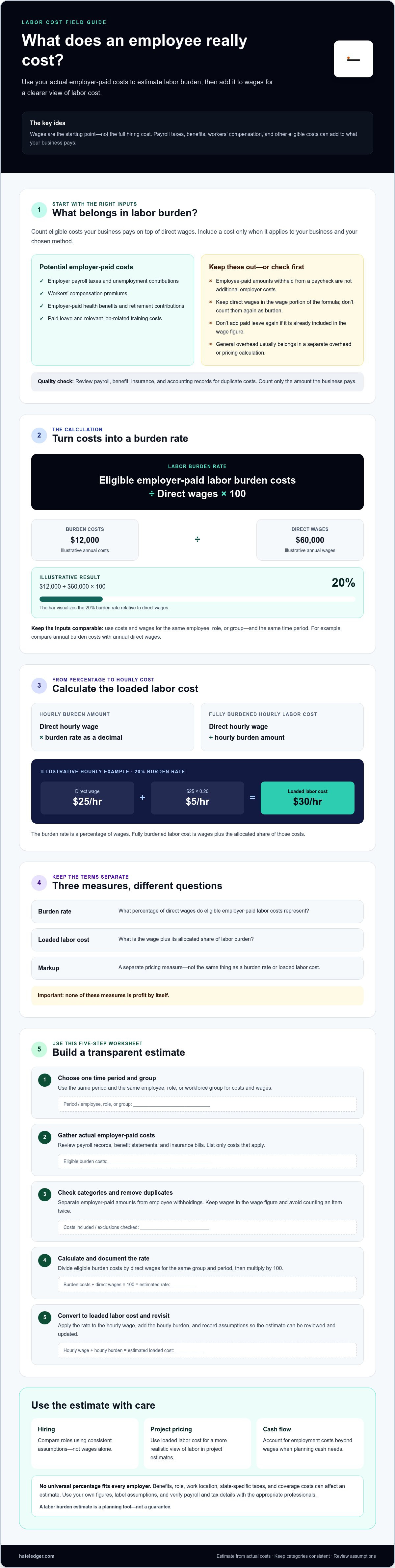
Labor burden rate (%) = eligible employer-paid labor burden costs ÷ direct wages × 100.
For example, if a role has $12,000 in eligible annual burden costs and $60,000 in annual direct wages, the estimated burden rate is 20%. The Employer Costs for Employee Compensation data from the U.S. Bureau of Labor Statistics separates compensation into wages and benefits, a reminder that wages are only part of the picture. Your rate still needs to come from your own costs.
How to calculate a burden rate from annual costs
Use costs and wages for the same people and period. Add eligible employer-paid costs, such as applicable payroll taxes, insurance, benefits, or other costs included in your chosen method. Divide the total by direct wages for the same employee, role, or group, then multiply by 100. Label the result an estimate and record what you included so you can update it consistently.
A labor burden rate calculator can handle the arithmetic, but it can’t correct mismatched inputs. Define your period and cost categories first.
How to calculate fully burdened hourly labor cost
The percentage isn’t the hourly cost. Convert it to an hourly amount, then add that amount to the employee’s direct hourly wage:
- Hourly burden amount = direct hourly wage × burden rate as a decimal
- Fully burdened hourly labor cost = direct hourly wage + hourly burden amount
Using the illustrative 20% rate above, an employee earning $25 per hour has an estimated $5 in burden per hour: $25 × 0.20. Add the two amounts, and the fully burdened hourly labor cost is $30.
The burden rate is the percentage of wages added for employment costs; fully burdened labor cost is the wage plus its allocated share of those costs. The distinction matters: use the percentage to compare cost structures, and use the loaded hourly figure to estimate the labor cost of work.
For salaried staff, choose a consistent, documented method to estimate working hours for the period. Divide the salary by those hours to establish an hourly wage equivalent, then apply the burden rate. Use the same hour assumptions when comparing roles or estimates, or document why they differ.
For broader visibility into business finances, explore small-business financial tracking. Treat any labor burden figure as an estimate, and verify payroll details with the appropriate professional.
Compare Labor Burden Rate, Markup, and Fully Loaded Labor Cost
These terms answer different questions. Confusing them can turn a cost estimate into a pricing mistake. Keep their purposes clear:
| Measure | What it tells you | What it does not tell you |
|---|---|---|
| Direct wages | Pay earned by an employee for the period or hours measured. | The employer’s additional employment costs. |
| Labor burden rate | Eligible employer-paid labor costs as a percentage of direct wages. | Profit or the price a customer should pay. |
| Fully loaded labor cost | Direct wages plus the allocated burden amount. | The full cost of running the business or completing a project. |
| Markup | An amount or percentage added to a cost to help set a selling price. | A measure of employer-paid labor costs. |
A burden rate measures added employment costs, not profit or customer pricing. Fully loaded labor cost gets you closer to the cost of an employee’s time, but it still isn’t a price quote. Pricing may need to account for other costs and business decisions. Markup belongs to that pricing decision, not the burden calculation.
Why burden rates differ across employees and businesses
There’s no single percentage that’s right for every employer. Benefit eligibility can differ by role, paid leave policies affect employer costs, and job risk and location can influence workers’ compensation and unemployment contributions. A role-specific estimate can reflect those differences more closely, but it takes more detail to maintain.
A company-wide average is simpler and may help with broad planning, but it can hide the higher or lower cost of a particular role. Use it as a planning shortcut, not a precise cost for every employee. Industry benchmarks can offer context, but compare them only when they come from a current, reliable source and use cost categories that match yours.
How to avoid misleading comparisons
Use the same definition of eligible burden costs for every employee you compare. Keep the wage denominator and burden-cost numerator aligned to the same period and the same employee or workforce group. A labor burden rate calculator makes the arithmetic consistent only when the inputs are comparable.
For example, comparing one employee’s annual costs with another employee’s monthly costs won’t give you a fair comparison. Adding markup to one role’s loaded cost while comparing it with another role’s burden rate also mixes cost measurement with pricing. First compare wages, burden rates, or fully loaded costs on equal terms. Then make pricing decisions separately.
Use This Labor Burden Rate Calculator Worksheet in Five Steps
Use one period and one clearly defined group. This worksheet works for a single employee, a role, or your whole workforce, but don’t mix them in the same calculation. The figures below are illustrative, not market averages.
What to gather before calculating
Gather payroll records and employer-paid benefit, insurance, paid leave, and relevant training costs. If you’re unsure whether a cost belongs in the calculation, ask a payroll or tax professional. Keep employee paycheck deductions separate from costs paid by your business.
Fill-in worksheet: five steps
- Set the scope: Period: ________. Employee, role, or group: ________.
- Enter direct wages: Wages for that same scope and period: $________.
- Add eligible burden costs: Payroll taxes: $______. Benefits: $______. Insurance and unemployment contributions: $______. Paid leave or training: $______. Other included costs: $______. Total burden costs: $________.
- Calculate the estimated rate: Total burden costs ÷ direct wages × 100 = ______%.
- Calculate loaded hourly cost, if useful: Estimated annual working hours: ________. Direct hourly wage: $______. Hourly burden: $______. Loaded hourly labor cost: $________.
Illustrative calculation: Assume one employee, one year, $52,000 in direct wages, and $13,000 in eligible employer-paid burden costs. The $13,000 is a made-up example total, assumed to include $4,200 in employer payroll taxes, $6,000 in benefits, $1,800 in insurance and unemployment costs, and $1,000 in paid leave or training. The estimated burden rate is $13,000 ÷ $52,000 × 100, or 25%. If the documented method uses 2,080 working hours, direct wages equal $25 per hour. The estimated hourly burden is $25 × 0.25, or $6.25, making the fully loaded hourly labor cost $31.25.
This labor burden rate calculator is only as useful as its inputs. Keep the period, group, and cost categories consistent from one line to the next.
How to check your result before using it
Confirm that every cost belongs to the selected period and employee group. Compare your estimate with prior periods and investigate large changes rather than smoothing them over. Review the figures regularly and after material changes to pay or benefits. For a broader framework, see this guide to small business hiring decisions.
Use the estimate to inform planning, not as a substitute for payroll or tax advice. To connect staffing choices with your wider business finances, explore Hate Ledger’s financial decision tools.
Turn Labor Burden Into Better Hiring and Cash-Flow Decisions
A labor burden estimate is useful when it improves what you check before committing to a hire. Compare the fully loaded labor cost with the work the role can realistically take on, the revenue or capacity it may support, and the cash your business can cover. It’s one input to the decision, not profit and not a guarantee that the hire will pay off.
Use the estimate before adding a role
Don’t build a hiring plan around salary alone. Record the assumptions behind your estimate, including expected hours, benefits, paid leave, and the workload the role is meant to handle. Then test whether the business can carry the cost if work starts later than planned or the role takes longer to reach expected capacity.
If financing is part of the hiring decision, consider the repayment commitment alongside the added labor cost. This business financing decision tool can help frame that separate question. For project estimates and pricing analysis, use loaded labor cost to understand the labor expense behind the work, then account for overhead, other costs, and pricing choices separately.
Hate Ledger offers human-capital ROI insights as a related way to assess staffing decisions. Treat those insights as a separate consideration, not a substitute for the figures in your labor burden rate calculator or a claim that the software calculates labor burden rates.
Keep labor costs visible without adding bookkeeping busywork
Organize wages and employer-paid costs by period and employee or role. Review them on a regular schedule, and revisit the estimate when pay, benefits, insurance, or responsibilities materially change. Consistent records make it easier to see what changed and update your assumptions without rebuilding the calculation from scratch.
Automated bank syncing can help organize financial activity, but it doesn’t determine which transactions belong in a labor burden estimate or calculate the rate. For broader context on keeping business finances understandable, read this guide to plain-English accounting software guidance.
Your estimate supports planning; it doesn’t replace payroll, legal, or tax advice, especially when you’re unsure how to classify a cost. For a clearer view of your business finances and staffing considerations, explore Hate Ledger’s financial visibility tools.
Make Your Next Hiring Decision With Clearer Numbers
A reliable labor burden rate calculator gives you more than a percentage. It helps you identify employer-paid costs beyond wages and estimate the fully loaded cost of a role. Keep your cost categories and time period consistent, then use the result to inform hiring, project estimates, pricing analysis, and cash-flow planning.
Remember the distinction: labor burden is an added employment cost, not profit or a customer price. Your estimate is only as useful as its assumptions, so update it when pay, benefits, or other costs change. For payroll, legal, or tax classifications, check with the appropriate professional.
Clear labor costs are one part of understanding your business finances. Hate Ledger offers plain-English accounting software for small businesses and contractors, along with human-capital ROI insights as a related resource for staffing decisions. See how Hate Ledger makes business finances easier to understand.
Start with the figures you have, make your assumptions visible, and refine the estimate as your records get clearer. Better decisions begin with better visibility.
Frequently Asked Questions
How do you calculate a labor burden rate?
Divide eligible employer-paid labor burden costs by direct wages for the same employee or group and time period, then multiply by 100. For example, if annual burden costs are $12,000 and annual direct wages are $60,000, the estimated rate is 20%. A labor burden rate calculator can do the arithmetic, but first decide which costs count and keep the period consistent. Treat the result as an estimate based on your inputs.
What is included in labor burden?
Labor burden can include employer-paid costs beyond direct wages, such as employer payroll taxes, unemployment contributions, workers’ compensation, health benefits, retirement contributions, paid leave, and relevant training. Your business may not have every cost, so include only items that fit your chosen method. Keep employee-paid amounts withheld from a paycheck separate from employer expenses. Check your records to avoid counting the same benefit or cost twice.
Is labor burden the same as fully burdened labor cost?
No. The labor burden rate is a percentage that compares eligible employer-paid costs with direct wages. Fully burdened labor cost is the wage plus an allocated share of those additional costs. For example, a 20% burden rate applied to a $25 hourly wage adds an estimated $5 per hour, producing a $30 fully burdened hourly labor cost. Neither figure is profit or automatically the right customer price.
What is a good labor burden rate?
There isn’t one rate that’s right for every employer. The result depends on factors such as wages, benefits, paid leave, insurance, location, and which costs you include. Instead of aiming for a generic percentage, calculate a transparent rate from your own records and use the same definitions when comparing roles or periods. Industry benchmarks can offer context only when they’re current, reliable, and based on comparable cost categories.
Does labor burden include payroll taxes?
Yes, employer-paid payroll taxes can be part of labor burden. In the United States, the employer share of FICA is 7.65%, made up of Social Security and Medicare taxes, though applicable amounts can depend on wage limits and employee circumstances. Include the employer’s cost for your chosen period. Don’t treat taxes withheld from an employee’s pay as an additional employer expense, and confirm payroll classifications with a qualified professional.
How often should I recalculate my labor burden rate?
Review it on a regular schedule that fits your planning cycle, and recalculate when a material change affects wages or employer-paid costs. Examples include a pay adjustment, a change in benefit coverage, or a shift in insurance costs. Keep the same period and cost categories when comparing updated results with earlier estimates. If the rate changes sharply, investigate the underlying figures rather than adjusting the result to look more consistent.
Can I use labor burden rate to price a project?
Yes, use the rate to estimate the employment costs attached to the labor hours in a project. Apply the burden to the relevant direct wages, then account separately for overhead, materials, other expenses, and pricing decisions. The burden rate is not a markup and doesn’t set profit or the final customer price by itself. Check that the roles, hours, and cost assumptions match the work being quoted, then review the estimate as project details change.
Frequently Asked Questions
Include costs your business pays on top of direct wages, when they apply. These may include: Separate employer-paid amounts from money withheld from an employee’s paycheck. An employee’s share of a benefit or tax withheld from wages isn’t an additional employer cost. Check payroll and benefit records to count only the amount the business pays.
In a wage-based burden-rate formula, keep direct wages in the wage part of the calculation, not among the additional burden costs. Otherwise, you count wages twice and inflate the rate. Check paid leave, too: if your wage figure already includes pay for leave, don’t add that same amount again as a separate burden cost. General overhead, such as rent or office utilities, usually belongs in a separate overhead or pricing calculation. Include it in labor burden only if your chosen method explicitly defines it that way. Also check for duplicate costs across payroll, benefits, insurance, and accounting records. Clear categories make the result useful; double counting makes it misleading. First, choose a measurement period and keep every figure within it. Annual burden costs should be compared with annual direct wages for the same employee, role, or workforce group. Mixing monthly costs with annual wages, or costs for different groups, will skew the result. Labor burden rate (%) = eligible employer-paid labor burden costs ÷ direct wages × 100. For example, if a role has $12,000 in eligible annual burden costs and $60,000 in annual direct wages, the estimated burden rate is 20%. The Employer Costs for Employee Compensation data from the U.S. Bureau of Labor Statistics separates compensation into wages and benefits, a reminder that wages are only part of the picture. Your rate still needs to come from your own costs.
Divide eligible employer-paid labor burden costs by direct wages for the same employee or group and time period, then multiply by 100. For example, if annual burden costs are $12,000 and annual direct wages are $60,000, the estimated rate is 20%. A labor burden rate calculator can do the arithmetic, but first decide which costs count and keep the period consistent. Treat the result as an estimate based on your inputs.
Labor burden can include employer-paid costs beyond direct wages, such as employer payroll taxes, unemployment contributions, workers’ compensation, health benefits, retirement contributions, paid leave, and relevant training. Your business may not have every cost, so include only items that fit your chosen method. Keep employee-paid amounts withheld from a paycheck separate from employer expenses. Check your records to avoid counting the same benefit or cost twice.
No. The labor burden rate is a percentage that compares eligible employer-paid costs with direct wages. Fully burdened labor cost is the wage plus an allocated share of those additional costs. For example, a 20% burden rate applied to a $25 hourly wage adds an estimated $5 per hour, producing a $30 fully burdened hourly labor cost. Neither figure is profit or automatically the right customer price.
There isn’t one rate that’s right for every employer. The result depends on factors such as wages, benefits, paid leave, insurance, location, and which costs you include. Instead of aiming for a generic percentage, calculate a transparent rate from your own records and use the same definitions when comparing roles or periods. Industry benchmarks can offer context only when they’re current, reliable, and based on comparable cost categories.
Yes, employer-paid payroll taxes can be part of labor burden. In the United States, the employer share of FICA is 7.65%, made up of Social Security and Medicare taxes, though applicable amounts can depend on wage limits and employee circumstances. Include the employer’s cost for your chosen period. Don’t treat taxes withheld from an employee’s pay as an additional employer expense, and confirm payroll classifications with a qualified professional.
Review it on a regular schedule that fits your planning cycle, and recalculate when a material change affects wages or employer-paid costs. Examples include a pay adjustment, a change in benefit coverage, or a shift in insurance costs. Keep the same period and cost categories when comparing updated results with earlier estimates. If the rate changes sharply, investigate the underlying figures rather than adjusting the result to look more consistent.
Yes, use the rate to estimate the employment costs attached to the labor hours in a project. Apply the burden to the relevant direct wages, then account separately for overhead, materials, other expenses, and pricing decisions. The burden rate is not a markup and doesn’t set profit or the final customer price by itself. Check that the roles, hours, and cost assumptions match the work being quoted, then review the estimate as project details change.