
Estimated Tax Software: A No-Nonsense Guide for 2026
September 28, 2026 · 16 min read
Your bank balance isn’t your spending money. Some of it may already be owed in taxes, even if your income changes from month to month and your usual set-aside rule no longer fits. Can estimated tax calculation software help you decide what to reserve and what to pay? It can help you estimate a tax reserve. It can’t promise an exact bill or replace IRS guidance.
You need more than a spreadsheet you have to rebuild or a bank balance that hides what’s already spoken for. This guide explains what estimated tax software can calculate, where its limits are, and how to choose a tool that gives you a clearer view of business cash. You’ll also learn when software may be enough, when an accountant can help, and when to check official IRS guidance.
We’ll look at the difference between estimating a reserve and knowing your final tax liability. We’ll also cover how connected financial information and tax reserve calculations can reduce repeated manual tracking. The goal is to make a more informed decision about what to set aside without treating an estimate as a guarantee.
Key Takeaways
- Use estimated tax calculation software to model a reserve, not as a promise of your exact tax bill or a substitute for filing.
- Check that your income, expenses, deductions, withholding, credits, and prior-year details are complete before relying on an estimate.
- Compare tools by where their data comes from, how clearly they show calculations, how often estimates update, and what you can adjust.
- Keep estimating, reserving, and paying distinct: money set aside is not the same as a tax payment made.
- See how bank syncing and tax reserve calculations can connect business finances to revenue, tax obligations, and money available to spend.
What estimated tax calculation software does, and what it does not do
Business income can swing from one month to the next. Tax obligations don’t disappear when revenue is uneven, and a fixed set-aside can stop matching what you may owe. Estimated tax calculation software helps model or track a tax estimate using financial and tax information you provide or connect. The result is a planning figure, not certainty about your final bill.
Tax estimation software estimates potential tax and helps you plan reserves; tax filing software prepares a return for submission. Those are different jobs. A tool may help organize cash and estimate an amount to reserve without calculating an exact payment, sending money to a tax authority, or preparing and filing a tax return. Check what the product actually does instead of relying on its label.
Who may need to estimate taxes during the year?
Self-employed people and contractors may receive business income without regular wage withholding. In a job with withholding, part of each paycheck is generally collected toward taxes. The basic idea is explained in Tax withholding in the United States. When business income doesn’t have that steady collection, estimating and planning may become part of managing cash flow.
Your situation may include more than business income. You could also have wages with withholding, other income, credits, or tax circumstances that affect what you owe. Don’t assume a software estimate determines whether or how much you need to pay during the year. Confirm your requirements with current IRS guidance or a tax professional who understands your circumstances.
Estimate, reserve, payment, or filing: know the difference
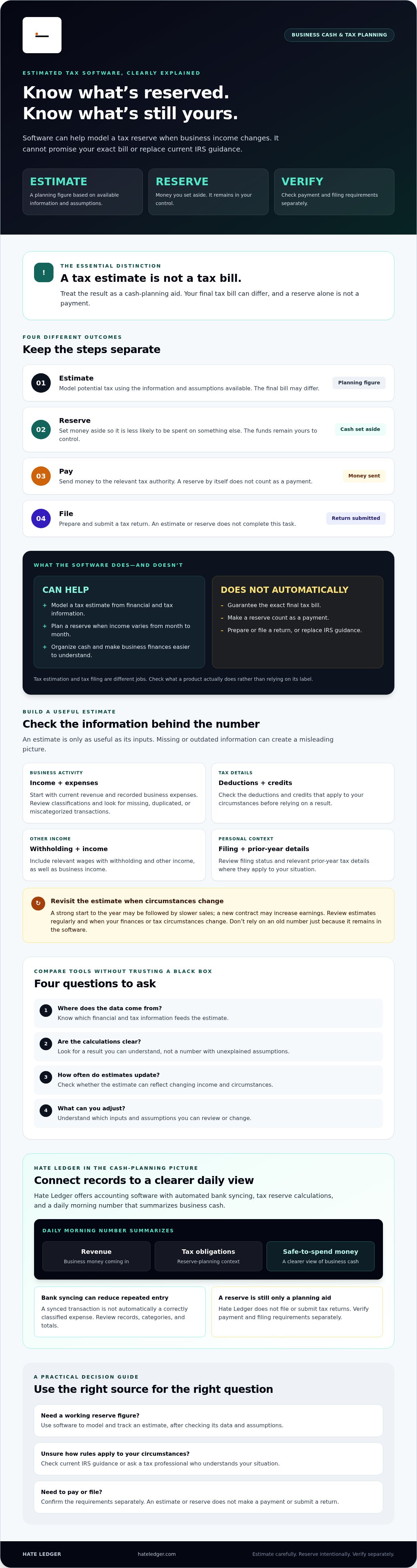
These are separate steps, with different outcomes:
- Estimate: A planning figure based on available information and assumptions. Your final tax bill can differ.
- Reserve: Money you set aside so it’s less likely to be spent on something else. The funds remain in your control.
- Payment: Money actually sent to the relevant tax authority. A reserve alone does not count as a payment.
- Filing: Preparing and submitting a tax return. An estimate or reserve doesn’t complete this task.
Hate Ledger offers accounting software with tax reserve calculations and a daily morning number that summarizes revenue, tax obligations, and money that can safely be spent. This can make business cash easier to understand. Hate Ledger does not file or submit tax returns. Treat its reserve as a cash-planning aid, then verify payment and filing requirements separately.
What information estimated tax software needs for a useful calculation
An estimate is only as useful as the information behind it. If income, expenses, or personal tax details are missing or out of date, the result may give you a misleading picture. Estimated tax calculation software can organize inputs and model a figure, but it can’t fill gaps you haven’t checked or account for every detail of your tax situation.
Review the main input categories: business income, expenses, deductions, withholding, credits, filing status, other income, and relevant prior-year tax details. Which ones apply depends on your circumstances. The IRS Estimated Taxes guidance explains how to figure estimated taxes and who may need to pay them. Use current IRS information or ask a tax professional to check how the rules apply to you.
Changing income matters. An estimate based on a strong start to the year may become less useful if sales slow, or if a new contract increases earnings. Review the estimate regularly and whenever your finances or tax circumstances change. Don’t keep relying on an old number just because it’s already in the software.
Which business numbers should you gather first?
Start with current revenue and recorded business expenses. These provide a working view of business activity, not a complete tax profile. Expense classifications can affect which figures feed into an estimate, so review categories rather than assuming every transaction has been labeled correctly.
Bank syncing can reduce manual transaction entry, but a synced transaction isn’t automatically a correctly classified expense. Before using totals, check for missing or duplicated entries and transactions in the wrong category. Hate Ledger includes automated bank syncing, which may reduce repeated manual tracking; it doesn’t remove the need to review your records.
Which personal tax details can change the result?
Business figures are only part of the picture. Filing status, other income, wage withholding, deductions, and credits may all affect an estimate. For a self-employed person, self-employment tax may also be part of the overall tax picture. For example, leaving out a spouse’s income or withholding could make an estimate based only on business activity less useful.
Gather relevant prior-year details too. They can inform planning, but they don’t guarantee this year’s result will match. Check current IRS guidance or consult a tax professional for case-specific treatment. If you want connected financial records and tax reserve calculations in one place, explore Hate Ledger’s accounting software, then review the assumptions behind any estimate it provides.
How to compare estimated tax calculation software without trusting a black box
A polished number isn’t proof that an estimate fits your situation. Before choosing estimated tax calculation software, find out what information it uses, what assumptions drive the result, and whether you can inspect or correct them. If a tool can’t explain where its estimate comes from, don’t treat the output as a reliable plan.
| What to compare | What to check |
|---|---|
| Data sources | Does the tool use connected bank activity, figures you enter, or both? Can you review transactions and correct missing or miscategorized entries? |
| Calculation visibility | Can you see which income, expenses, and tax assumptions affect the estimate, or only a final number? |
| Update frequency | Does the estimate change when new information is added? Confirm how updates work rather than assuming synced data changes the estimate automatically. |
| User control | Can you adjust assumptions or correct inputs? Check which changes are allowed and how they affect the result. |
What should a tax estimate tool make clear?
Look for a clear explanation, not a mysterious total. You should be able to identify the inputs behind the estimate, understand how new information affects it, and review synced transactions for errors. Then check whether the tool supports your tax situation. Features and calculation methods vary, so verify product claims directly and consult IRS Publication 505 for official guidance on withholding and estimated tax.
Even transparent software can’t guarantee a final tax bill. Its output is an estimate based on available information and assumptions. If your situation is complex, or the number doesn’t make sense, have a tax professional review it.
When does accounting software differ from tax software?
Accounting software helps organize business financial activity and understand cash. Tax-reserve features can help show money set aside, but they aren’t the same as instructions to make a specific estimated payment. Tax preparation software may help prepare or file returns if those functions are confirmed for that product. Check the exact scope. Don’t assume a reserve tool files a return or sends a payment.
If your main goal is separating tax reserves from spendable business cash, read this guide to automated tax reserve guidance. Use it to assess whether reserve tracking fits your routine, then verify payment and filing requirements separately.
Using Tax Estimates to Plan Reserves and Payments
A useful estimate only helps if you turn it into a clear next step. Use this sequence: organize your records, review the assumptions, check the estimate, reserve funds, then verify what you’re required to pay and when. Estimated tax calculation software can support the planning, but it can’t make the payment decision for you.
- Organize: Bring business income and expenses up to date.
- Review: Check that the estimate uses relevant, current information and reasonable assumptions.
- Check: Compare the result with your own records. Investigate a figure that looks off.
- Reserve: Move money aside so it’s not mistaken for spendable cash.
- Verify: Check current federal and applicable state tax authority guidance for your payment obligations and deadlines.
A tax reserve is a cash-planning action, not a tax payment. Setting money aside doesn’t send it to a tax authority or satisfy a payment obligation. Don’t rely on a saved estimate or an old calendar reminder for current deadlines. Verify the dates and requirements that apply to you.
A simple review routine for changing business income
Review current transactions before acting on an estimate. Look for missing entries, duplicates, and activity filed under the wrong category. A major new contract, a drop in sales, or a large expense can change the assumptions behind your previous estimate. Take another look when the business picture shifts instead of letting an old number run on autopilot.
Keep a simple record of estimates, the assumptions used, payments made, and your eventual tax outcomes. That history can help you see where your planning differed from the final result and give an advisor useful context for a future discussion.
When to involve an accountant or tax professional
Bring in a qualified tax professional if you have complex income, a major life change, or uncertainty about how a rule applies to you. Software output isn’t individualized tax or legal advice, and an estimate isn’t a guarantee. A professional can review the assumptions and help you understand questions a general-purpose tool may not resolve.
If you’re comparing ways to keep business finances organized, see this guide to plain-English accounting software guidance. To connect cash visibility with tax reserves, explore Hate Ledger’s tax reserve calculations and decide whether that workflow fits how you manage your business.
How Hate Ledger connects tax reserves to the money your business can safely spend
A bank balance shows what’s in your account. It doesn’t show what portion may need to stay there for taxes. Hate Ledger is accounting software for small businesses, self-employed professionals, and contractors. It includes automated bank syncing, tax reserve calculations, and a daily morning number designed to make that picture clearer.
The morning number brings together revenue, tax obligations, and money that can safely be spent. Instead of treating the full account balance as available, you get a view that accounts for potential tax reserves. This can make everyday spending decisions easier to assess, especially when business cash changes over time.
What an ongoing tax reserve workflow can simplify
Connected financial activity can reduce repeated manual transaction tracking and give you a more current view of business money. Tax reserve calculations add another useful distinction: cash in the account isn’t necessarily cash available for spending. Review your records and assumptions so the information you use reflects your business.
Hate Ledger’s reserve calculation is a planning aid, not a promise of an exact estimated tax payment or final tax bill. The platform doesn’t file or submit returns, and a reserve doesn’t send money to a tax authority. Keep payment requirements and filing separate from the decision to set funds aside.
Who should explore Hate Ledger, and who may need more?
If you’re self-employed, a contractor, or a small business owner who wants a simpler view of income, tax obligations, and spendable cash, Hate Ledger may fit how you manage money. It combines accounting software with tax reserve calculations, helping you look beyond the bank balance alone. When assessing any estimated tax calculation software, check what its figures represent and what they don’t.
If you need tax return filing or human bookkeeping, Hate Ledger doesn’t sell those services. You’ll need to look elsewhere for that support. If you need an exact payment figure or advice for a complex tax situation, confirm the details with current tax guidance or a tax professional.
Hate Ledger has a free tier without a credit-card requirement. Explore Hate Ledger and decide whether its workflow fits your business finances.
Make tax reserves part of your cash routine
Good tax planning starts with a clearer view of your money. Estimated tax calculation software can help you model a reserve, but the result depends on the information and assumptions behind it. Review your figures as income changes, and check current tax guidance or consult a tax professional when you’re unsure what applies. An estimate helps you plan. It doesn’t guarantee your final tax bill, make a payment, or file a return.
Hate Ledger connects automated bank syncing and tax reserve calculations with a daily morning number showing revenue, tax obligations, and money that can safely be spent. That can help separate business cash from funds you may need to keep aside without treating the estimate as a final answer. A free tier is available without a credit-card requirement.
If you want a simpler way to see what’s coming in, what may be owed, and what’s available to spend, explore a simpler way to see your tax reserves and spendable money. Build a clearer routine, keep checking your assumptions, and make your next money decision with more confidence.
Frequently Asked Questions
What is estimated tax calculation software?
Estimated tax calculation software helps model or track a planning estimate based on financial and tax information. Depending on the tool, you may enter figures yourself or connect financial records. The estimate can help you plan how much cash to reserve, but it isn’t a guaranteed final tax bill. Check whether the software also guides estimated payments or prepares returns. Those are separate functions and aren’t included in every tool.
How does estimated tax software calculate what I may owe?
It uses the information and assumptions available to estimate your tax picture. Inputs may include business income and expenses, deductions, filing status, other income, withholding, credits, and prior-year details. Tools differ in which inputs they request and how they use them. Check the calculation and correct missing or misclassified records. If important details are left out, the estimate may not reflect your situation.
Can accounting software calculate my quarterly estimated taxes?
Some accounting software includes tax estimates or reserve calculations, but don’t assume it calculates the exact amount to pay each quarter. Accounting tools may help organize transactions and set aside money, while payment guidance is a separate feature to verify. Hate Ledger offers tax reserve calculations, but it doesn’t promise an exact quarterly payment amount. Check current IRS guidance or ask a tax professional what payment applies to you.
Is estimated tax calculation software accurate?
It can be useful for planning, but no estimate should be treated as a guaranteed final tax result. Accuracy depends on complete, current inputs and whether the tool’s assumptions fit your tax situation. A new contract, changed expenses, withholding, or other income can affect the picture. Review the inputs and calculation regularly. Ask a tax professional to review the estimate if your circumstances are complex or the result seems wrong.
How much should I set aside for estimated taxes?
There isn’t one set-aside amount that fits every business owner. The right reserve depends on factors such as income, deductible expenses, filing status, other income, withholding, and credits. Use a current estimate as a planning starting point, then confirm your payment obligations and applicable federal and state guidance. Remember, money reserved in your account hasn’t been paid to a tax authority. Don’t rely on a generic percentage without checking your situation.
What happens if my estimated tax calculation is wrong?
First, check the inputs and assumptions. Look for missing income, expenses in the wrong category, or personal tax details that weren’t included. Update the estimate, then verify what you may owe and when payment is due using current tax authority guidance. If you think you’ve paid too little or you’re unsure how to correct course, contact a tax professional. Software output alone can’t confirm your obligations or resolve a tax issue.
Does Hate Ledger file estimated tax payments or tax returns?
No. Hate Ledger doesn’t send estimated tax payments or file and submit tax returns. It offers automated bank syncing and tax reserve calculations to help you understand business finances. Its daily morning number shows revenue, tax obligations, and money that can safely be spent. Treat those features as cash-planning support, not payment or filing services. You’ll need to verify payment requirements and deadlines and arrange payment and return filing separately.
Frequently Asked Questions
Self-employed people and contractors may receive business income without regular wage withholding. In a job with withholding, part of each paycheck is generally collected toward taxes. The basic idea is explained in Tax withholding in the United States. When business income doesn’t have that steady collection, estimating and planning may become part of managing cash flow. Your situation may include more than business income. You could also have wages with withholding, other income, credits, or tax circumstances that affect what you owe. Don’t assume a software estimate determines whether or how much you need to pay during the year. Confirm your requirements with current IRS guidance or a tax professional who understands your circumstances.
Start with current revenue and recorded business expenses. These provide a working view of business activity, not a complete tax profile. Expense classifications can affect which figures feed into an estimate, so review categories rather than assuming every transaction has been labeled correctly. Bank syncing can reduce manual transaction entry, but a synced transaction isn’t automatically a correctly classified expense. Before using totals, check for missing or duplicated entries and transactions in the wrong category. Hate Ledger includes automated bank syncing, which may reduce repeated manual tracking; it doesn’t remove the need to review your records.
Business figures are only part of the picture. Filing status, other income, wage withholding, deductions, and credits may all affect an estimate. For a self-employed person, self-employment tax may also be part of the overall tax picture. For example, leaving out a spouse’s income or withholding could make an estimate based only on business activity less useful. Gather relevant prior-year details too. They can inform planning, but they don’t guarantee this year’s result will match. Check current IRS guidance or consult a tax professional for case-specific treatment. If you want connected financial records and tax reserve calculations in one place, explore Hate Ledger’s accounting software, then review the assumptions behind any estimate it provides. A polished number isn’t proof that an estimate fits your situation. Before choosing estimated tax calculation software, find out what information it uses, what assumptions drive the result, and whether you can inspect or correct them. If a tool can’t explain where its estimate comes from, don’t treat the output as a reliable plan.
Look for a clear explanation, not a mysterious total. You should be able to identify the inputs behind the estimate, understand how new information affects it, and review synced transactions for errors. Then check whether the tool supports your tax situation. Features and calculation methods vary, so verify product claims directly and consult IRS Publication 505 for official guidance on withholding and estimated tax. Even transparent software can’t guarantee a final tax bill. Its output is an estimate based on available information and assumptions. If your situation is complex, or the number doesn’t make sense, have a tax professional review it.
Accounting software helps organize business financial activity and understand cash. Tax-reserve features can help show money set aside, but they aren’t the same as instructions to make a specific estimated payment. Tax preparation software may help prepare or file returns if those functions are confirmed for that product. Check the exact scope. Don’t assume a reserve tool files a return or sends a payment. If your main goal is separating tax reserves from spendable business cash, read this guide to automated tax reserve guidance. Use it to assess whether reserve tracking fits your routine, then verify payment and filing requirements separately. A useful estimate only helps if you turn it into a clear next step. Use this sequence: organize your records, review the assumptions, check the estimate, reserve funds, then verify what you’re required to pay and when. Estimated tax calculation software can support the planning, but it can’t make the payment decision for you. A tax reserve is a cash-planning action, not a tax payment. Setting money aside doesn’t send it to a tax authority or satisfy a payment obligation. Don’t rely on a saved estimate or an old calendar reminder for current deadlines. Verify the dates and requirements that apply to you.
If you’re self-employed, a contractor, or a small business owner who wants a simpler view of income, tax obligations, and spendable cash, Hate Ledger may fit how you manage money. It combines accounting software with tax reserve calculations, helping you look beyond the bank balance alone. When assessing any estimated tax calculation software, check what its figures represent and what they don’t. If you need tax return filing or human bookkeeping, Hate Ledger doesn’t sell those services. You’ll need to look elsewhere for that support. If you need an exact payment figure or advice for a complex tax situation, confirm the details with current tax guidance or a tax professional. Hate Ledger has a free tier without a credit-card requirement. Explore Hate Ledger and decide whether its workflow fits your business finances. Good tax planning starts with a clearer view of your money. Estimated tax calculation software can help you model a reserve, but the result depends on the information and assumptions behind it. Review your figures as income changes, and check current tax guidance or consult a tax professional when you’re unsure what applies. An estimate helps you plan. It doesn’t guarantee your final tax bill, make a payment, or file a return. Hate Ledger connects automated bank syncing and tax reserve calculations with a daily morning number showing revenue, tax obligations, and money that can safely be spent. That can help separate business cash from funds you may need to keep aside without treating the estimate as a final answer. A free tier is available without a credit-card requirement. If you want a simpler way to see what’s coming in, what may be owed, and what’s available to spend, explore a simpler way to see your tax reserves and spendable money. Build a clearer routine, keep checking your assumptions, and make your next money decision with more confidence.
Estimated tax calculation software helps model or track a planning estimate based on financial and tax information. Depending on the tool, you may enter figures yourself or connect financial records. The estimate can help you plan how much cash to reserve, but it isn’t a guaranteed final tax bill. Check whether the software also guides estimated payments or prepares returns. Those are separate functions and aren’t included in every tool.
It uses the information and assumptions available to estimate your tax picture. Inputs may include business income and expenses, deductions, filing status, other income, withholding, credits, and prior-year details. Tools differ in which inputs they request and how they use them. Check the calculation and correct missing or misclassified records. If important details are left out, the estimate may not reflect your situation.
Some accounting software includes tax estimates or reserve calculations, but don’t assume it calculates the exact amount to pay each quarter. Accounting tools may help organize transactions and set aside money, while payment guidance is a separate feature to verify. Hate Ledger offers tax reserve calculations, but it doesn’t promise an exact quarterly payment amount. Check current IRS guidance or ask a tax professional what payment applies to you.
It can be useful for planning, but no estimate should be treated as a guaranteed final tax result. Accuracy depends on complete, current inputs and whether the tool’s assumptions fit your tax situation. A new contract, changed expenses, withholding, or other income can affect the picture. Review the inputs and calculation regularly. Ask a tax professional to review the estimate if your circumstances are complex or the result seems wrong.
There isn’t one set-aside amount that fits every business owner. The right reserve depends on factors such as income, deductible expenses, filing status, other income, withholding, and credits. Use a current estimate as a planning starting point, then confirm your payment obligations and applicable federal and state guidance. Remember, money reserved in your account hasn’t been paid to a tax authority. Don’t rely on a generic percentage without checking your situation.
First, check the inputs and assumptions. Look for missing income, expenses in the wrong category, or personal tax details that weren’t included. Update the estimate, then verify what you may owe and when payment is due using current tax authority guidance. If you think you’ve paid too little or you’re unsure how to correct course, contact a tax professional. Software output alone can’t confirm your obligations or resolve a tax issue.
No. Hate Ledger doesn’t send estimated tax payments or file and submit tax returns. It offers automated bank syncing and tax reserve calculations to help you understand business finances. Its daily morning number shows revenue, tax obligations, and money that can safely be spent. Treat those features as cash-planning support, not payment or filing services. You’ll need to verify payment requirements and deadlines and arrange payment and return filing separately.