
Cheap Accounting Software: How to Find a Low-Cost Tool That Works
September 26, 2026 · 16 min read
The cheapest accounting software can cost you more in guesswork. A free plan may look like the obvious pick, but if it hides what you owe, leaves out tools you need, or makes everyday numbers hard to understand, the savings can come with extra work. That’s the real test of cheap accounting software: can it help you make clear money decisions?
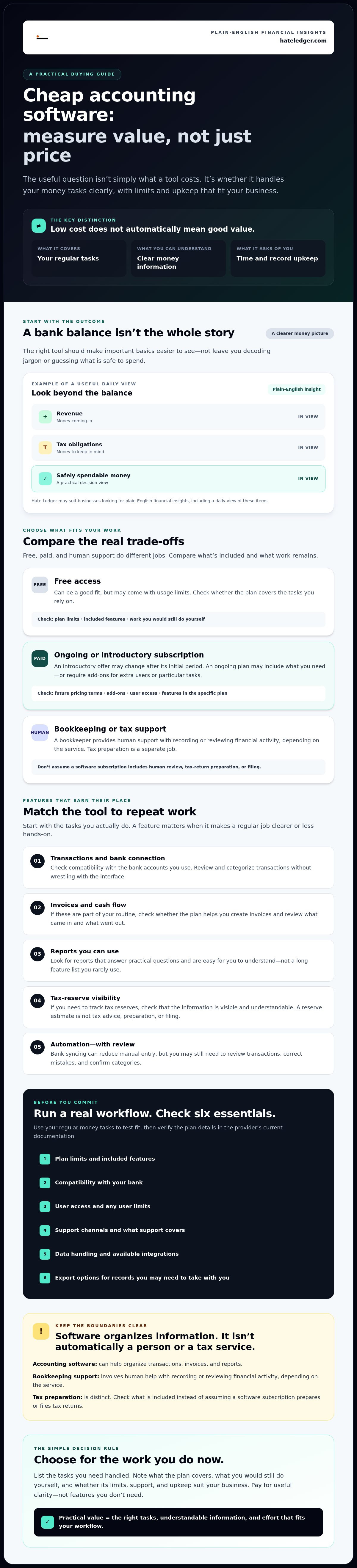
You’re right to question another subscription before it proves its value. You shouldn’t have to decode accounting jargon to compare options, either. The right tool should make the basics easier to see, from money coming in and tax obligations to what’s safe to spend. A bank balance alone doesn’t tell the whole story.
This guide compares free and paid options using practical questions: what can each tool help you do, what does it leave out, and where might limits or extra fees create friction? You’ll learn what affordable software should handle and how to weigh features against ease of use, so you can choose a tool that brings your finances into focus without paying for more than you need.
Key Takeaways
- Judge cheap accounting software by the tasks it handles and the effort it saves, not by the size of its feature list.
- Compare free plans, paid software, and outsourced support by limits, user effort, support, and fit for your business.
- Test a real workflow, then check plan limits, bank compatibility, user access, support, data handling, and export options before committing.
- Hate Ledger may suit businesses that want plain-English financial insights, including a daily view of revenue, tax obligations, and safely spendable money.
- Use your regular money tasks to decide which features matter now and which you can skip.
Cheap accounting software: what affordable should actually mean
Keeping software spending low matters. But a low fee alone proves little if the plan leaves out a feature you rely on or turns routine recordkeeping into a manual chore. The useful question isn’t simply what a tool costs. It’s whether its features, limits, and upkeep fit the way your business handles money.
Cheap accounting software covers the financial tasks your business needs without creating more work or confusion than it removes. Free can be a good fit, but it isn’t the definition of affordable. A more useful measure is practical value: what you can do, what you can understand, and how much effort it takes to keep your records useful.
Accounting software helps organize financial information, such as transactions, invoices, and reports. But software is only one part of the picture. Don’t compare it with human support or tax services as if they’re interchangeable.
What counts as cheap accounting software?
Affordability depends on your workload. A solo operator who tracks a manageable number of transactions may need less than a business with multiple users, frequent invoicing, or more involved reporting. A tool that handles your regular tasks clearly may be a better value than one with a longer feature list you rarely use.
Check what kind of offer you’re evaluating. Free access may come with usage limits. An introductory offer may change after its initial period. An ongoing subscription may include the features you need, or require add-ons for extra users or particular tasks. Look beyond the headline offer: plan limits, optional features, and the time you spend maintaining records all affect the real-world fit.
Software, bookkeeping, and tax filing are different jobs
Accounting software organizes information and may help you track transactions, create invoices, or review reports. That doesn’t mean a human bookkeeper is checking your records. A bookkeeper provides human support with tasks such as recording or reviewing financial activity, depending on the service.
Tax preparation is another distinct job. A software subscription may help you organize financial information, but don’t assume it includes preparing or filing tax returns. Check what’s included before you choose. Otherwise, you may compare a software tool with a service that does different work, then discover the gap only when you need that support.
Make the comparison concrete: list the tasks you need handled, note which ones the plan covers, and identify anything you’d still do yourself or arrange separately. That’s how you judge affordability without mistaking “low cost” for “complete.”
Which features make cheap accounting software worth using?
Ignore the feature-count contest. Start with the work you repeat: checking transactions, sending invoices, reviewing cash flow, or setting aside money for tax obligations. A feature earns its place if it makes one of those jobs clearer or less hands-on. For a broader checklist, Forbes explains its criteria for evaluating accounting software, but your daily workflow should decide what matters most.
Which basics should a small business check first?
Check the basics against your routine, not a vendor’s headline claims. Does the tool connect to the bank accounts you use? Can you review and categorize transactions without wrestling with the interface? Do its reports answer practical questions, such as what came in and what went out? If you need to track tax reserves, make sure that information is visible and understandable. Confirm the features and limits included in the specific plan you’re considering.
Then check what happens when your business changes. Look for user limits, available integrations, support channels, and export options in the provider’s current documentation. A report you can read and records you can take with you may matter more than a long list of features you won’t use.
When do automation and decision tools add value?
Automation can cut repetitive entry, but it doesn’t make your financial data automatically correct. Automated bank syncing can bring transactions from a connected account into the software, reducing manual entry. You may still need to review transactions, fix mistakes, and confirm categories. Check whether the connection works with your bank and what the provider says about its limits.
Tax reserve visibility can help you keep obligations in view, but an estimate or reserve calculation isn’t the same as tax advice, tax-return preparation, or filing. Treat it as a planning aid, then confirm what you owe through the appropriate process. A decision tool is useful when its output helps answer a real question, such as whether a planned hire makes sense, not merely because it sounds advanced.
Hate Ledger offers automated bank syncing and tax reserve calculations. Its daily morning number brings together revenue, tax obligations, and money that may be safely spent, providing a view that a bank balance alone can’t offer. That kind of plain-English output may suit owners who want a clearer read on daily finances. See how Hate Ledger simplifies daily business finances.
Before choosing any cheap accounting software, test the workflow you’ll actually use: review a transaction, find a relevant report, and locate the information you need to make a money decision. If those steps feel confusing or depend on features locked behind another plan, keep comparing.
Free versus low-cost accounting software: compare the real trade-offs
Free, paid, and outsourced options solve different versions of the same problem: keeping financial records useful. Compare what each includes, what it asks you to do, and where its limits could get in your way. A free plan may cover straightforward needs. A paid feature earns its place only if you’ll use it. Human support can help with financial tasks, but it isn’t the same as software access.
| Option | Included functions | Limits and user effort | Support and possible fit |
|---|---|---|---|
| Free software plan | May cover core recordkeeping, transaction tracking, or basic reporting. | Check transaction, user, reporting, and export limits. You still enter, review, or correct information as needed. | Support options vary. Could suit a simple operation with straightforward records and few users. |
| Paid software plan | May add capabilities such as more detailed reports, automation, or access for additional users. | Plan restrictions still apply. You’re responsible for checking records and learning the workflow. | Support depends on the provider and plan. Consider it when a specific included feature solves a recurring need. |
| Outsourced accounting support | A human provider may help with agreed financial tasks; the exact scope depends on the service. | Clarify what work is covered, what information you must provide, and what remains your responsibility. | May fit when you need human assistance, not just a tool to organize information. |
When can a free plan be enough?
A freelancer with one user, steady transactions, and simple records may be able to manage with a free plan. But don’t rely on the word “free” alone. Check how much activity the plan allows, which reports it includes, what support is available, and whether you can export your records. Free access doesn’t remove the need to review your books or meet your tax obligations.
When should you consider a paid plan or human support?
Reassess your setup when transaction volume grows, more people need access, or the reports you rely on are missing. Upgrade only if the plan’s added features address a real bottleneck. If you need a person to help handle financial work, a software subscription won’t automatically fill that role. Compare the service scope separately.
The right choice depends on your workflow and financial complexity, not on a universal winner. For another perspective on choosing a tool that feels easier to use, read this guide to accounting software for people who hate accounting. Use its ideas alongside your own checklist to judge whether cheap accounting software is enough or whether you need a different kind of support.
How to choose cheap accounting software without creating a costly switch later
A low-cost tool isn’t a bargain if switching away means rebuilding your records. Shortlist options around your actual work, then test the workflow and confirm you can take your data with you. These four checks can prevent a frustrating move later.
A practical checklist for shortlisting software
- 1. List your needs. Write down the tasks you handle regularly, such as reviewing transactions or checking reports. Separate must-haves from features you’d rarely use.
- 2. Compare plan limits. Check current plan details for transaction or reporting restrictions, supported banks, permitted users, and included features. Don’t assume a feature shown on a product page comes with every plan.
- 3. Check the practical details. Review available support channels and how the provider handles your financial data. Look for clear information about imports and exports. If anything is unclear, record the question and ask the provider for a written answer.
- 4. Test a real workflow. Before moving your books, use a low-risk sample to review transactions and generate a report. If possible, test a representative month of activity. Can you find key information and understand what the report tells you?
How to test a tool before moving your books
Use the trial or evaluation access the provider makes available, and don’t treat a polished demo as proof that the day-to-day workflow fits. Try to connect the bank account you actually use, if supported, then review sample transactions and see how the software presents income, obligations, and reports. The goal is to find out whether the tool makes your decisions clearer, not just whether it has the right features on paper.
Tax reserves can help you keep obligations in view, but they don’t replace tax advice or filing. If you’re self-employed and want to think through the role of reserves in spending decisions, read this automated tax reserve guide for self-employed readers.
Before committing, confirm what historical information can be imported. Before leaving your current tool, export the records you’ll need and check that the files are readable and complete. Plan the handoff before canceling access, so you’re not left searching for older transactions or reports after the switch.
Choose cheap accounting software only after it passes both tests: it works for your routine today, and you can leave with your records if your needs change. Explore Hate Ledger’s accounting software as one option to evaluate against your checklist.
Is Hate Ledger a fit if you want cheap accounting software?
Hate Ledger is one option to assess, not an automatic winner. Its approach may fit small business owners, self-employed professionals, and contractors who want financial information in plain English and less manual work keeping records organized. The key question is whether its features match your routine and whether its outputs help you make clearer decisions.
Who may benefit from Hate Ledger's approach?
The platform automatically syncs bank activity and calculates tax reserves. It also produces a daily morning number showing revenue, tax obligations, and money that can be safely spent. That can offer more context than a bank balance alone, which doesn’t show what may need to be set aside. These features support visibility; they don’t guarantee savings or remove the need to review your finances.
Hate Ledger also uses invisible double-entry accounting behind the scenes. In practical terms, accounting records are organized in the background while the platform presents financial information in a more accessible way. That may reduce the amount of accounting language you need to work through, but you should still review records and follow up on anything that looks wrong. Its Human Capital ROI Engine and hiring or financing decision engine may also be relevant if those decisions are part of your work.
Be clear about the boundaries: Hate Ledger is software, not human bookkeeping, tax-return preparation or filing, or inventory management. If you need one of those services, check how you’ll handle it separately.
What should you verify before signing up?
Check the current plan details before deciding. Confirm which features and limits apply to the free tier, whether the bank accounts you use are supported, and what terms apply to access and data handling. Then test the software against a real task: review financial activity and see whether the daily view helps you understand what’s coming in, what’s owed, and what may be available to spend.
Don’t choose based on “free” alone. Compare the available features with your must-haves, and consider whether the way information is presented works for you. If you need tax filing, inventory management, or a human bookkeeper, this software won’t replace those services.
If the fit looks right, try Hate Ledger's free tier and see if it fits. Treat it as a chance to evaluate the workflow against your needs, not a reason to stop comparing cheap accounting software options.
Choose the tool that makes your next decision clearer
Cheap accounting software is a good fit only if it handles the work you actually do, makes your financial information easier to understand, and won’t trap your records if you switch later. Compare plan limits, test a realistic workflow, and check your export options before committing. A low fee means little if routine money decisions stay murky.
Hate Ledger is one option to evaluate. Its free tier doesn’t require a credit card, and its automated bank syncing and tax reserve calculations feed into a daily morning number showing revenue, tax obligations, and money that may be safely spent. Paid plans start at $19 per month. Check the current plan details and whether those features fit your needs before choosing.
To see whether that clearer daily view works for your business, try Hate Ledger’s free tier. Test it against your real workflow, then choose the tool that helps you move forward with confidence.
Frequently Asked Questions
Is cheap accounting software good enough for a small business?
Yes, cheap accounting software can be enough if it handles your regular tasks and makes your records easy to review. A small business with straightforward transactions may need only bank syncing, transaction categorization, and clear reports. Check the plan’s user and activity limits, support options, and export features before relying on it. The best fit meets your needs without adding confusing workarounds.
Can I use free accounting software for my self-employed business?
Yes, a free plan may work for a self-employed business with simple records and limited users. Before choosing, confirm that it covers your transaction volume and provides the reports and exports you need. You’ll still need to review your records and handle your tax obligations. Treat free access as an option to test against your actual workflow, not as proof that the plan includes every feature you may need.
What should I compare when choosing cheap accounting software?
Compare features against the tasks you handle regularly. Check bank compatibility, transaction review, categorization, reports, tax reserve visibility if relevant, export options, user limits, support, and plan restrictions. Look beyond the feature list and confirm what’s included in the specific plan you’re considering. Then test a representative workflow, such as reviewing transactions and finding a report you need. Clear information and a manageable process matter as much as the feature count.
Does cheap accounting software include tax filing?
Not necessarily. Accounting software can organize transactions and financial records, but that doesn’t mean it prepares or files tax returns. Check the provider’s current plan details and service descriptions to confirm what’s included. Tax reserve estimates or calculations can help you keep obligations visible, but they aren’t tax filing or professional tax advice. Plan separately for any tax support you need beyond the software’s stated features.
Can accounting software tell me how much money I can safely spend?
Some software can help estimate what may be available after accounting for obligations, but treat that figure as a guide and review the underlying records. Hate Ledger calculates a daily morning number showing revenue, tax obligations, and money that can be safely spent. It also offers automated bank syncing and tax reserve calculations. A bank balance alone may not show what you need to set aside.
How do I switch accounting software without losing my records?
Before switching, confirm what historical information the new tool can import and what your current provider lets you export. Save the records and reports you’ll need, then check that the exported files are complete and readable. Test the new software with a low-risk sample before moving everything. Keep access to the old tool until you’ve checked the transition and can find the information you expect.
When should a small business move from free accounting software to a paid plan?
Consider a paid plan when the free option’s limits start blocking work you actually need to do. That may happen as transaction volume grows, more users need access, or you need reports or automation the free plan doesn’t include. Compare the added features with your workflow before upgrading. If you’re relying on workarounds or spending too much time maintaining records, reassess whether another plan is a better fit.
Frequently Asked Questions
Affordability depends on your workload. A solo operator who tracks a manageable number of transactions may need less than a business with multiple users, frequent invoicing, or more involved reporting. A tool that handles your regular tasks clearly may be a better value than one with a longer feature list you rarely use. Check what kind of offer you’re evaluating. Free access may come with usage limits. An introductory offer may change after its initial period. An ongoing subscription may include the features you need, or require add-ons for extra users or particular tasks. Look beyond the headline offer: plan limits, optional features, and the time you spend maintaining records all affect the real-world fit.
Check the basics against your routine, not a vendor’s headline claims. Does the tool connect to the bank accounts you use? Can you review and categorize transactions without wrestling with the interface? Do its reports answer practical questions, such as what came in and what went out? If you need to track tax reserves, make sure that information is visible and understandable. Confirm the features and limits included in the specific plan you’re considering. Then check what happens when your business changes. Look for user limits, available integrations, support channels, and export options in the provider’s current documentation. A report you can read and records you can take with you may matter more than a long list of features you won’t use.
Automation can cut repetitive entry, but it doesn’t make your financial data automatically correct. Automated bank syncing can bring transactions from a connected account into the software, reducing manual entry. You may still need to review transactions, fix mistakes, and confirm categories. Check whether the connection works with your bank and what the provider says about its limits. Tax reserve visibility can help you keep obligations in view, but an estimate or reserve calculation isn’t the same as tax advice, tax-return preparation, or filing. Treat it as a planning aid, then confirm what you owe through the appropriate process. A decision tool is useful when its output helps answer a real question, such as whether a planned hire makes sense, not merely because it sounds advanced. Hate Ledger offers automated bank syncing and tax reserve calculations. Its daily morning number brings together revenue, tax obligations, and money that may be safely spent, providing a view that a bank balance alone can’t offer. That kind of plain-English output may suit owners who want a clearer read on daily finances. See how Hate Ledger simplifies daily business finances. Before choosing any cheap accounting software, test the workflow you’ll actually use: review a transaction, find a relevant report, and locate the information you need to make a money decision. If those steps feel confusing or depend on features locked behind another plan, keep comparing. Free, paid, and outsourced options solve different versions of the same problem: keeping financial records useful. Compare what each includes, what it asks you to do, and where its limits could get in your way. A free plan may cover straightforward needs. A paid feature earns its place only if you’ll use it. Human support can help with financial tasks, but it isn’t the same as software access.
A freelancer with one user, steady transactions, and simple records may be able to manage with a free plan. But don’t rely on the word “free” alone. Check how much activity the plan allows, which reports it includes, what support is available, and whether you can export your records. Free access doesn’t remove the need to review your books or meet your tax obligations.
Reassess your setup when transaction volume grows, more people need access, or the reports you rely on are missing. Upgrade only if the plan’s added features address a real bottleneck. If you need a person to help handle financial work, a software subscription won’t automatically fill that role. Compare the service scope separately. The right choice depends on your workflow and financial complexity, not on a universal winner. For another perspective on choosing a tool that feels easier to use, read this guide to accounting software for people who hate accounting. Use its ideas alongside your own checklist to judge whether cheap accounting software is enough or whether you need a different kind of support. A low-cost tool isn’t a bargain if switching away means rebuilding your records. Shortlist options around your actual work, then test the workflow and confirm you can take your data with you. These four checks can prevent a frustrating move later.
The platform automatically syncs bank activity and calculates tax reserves. It also produces a daily morning number showing revenue, tax obligations, and money that can be safely spent. That can offer more context than a bank balance alone, which doesn’t show what may need to be set aside. These features support visibility; they don’t guarantee savings or remove the need to review your finances. Hate Ledger also uses invisible double-entry accounting behind the scenes. In practical terms, accounting records are organized in the background while the platform presents financial information in a more accessible way. That may reduce the amount of accounting language you need to work through, but you should still review records and follow up on anything that looks wrong. Its Human Capital ROI Engine and hiring or financing decision engine may also be relevant if those decisions are part of your work. Be clear about the boundaries: Hate Ledger is software, not human bookkeeping, tax-return preparation or filing, or inventory management. If you need one of those services, check how you’ll handle it separately.
Check the current plan details before deciding. Confirm which features and limits apply to the free tier, whether the bank accounts you use are supported, and what terms apply to access and data handling. Then test the software against a real task: review financial activity and see whether the daily view helps you understand what’s coming in, what’s owed, and what may be available to spend. Don’t choose based on “free” alone. Compare the available features with your must-haves, and consider whether the way information is presented works for you. If you need tax filing, inventory management, or a human bookkeeper, this software won’t replace those services. If the fit looks right, try Hate Ledger's free tier and see if it fits. Treat it as a chance to evaluate the workflow against your needs, not a reason to stop comparing cheap accounting software options. Cheap accounting software is a good fit only if it handles the work you actually do, makes your financial information easier to understand, and won’t trap your records if you switch later. Compare plan limits, test a realistic workflow, and check your export options before committing. A low fee means little if routine money decisions stay murky. Hate Ledger is one option to evaluate. Its free tier doesn’t require a credit card, and its automated bank syncing and tax reserve calculations feed into a daily morning number showing revenue, tax obligations, and money that may be safely spent. Paid plans start at $19 per month. Check the current plan details and whether those features fit your needs before choosing. To see whether that clearer daily view works for your business, try Hate Ledger’s free tier. Test it against your real workflow, then choose the tool that helps you move forward with confidence.
Yes, cheap accounting software can be enough if it handles your regular tasks and makes your records easy to review. A small business with straightforward transactions may need only bank syncing, transaction categorization, and clear reports. Check the plan’s user and activity limits, support options, and export features before relying on it. The best fit meets your needs without adding confusing workarounds.
Yes, a free plan may work for a self-employed business with simple records and limited users. Before choosing, confirm that it covers your transaction volume and provides the reports and exports you need. You’ll still need to review your records and handle your tax obligations. Treat free access as an option to test against your actual workflow, not as proof that the plan includes every feature you may need.
Compare features against the tasks you handle regularly. Check bank compatibility, transaction review, categorization, reports, tax reserve visibility if relevant, export options, user limits, support, and plan restrictions. Look beyond the feature list and confirm what’s included in the specific plan you’re considering. Then test a representative workflow, such as reviewing transactions and finding a report you need. Clear information and a manageable process matter as much as the feature count.
Not necessarily. Accounting software can organize transactions and financial records, but that doesn’t mean it prepares or files tax returns. Check the provider’s current plan details and service descriptions to confirm what’s included. Tax reserve estimates or calculations can help you keep obligations visible, but they aren’t tax filing or professional tax advice. Plan separately for any tax support you need beyond the software’s stated features.
Some software can help estimate what may be available after accounting for obligations, but treat that figure as a guide and review the underlying records. Hate Ledger calculates a daily morning number showing revenue, tax obligations, and money that can be safely spent. It also offers automated bank syncing and tax reserve calculations. A bank balance alone may not show what you need to set aside.
Before switching, confirm what historical information the new tool can import and what your current provider lets you export. Save the records and reports you’ll need, then check that the exported files are complete and readable. Test the new software with a low-risk sample before moving everything. Keep access to the old tool until you’ve checked the transition and can find the information you expect.
Consider a paid plan when the free option’s limits start blocking work you actually need to do. That may happen as transaction volume grows, more users need access, or you need reports or automation the free plan doesn’t include. Compare the added features with your workflow before upgrading. If you’re relying on workarounds or spending too much time maintaining records, reassess whether another plan is a better fit.