
Best Accounting Software for Self Employed Professionals in 2026
September 23, 2026 · 14 min read
Most bookkeeping platforms are built for corporate accounting departments, not solo operators. If you are searching for the best accounting software for self employed work, you shouldn't have to master double-entry bookkeeping just to see what you actually earned this week.
You already know the grind. You lose precious weekend hours reconciling obscure bank feeds, sweating over estimated quarterly tax deadlines, and paying monthly software fees for bloated enterprise dashboards you never touch. You didn't start working for yourself to become an unpaid bookkeeper managing complex ledgers.
You need clarity, not corporate overhead. This guide highlights the software that delivers real financial control without administrative headaches. We evaluate the top platforms that automate your tax reserves, surface your safe daily spendable income, and give you plain-English answers in five minutes flat. Here is how the leading tools compare for independent operators.
Key Takeaways
- Legacy platforms force solo operators into complex corporate workflows that waste billable time on manual reconciliation.
- The best accounting software for self employed pros prioritizes real-time tax protection and clear cash visibility over bloated feature sets.
- Dynamic tax reserve math eliminates end-of-quarter surprises by setting aside exact liability as income lands.
- Migrating to a streamlined financial tool requires just four clean steps, preserving tax history without carrying over administrative debt.
Why Traditional Accounting Software Fails the Self Employed
Legacy platforms expect you to act like a corporate controller. You aren't one. When searching for the best accounting software for self employed workflows, you quickly run into a wall of over-engineered software. These tools force solo operators into rigid frameworks built for mid-sized finance teams. Instead of driving revenue, you spend Sunday nights wrestling with journal entries, chart-of-accounts setups, and manual categorization.
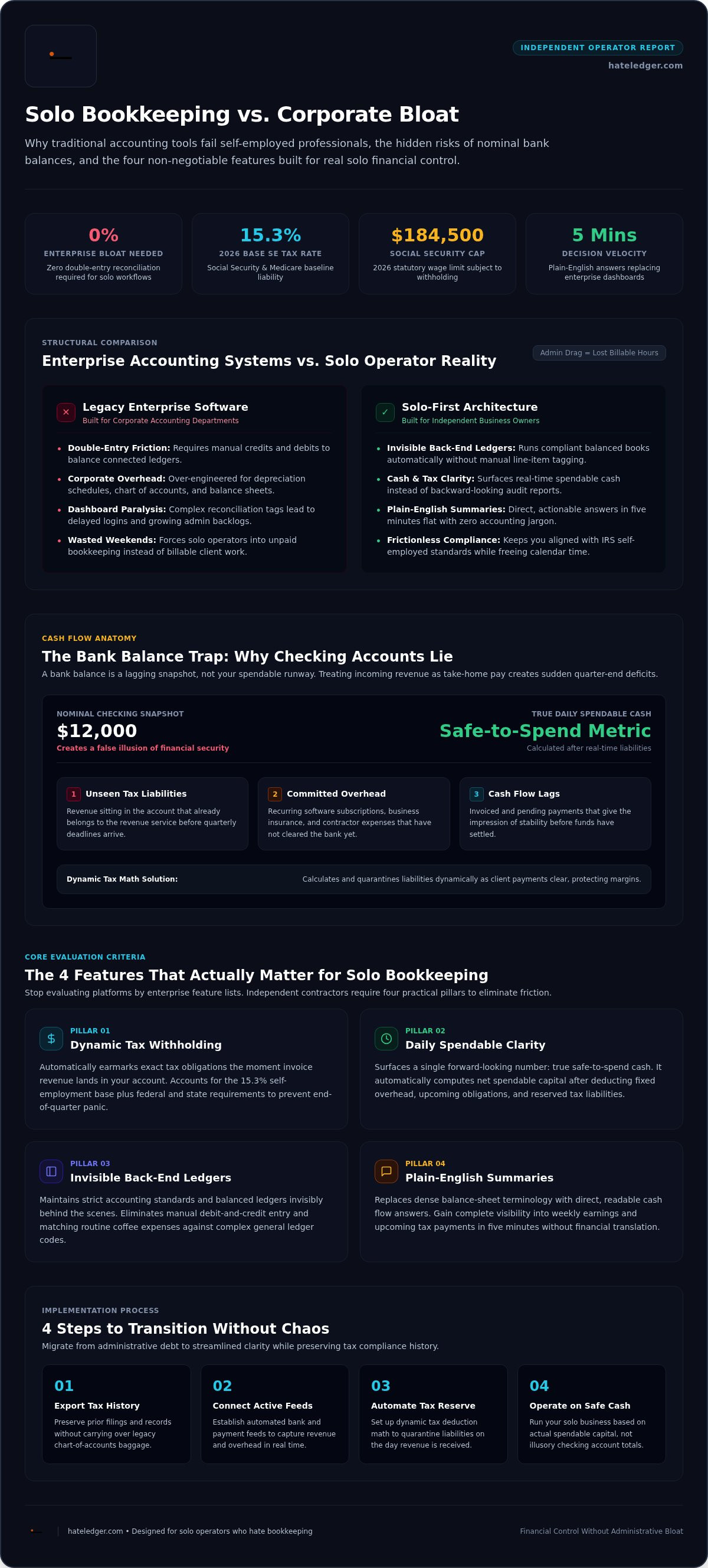
The mismatch is structural. To understand why modern tools fail solo business owners, look at what is accounting software traditionally designed to accomplish: produce balance sheets, maintain audit trails, and calculate enterprise depreciation schedules. Independent operators do not need corporate compliance bloat. They need fast, actionable clarity on cash and taxes.
The Double-Entry Bookkeeping Tax on Your Time
Double-entry bookkeeping requires balancing every financial move with a matching credit and debit across linked ledgers. For an enterprise with an accounting team, this prevents systemic errors. For an independent contractor, it creates pure friction.
Every minute spent troubleshooting unreconciled line items drains your energy. Admin drag is lost billable client time. When a platform forces you to resolve obscure categorization tags every Friday, dashboard paralysis sets in. You delay logging in, the backlog multiplies, and minor admin tasks balloon into massive weekend headaches.
The Bank Balance Trap: Why Checking Accounts Lie
Exhausted by complex platforms, many freelancers revert to checking their banking app to gauge financial health. That habit is just as dangerous as bloated software.
Your checking account balance is a lagging snapshot, not your actual spending power. It creates a false illusion of safety by ignoring dynamic financial realities:
- Unseen tax liabilities: Money sitting in your account that already belongs to the revenue service.
- Committed overhead: Recurring software, insurance, and contractor expenses that haven't cleared yet.
- Cash flow lags: Invoiced revenue that gives the impression of safety before the cash actually settles.
A $12,000 bank balance feels secure until an unexpected tax deficit cuts it in half. The best accounting software for self employed professionals replaces backward-looking compliance reports with forward-looking clarity, telling you what you can safely spend right now.
The 4 Features That Actually Matter for Solo Bookkeeping
Stop evaluating tools by their feature counts. Solo professionals don't need inventory tracking, complex audit trails, or multi-currency consolidation. You need software that protects your margins and frees up your calendar. Finding the best accounting software for self employed work means identifying what prevents administrative friction while keeping you compliant with official rules like the IRS requirements for self-employed professionals.
Here are the four capabilities that genuinely matter for independent business owners:
- Dynamic tax withholding: Automatically earmarking tax money the moment revenue enters your account.
- Daily spendable clarity: Calculating true safe-to-spend cash after subtracting fixed costs and liabilities.
- Invisible back-end ledgers: Running balanced books without forcing manual debit-and-credit categorization.
- Plain-English summaries: Presenting cash flow without balance-sheet jargon.
Automated Tax Reserves and Safe Spendable Cash
End-of-quarter tax panic happens when you treat incoming client payments as take-home pay. The 2026 self-employment tax rate sits at 15.3%, covering Social Security up to $184,500 and Medicare. Add federal and state income taxes, and your actual liability runs much higher.
Relying on automated tax reserves for self-employed operators removes the guesswork entirely. Modern platforms calculate tax liabilities dynamically as payments clear, separating those reserves from your available funds. You get a single daily metric: your exact safe-to-spend cash balance.
Invisible Ledger Mechanics vs. Manual Reconciliation
Your software should handle ledger math behind the scenes invisibly. You shouldn't need to match transactions against arbitrary general ledger codes just to reconcile a coffee meeting.
Backend bookkeeping must be silent, automated, and invisible to the user. The platform maintains compliance standards under the hood while you interact with a clean, low-friction dashboard. That distinction separates bloated legacy systems from the best accounting software for self employed contractors.
Radical Simplicity and Plain-English Interfaces
Ditch the outdated terminology. Traditional reports label your money as "retained earnings" and "accounts payable," forcing you to translate accountancy concepts into real-world business decisions. That language exists for certified accountants, not operators.
Modern workflows strip out the fluff. Following the core principles of accounting software for people who hate accounting, you see direct terms: cash coming in, taxes reserved, and spendable profit. You review your standing in five minutes flat each morning. If you want a platform designed strictly around this direct clarity, explore hateledger.com to eliminate bookkeeping drag.
Comparing the Best Accounting Software for Self Employed in 2026
Picking a financial tool comes down to one trade-off: administrative complexity versus operational speed. Research shows that 44% of small business owners cite time management as a top operational challenge. Despite this, mainstream comparisons push solo operators toward software that demands constant manual upkeep. The SBA financial management guide emphasizes matching your accounting system to your actual organizational scale. Here is how the primary options stack up for independent professionals.
| Platform Category | Tax Allocation | Setup & Admin Friction | Best Suited For |
|---|---|---|---|
| Legacy Giants (QuickBooks, Xero) | Manual calculation or third-party add-ons | High; complex reconciliation menus | Multi-employee firms and inventory sellers |
| Spreadsheets & Invoice Apps | None; purely DIY formula tracking | High maintenance; manual entry | Side hustlers with under five clients |
| Decision Engines (Hate Ledger) | Automated, dynamic tax reserve math | Low; invisible back-end mechanics | Solo operators wanting instant cash clarity |
Legacy Corporate Platforms: QuickBooks and Xero
QuickBooks and Xero dominate market share for good reason. They handle complex payroll, extensive vendor lists, and multi-entity consolidation. If you run a warehouse or employ twenty staff members, that depth is mandatory.
For independent contractors, that same depth causes persistent fatigue. Solo users often get trapped paying premium subscriptions for features they never touch, like advanced inventory tracking. Artificial invoice limits on entry tiers push operators into costly upgrades. If you feel boxed in by complex ledgers, read our breakdown of the best Xero alternatives for freelancers.
Spreadsheets and Free Generic Invoice Apps
Free templates feel harmless early on. You create a simple Google Sheet, copy standard formulas, and manually log project fees. Invoices go out on basic standalone tools.
This approach breaks down quickly. Spreadsheets lack real-time bank synchronization. A single broken formula can quietly miscalculate your annual income, leading to underpaid quarterly taxes and expensive penalty notices. Manual systems consume massive administrative hours while delivering zero proactive protection.
Modern Decision-Engine Platforms: The New Standard
Modern tools take the opposite approach. Instead of functioning as retroactive record archives, platforms like Hate Ledger operate as forward-looking financial engines. They handle double-entry mechanics behind the scenes while showing you exactly what is safe to spend today.
This shift redefines the best accounting software for self employed pros. You skip chart-of-accounts maintenance entirely. The platform reserves tax funds automatically as deposits arrive, protects cash reserves, and surfaces clear numbers in minutes. You get peace of mind without having to manage a balance sheet.
How to Transition Your Financial System Without Chaos
Switching tools sounds daunting. Most independent professionals endure frustrating software for years simply because moving feels like opening a tax nightmare. It doesn't have to be.
You don't need to migrate a messy five-year history of individual debit line items to upgrade your workflow. Adopting the best accounting software for self employed business models requires a clean break, not a data-mapping marathon. Follow this four-step plan to transition smoothly over a single afternoon.
Step 1 & 2: Archiving Prior Years and Clean Cut-Offs
Never import messy historical transactions into a fresh workspace. Instead, preserve your compliance trail by pulling full historical archives from your current setup:
- Export your records: Download general ledgers, balance sheets, and profit-and-loss statements as PDFs and CSV files. Store them securely in local cold storage or an encrypted cloud drive.
- Pick a sharp cut-off point: Choose the first day of an upcoming quarter or a clean month-end. Don't switch midway through an active reporting period.
- Audit outstanding receivables: List all unpaid invoices and uncleared liabilities before turning off your old platform.
Step 3 & 4: Live Bank Syncing and Establishing Your Routine
Once your clean cut-off date arrives, link your business checking, savings, and credit accounts directly to your new engine. Establish your baseline by verifying that opening cash balances match your live accounts precisely.
Next, lock down your automated tax percentages. Set aside liabilities based on your federal, state, and self-employment brackets right from day one. You no longer have to set calendar alerts for reconciliation sessions or spend Sunday afternoons tracking receipts.
Instead, replace bloated admin days with a 60-second morning check-in. Open your dashboard, review incoming client payments, and verify your spendable cash. That fast feedback loop ensures you maintain absolute financial visibility every day. If you are ready to ditch manual ledgers and reclaim your workweek, get started with Hate Ledger today to switch systems without the friction.
Take Control with Hate Ledger: Built for People Who Hate Bookkeeping
Traditional bookkeeping platforms assume you want to spend hours learning accounting theory. Hate Ledger assumes you have a business to run. Designed as a direct antidote to bloated legacy suites, it cuts out corporate bureaucracy to give you instant operational clarity. You shouldn't need a finance degree to see whether your company is healthy.
By automating the heavy lifting behind the scenes, it eliminates manual entries, complex sub-ledgers, and confusing menus. That focus makes Hate Ledger the best accounting software for self employed pros who want accurate records without becoming part-time bookkeepers.
The Morning Number: Real Clarity in 10 Seconds
Balance sheets tell you where money went months ago. They don't tell you if buying a new laptop today will leave you short on taxes next month.
Hate Ledger replaces complex reports with the Morning Number. The math is simple: total cleared revenue minus automated tax reserves minus committed operational expenses. What remains is your safe spendable cash. You check it in ten seconds every morning, know your exact baseline, and get back to work without second-guessing a single transaction.
Automated Tax Protection and Zero Administrative Drag
Surprise tax bills kill solo businesses. While the research shows 64.4% of small business owners use accounting software to simplify bookkeeping, most platforms still force you to calculate and move tax reserves manually. Hate Ledger handles that liability automatically as income lands.
The system uses invisible double-entry architecture. While you view plain-English summaries, the engine maintains precise, balanced books under the hood. You get audit-ready records without ever typing a manual debit or credit entry. It delivers complete compliance protection while demanding zero admin hours from your week.
Getting started doesn't require a financial commitment or upfront credit card details. You can start with the Free Forever Tier today to see your true numbers, automate your tax safety, and experience the best accounting software for self employed operators firsthand.
Stop Playing Accountant and Run Your Business
You didn't strike out on your own to balance corporate ledgers, decipher obscure balance sheets, or dread quarterly tax deadlines. Finding the best accounting software for self employed work isn't about collecting complex features you'll never touch. It's about securing total financial visibility without burning billable hours on administrative busywork.
Real peace of mind requires a system that protects your business silently. That means automated quarterly tax reserve protection every time cash hits your account, an invisible double-entry architecture without the jargon, and an instant daily Morning Number calculation that confirms your exact safe-to-spend funds in seconds.
Reclaim your focus and your weekends. Step away from cluttered enterprise dashboards, stop guessing your margins, and run your business with complete confidence. Ditch the spreadsheets and claim your Free Forever Tier to get the direct financial clarity you deserve.
Frequently Asked Questions
Can I use basic spreadsheet templates instead of dedicated accounting software?
Yes, but relying on spreadsheets quickly introduces severe blind spots. Manual sheets lack automated bank syncing, leaving you vulnerable to broken cell formulas and forgotten expense entries. More importantly, static sheets cannot dynamically isolate tax reserves as cash arrives. While spreadsheets work for basic side projects, scaling operators require real-time visibility that only specialized software provides.
How does accounting software for self-employed professionals calculate estimated taxes?
Modern platforms calculate estimated obligations dynamically by applying a target percentage to every incoming payment. This calculation accounts for the 15.3% self-employment tax rate alongside estimated federal and state income tax burdens. Instead of forcing manual math at quarter-end, the software quarantines those liabilities instantly, protecting you from sudden deficits when filing dates arrive.
What is invisible double-entry bookkeeping and how does it protect my business?
Invisible double-entry bookkeeping runs full balancing ledgers behind the scenes without forcing you to manually assign debits and credits. The system creates compliant, audit-ready financial structures under the hood while presenting only plain-English balances on your dashboard. You receive the legal accuracy of enterprise-grade accounting without the friction of learning technical accountancy rules.
What is the difference between single-entry and double-entry accounting software?
Single-entry software works like a digital checkbook, recording cash coming in and going out as simple one-line transactions. Double-entry systems record every transaction twice, balancing assets against liabilities. While single-entry seems simpler, finding the best accounting software for self employed pros means choosing platforms that maintain robust double-entry records in the background without user intervention.
Do I need to hire a professional bookkeeper if I use self-employed software?
Most solo operators do not need ongoing human bookkeeping services if their software automates ledger balancing and bank transaction syncing. Modern decision engines organize data cleanly throughout the year. However, you should still consult a certified CPA or tax specialist for strategic year-end tax preparation, entity structuring, and official filing submissions.
Can I track my business expenses and tax deductions without saving paper receipts?
Yes, digital recordkeeping is fully compliant under modern tax guidelines. Secure bank integrations automatically pull transactional data directly from your checking accounts and credit cards, documenting payees, timestamps, and amounts. Storing digital records and electronic statements satisfies documentation standards, completely eliminating the need to stockpile physical paper receipts in shoeboxes.
How hard is it to switch accounting platforms in the middle of a tax year?
Switching mid-year is simple if you set a firm cut-off date rather than migrating individual historical line items. Export prior profit-and-loss reports and balance sheets to secure storage, verify closing balances, and connect your live accounts on the first day of a new month or quarter. The best accounting software for self employed operators starts fresh immediately without messy data-mapping delays.
Frequently Asked Questions
Yes, but relying on spreadsheets quickly introduces severe blind spots. Manual sheets lack automated bank syncing, leaving you vulnerable to broken cell formulas and forgotten expense entries. More importantly, static sheets cannot dynamically isolate tax reserves as cash arrives. While spreadsheets work for basic side projects, scaling operators require real-time visibility that only specialized software provides.
Modern platforms calculate estimated obligations dynamically by applying a target percentage to every incoming payment. This calculation accounts for the 15.3% self-employment tax rate alongside estimated federal and state income tax burdens. Instead of forcing manual math at quarter-end, the software quarantines those liabilities instantly, protecting you from sudden deficits when filing dates arrive.
Invisible double-entry bookkeeping runs full balancing ledgers behind the scenes without forcing you to manually assign debits and credits. The system creates compliant, audit-ready financial structures under the hood while presenting only plain-English balances on your dashboard. You receive the legal accuracy of enterprise-grade accounting without the friction of learning technical accountancy rules.
Single-entry software works like a digital checkbook, recording cash coming in and going out as simple one-line transactions. Double-entry systems record every transaction twice, balancing assets against liabilities. While single-entry seems simpler, finding the best accounting software for self employed pros means choosing platforms that maintain robust double-entry records in the background without user intervention.
Most solo operators do not need ongoing human bookkeeping services if their software automates ledger balancing and bank transaction syncing. Modern decision engines organize data cleanly throughout the year. However, you should still consult a certified CPA or tax specialist for strategic year-end tax preparation, entity structuring, and official filing submissions.
Yes, digital recordkeeping is fully compliant under modern tax guidelines. Secure bank integrations automatically pull transactional data directly from your checking accounts and credit cards, documenting payees, timestamps, and amounts. Storing digital records and electronic statements satisfies documentation standards, completely eliminating the need to stockpile physical paper receipts in shoeboxes.
Switching mid-year is simple if you set a firm cut-off date rather than migrating individual historical line items. Export prior profit-and-loss reports and balance sheets to secure storage, verify closing balances, and connect your live accounts on the first day of a new month or quarter. The best accounting software for self employed operators starts fresh immediately without messy data-mapping delays.