
Accounting Software Alternatives to QuickBooks: Why Simple Wins in 2026
September 25, 2026 · 17 min read
Complexity is a hidden tax on your business. If bookkeeping eats hours, leaves you guessing what you can spend, and still makes tax time feel risky, it may be time to consider accounting software alternatives to quickbooks. You don’t need another system that turns running your business into a second job. You need clear answers without the jargon.
The right alternative should do more than replace a ledger. It should reduce manual work, help you set money aside for taxes, and show what’s safe to spend today. That’s the difference between simply keeping records and using your numbers to make decisions.
In this guide, we compare popular options, explain where free and low-cost plans can hit limits, and outline what to check before you switch. We also look at Hate Ledger’s approach: a daily Morning Number for spendable cash, automated tax reserves, and a Decision Engine designed to inform hiring and financing choices. Less bookkeeping busywork, more clarity about what comes next.
Key Takeaways
- Use a practical five-point framework to judge accounting software by how well it supports your daily work, not by brand recognition.
- Compare accounting software alternatives to quickbooks by their actual limits, including caps on clients, invoices, or users that could affect you as your business grows.
- Look beyond subscription costs. Manual work, delayed financial answers, and time spent fixing records have costs of their own.
- Hate Ledger offers a daily Morning Number for spendable cash and automated tax reserves.
- Consider whether decision tools can help you assess hiring and financing choices, not just track transactions.
The QuickBooks Trap: Why Most Alternatives Still Feel Like a Second Job
The QuickBooks trap is simple: software built around accountants’ needs can end up in the hands of founders who just want to run a business. Many accounting software alternatives to quickbooks change the interface but keep the same basic assignment: categorize transactions, reconcile accounts, and learn bookkeeping terms before you can get a useful answer.
That terminology can create friction. “Double-entry” is a method for recording each transaction in linked accounts. A “general ledger” is the complete record behind your financial reports. Both have a purpose, but most owners don’t need to master them to answer a practical question: How much cash can I safely spend today? The broader accounting software category includes tools with very different features. A long feature list, however, doesn’t automatically make a tool easier to use.
There’s also a timing problem. Traditional bookkeeping can give you a clearer picture after transactions have been recorded and reports prepared. That helps explain what happened last month, but may not answer whether you can afford a hire or purchase today. “Automated” doesn’t always mean effortless, either. If software imports a transaction incorrectly or assigns a category you need to review, the work hasn’t disappeared. It has shifted to cleanup.
The Cost of “Feature Bloat”
The claim that 90% of small businesses use only 10% of QuickBooks features shouldn’t be treated as fact without a reliable source. The underlying problem remains: a small-business owner may face options built for needs they don’t have. Extra menus and unfamiliar settings add mental load, especially when you’re trying to find one useful number quickly.
Unused features aren’t automatically a waste if they’re included in a plan you need. But complexity can cost attention and time. Judge a tool by the tasks it makes easier, not the size of its feature list. If the dashboard slows you down or sends you into work you don’t understand, its value to your business falls.
Compliance vs. Decision Making
Accounting records need to support accurate reporting and tax preparation. But “tax-ready” isn’t the same as “growth-ready.” Tax-ready records help organize what happened. Growth-ready information helps you weigh what to do next, such as whether a new expense or hire fits your cash position. Don’t assume software handles tax filing unless its specific offering confirms that.
Founder-first accounting means turning business finances into clear, timely answers owners can act on, without requiring them to become bookkeepers. That’s the distinction to look for in the accounting software alternatives to quickbooks ahead: not just faster bookkeeping, but less bookkeeping between you and a decision.
The 5-Point Framework for Choosing an Alternative You Won’t Hate
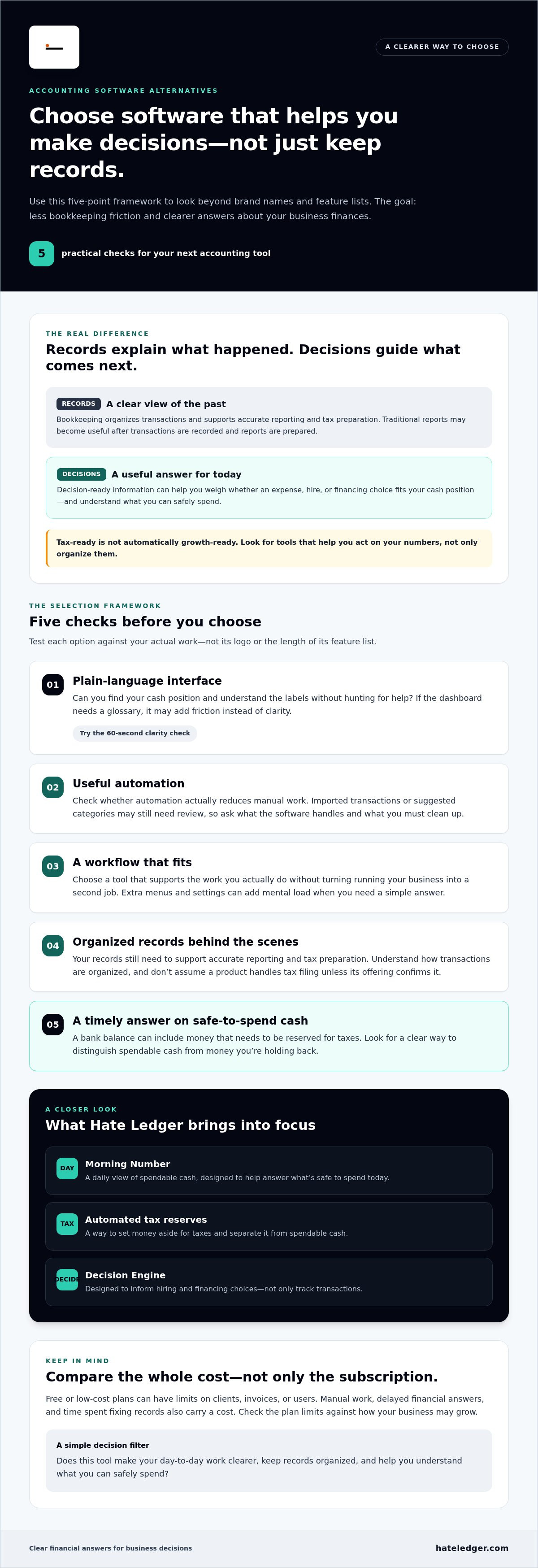
Don’t choose by logo or longest feature list. Choose by what the software helps you do without turning bookkeeping into another job. Use these five checks to compare accounting software alternatives to quickbooks: clear language, useful automation, a workflow that fits, organized records behind the scenes, and a timely answer to what you can safely spend. Reviews such as PCMag’s Top QuickBooks Alternatives can help you build a shortlist. Then test each option against your actual work.
Step 1: Jargon-Free Interface
If you need a glossary to navigate the dashboard, keep looking. Open a demo or trial and give yourself 60 seconds: Can you find your cash position and understand the labels without searching for help? Plain-English reports reduce the effort between seeing a number and understanding it. Confusing screens are a warning, not a learning challenge you owe the software.
Step 2: Automated Tax Reserves
Your bank balance can give a false sense of how much is available if some of that cash needs to be set aside for taxes. Look for a clear reserve that helps distinguish spendable money from money you’re holding back. Ask how the calculation works and which assumptions you need to check. For more on this approach, see automated tax reserves for self-employed people.
Step 3: Growth Decision Engines
A useful finance tool should help you think beyond recording transactions. If you’re considering a hire, can it help you weigh the expected contribution against the cost? Human Capital ROI gives that decision a financial lens instead of leaving you with a ledger and a guess. Explore what to assess with this small business hiring decision tool.
Steps 4 and 5: Fit Your Workflow and Pass the Morning Number Test
Bank connections matter, but they aren’t the whole workflow. Consider where invoicing, expenses, and other routine money tasks happen. Then check whether the software fits those habits or adds extra steps. Also look for “invisible double-entry”: the system should keep its underlying records organized without making you manage accounting mechanics by hand.
Finally, ask the Morning Number question: Can I quickly see what I can spend right now? A report that only explains last month may be useful for review, but it won’t necessarily guide today’s choice. Hate Ledger is one option to consider if you want a daily spendable-cash number alongside tax reserves and decision support. See whether its plain-English accounting platform fits the way you run your business.
Top Accounting Software Alternatives to QuickBooks, Categorized by Business Need
There’s no universal winner. The best accounting software alternatives to quickbooks depend on whether you need standard bookkeeping, industry-specific workflows, or clearer answers for making decisions. Start with the work you want the software to take off your plate, then check the limits that could affect you as your business grows.
The familiar all-rounders: Xero, FreshBooks, and Wave cover common small-business needs, but they still ask you to manage accounting tasks. Xero’s Early plan is $25 per month and caps usage at 20 invoices and 5 bills monthly; its plans allow unlimited users. FreshBooks Lite is $23 per month for up to 5 clients, and extra team members cost $11 per user monthly. Wave has a free Starter plan for core accounting, while its $19-per-month Pro plan adds features such as receipt data extraction. Free or low-cost plans can be a useful starting point, but caps and paid upgrades matter. Check what happens when you outgrow the entry tier, not just what it costs today.
The specialist option: Some tools are designed around a particular type of business, such as managed service providers (MSPs) or contractors. A closer fit may help with industry-specific tasks, but it can still leave a founder with the bigger question: what does the information mean for the business? Test the workflow you actually need and the decisions you need to make.
The anti-accounting option: This category aims to reduce the mental work, not just speed up bookkeeping. Hate Ledger provides a daily Morning Number for spendable cash, automated tax reserves, and decision support for hiring and financing. It’s built for owners who want useful financial direction without treating accounting as a second job.
The Freelancer’s Choice: Simple vs. Sophisticated
Solo operators need time to serve clients, not learn a complicated system. Xero offers unlimited users across its plans, but freelancers should still consider whether its features suit their workload. Compare invoice limits, client caps, and the time required to keep records current. Simple bookkeeping can be a competitive advantage: less admin means more attention for paid work. For another perspective, see the best Xero alternatives for freelancers.
The Growth-Minded Founder: ROI Over Reconciliation
A Profit and Loss statement can show income and expenses, but growth decisions call for more context. Before hiring, consider whether the expected contribution justifies the cost. Before financing, examine how a new commitment fits your cash position. Business financing decision tools can help structure that thinking. The shift is from balancing the books to understanding how people and spending support growth.
The Hidden Costs of Sticking with Complex Accounting Systems
A software subscription is only the visible cost. Less obvious costs show up in cleanup, delayed decisions, and the attention bookkeeping pulls away from running your business. That’s the real “Accountant Tax”: time spent untangling records yourself or paying a professional to sort out work that became confusing or inconsistent.
Then there’s “Decision Delay.” If you only understand your cash position after the books are updated and a month-end report is ready, you may be making today’s choices with yesterday’s information. A planned hire, equipment purchase, or financing decision can’t always wait for a tidy report. And when every money task feels like a chore, it adds mental load. The cost isn’t just time at the keyboard. It’s attention you could give to customers, delivery, or growth.
The Time-Value of Bookkeeping
Put a number on the time you spend. Track the hours spent entering transactions, fixing categories, and chasing unclear figures over a typical month. Then multiply those hours by the value of an hour of your work. You don’t need to assume every freed hour will become revenue; the calculation simply makes the trade-off visible. A low-cost tool can be a poor deal if it regularly sends you into manual cleanup.
Setup speed matters, too. A system that takes months to become useful can prolong the old process while you learn the new one. Hate Ledger lists a 90-day setup promise. Review the terms and what setup involves before relying on that timeline. The goal is a smoother transition, not another long project competing for your time.
Accuracy and the “Invisible” Error
Manual categorization can put a transaction in the wrong place or make an expense harder to spot. The error may go unnoticed until you review the books, prepare for tax time, or compare reports. Bank syncing can move transactions into the software, but it doesn’t automatically guarantee that every item is categorized correctly or reflects your business reality. Check how the system flags uncertain entries and what you’ll need to review.
Look for software that keeps records organized in the background while making exceptions clear. That’s different from automating every click and leaving you to discover mistakes later. The “Tax Trap” is treating the full bank balance as available when some of that cash may need to be reserved for tax obligations. Keep a deliberate buffer and confirm how any software’s reserve works. Don’t assume a displayed balance is all spendable money.
If you’re weighing a simpler workflow, explore Hate Ledger’s plain-English accounting platform and see whether its approach fits the way you want to manage your finances.
Hate Ledger: The Invisible Solution for People Who Refuse to Play Accountant
Many accounting software alternatives to quickbooks still expect you to do the accounting, just with a different dashboard. Hate Ledger takes a founder-first approach: give owners clear financial information and decision support without making bookkeeping the main event. It’s plain-English accounting software for people who would rather get back to running their business.
The idea starts with one daily check: the Morning Number, which shows revenue, tax obligations, and the amount of money that can be safely spent. Instead of interpreting a stack of reports to work out what might be safe to spend, you get a number designed around that everyday question. Automated tax reserves help distinguish money set aside for taxes from money available to use. They don’t replace tax advice or filing, but they can make it easier to avoid treating every dollar in the bank as spendable.
Hate Ledger also goes beyond tracking what came in and went out. Its Human Capital ROI Engine and decision engine are designed to help founders think through hiring and financing choices. Payroll is a cost; the bigger question is how an investment in people could support the business. That’s a different job from simply reconciling transactions.
From Data Entry to Decision Making
Software can automate bookkeeping tasks and still leave you to make the same decisions alone. A decision tool aims to make the numbers more useful for questions like whether a hire makes sense or how financing might affect the business. Hate Ledger presents financial information in plain English, with a Free Forever Tier for owners who want to explore the platform without a credit card. Check what’s included and whether it fits your needs before relying on it for a decision.
Your 90-Day Transformation
Switching systems takes more than opening an account. Before moving from QuickBooks, list the records you need to keep, check how historical data can be handled, and confirm which steps require your review. Hate Ledger states a 90-day setup promise; review its terms to understand what that means for your transition. Don’t assume any platform eliminates every check or correction. Ask how it keeps records organized behind the scenes and flags information that needs your attention.
If you want to see whether a simpler approach fits your business, try Hate Ledger for free, no credit card required.
Choose a Tool That Gives You Time Back
The right accounting software should fit the way you work, make your numbers easier to understand, and help you act without turning bookkeeping into a second job. As you compare accounting software alternatives to quickbooks, look beyond familiar names and feature lists. Focus on what saves effort and gives you useful answers when you need them.
For self-employed professionals, Hate Ledger offers a simpler starting point: a daily Morning Number for spendable cash, automated tax reserves, and decision support for hiring and financing. Its Free Forever Tier requires no credit card, so you can explore the platform before deciding whether it suits your business. Hate Ledger also outlines a 90-day setup promise; review the details to understand what the transition involves.
You don’t need to become an accountant to make confident business decisions. Start with a tool designed to make your financial picture clearer and the busywork lighter. Start your Free Forever Tier with Hate Ledger and spend less time managing books and more time building your business.
Frequently Asked Questions
Is it hard to switch from QuickBooks to another accounting software?
It can be manageable if you plan the move instead of switching midstream without preparation. Check how to export your records, which information the new software can import, and how it handles opening balances and categories. Keep access to your old records, and compare key reports after the move. If an accountant helps with your books, ask what files or reports they’ll need before choosing a new system.
Will my accountant be mad if I stop using QuickBooks?
Probably not, but your accountant may have a preferred workflow or need specific reports. Tell them before switching and ask what they require to review your records, prepare reports, or support tax work. Then confirm the new software can provide that information in a usable format. The goal isn’t to keep a particular brand at all costs. It’s to choose a system that works for you and gives your accountant the information they need.
Can I really manage my business finances without knowing accounting jargon?
Yes, you can use plain-English tools without learning every accounting term. You still need to review the information, check unusual transactions, and understand the decisions you’re making. A clear dashboard can make those tasks less intimidating. Hate Ledger is designed for small business owners, self-employed professionals, and contractors who dislike traditional bookkeeping. It presents financial information to help answer practical questions without demanding accounting expertise.
What is the best QuickBooks alternative for a one-person business?
There isn’t one best choice for every solo business. Compare the limits, workflow, and reports against your actual needs, such as client volume, invoicing, and how often you need a cash update. If you’re self-employed and want a daily view of revenue, tax obligations, and safely spendable money, Hate Ledger is one option to evaluate. Its Free Forever Tier has no credit-card requirement, so you can assess whether the approach fits.
How does automated tax reserve software actually work?
Automated tax reserve software uses financial information to calculate an amount to set aside for tax obligations, helping distinguish that money from cash available for business spending. The result depends on the software’s calculation and the information it has, so review its assumptions and keep your records accurate. A reserve calculation is not the same as filing a return or paying tax. Confirm what the software does before relying on it.
Is “free” accounting software safe for my business data?
Free doesn’t automatically mean unsafe, and a paid price doesn’t prove that a tool protects data well. Before connecting financial accounts, review the provider’s privacy and security information. Check what data it collects, who can access it, whether protections such as multifactor authentication are available, and how you can export or delete your records. Hate Ledger’s Free Forever Tier requires no credit card, but assess its published data policies before entering business information.
What is a “Morning Number” and why does it matter more than a P&L?
A Morning Number is a daily figure showing revenue, tax obligations, and how much money can be safely spent. Hate Ledger provides this view to help owners answer a practical question about today’s spending. It doesn’t replace a Profit and Loss statement, which summarizes income and expenses over a period. They serve different purposes: use the daily figure for a current spending check and the P&L to review business performance over time.
Does Hate Ledger handle tax filing and submission?
No. Hate Ledger does not provide tax filing or submission. The platform provides financial information such as automated tax reserve calculations, but setting money aside and preparing a return are different tasks. You remain responsible for filing and paying any taxes due, or for working with a qualified tax professional. Before choosing accounting software, check exactly which tax-related features it includes so you don’t mistake a reserve estimate for a filed return.
Frequently Asked Questions
It can be manageable if you plan the move instead of switching midstream without preparation. Check how to export your records, which information the new software can import, and how it handles opening balances and categories. Keep access to your old records, and compare key reports after the move. If an accountant helps with your books, ask what files or reports they’ll need before choosing a new system.
Probably not, but your accountant may have a preferred workflow or need specific reports. Tell them before switching and ask what they require to review your records, prepare reports, or support tax work. Then confirm the new software can provide that information in a usable format. The goal isn’t to keep a particular brand at all costs. It’s to choose a system that works for you and gives your accountant the information they need.
Yes, you can use plain-English tools without learning every accounting term. You still need to review the information, check unusual transactions, and understand the decisions you’re making. A clear dashboard can make those tasks less intimidating. Hate Ledger is designed for small business owners, self-employed professionals, and contractors who dislike traditional bookkeeping. It presents financial information to help answer practical questions without demanding accounting expertise.
There isn’t one best choice for every solo business. Compare the limits, workflow, and reports against your actual needs, such as client volume, invoicing, and how often you need a cash update. If you’re self-employed and want a daily view of revenue, tax obligations, and safely spendable money, Hate Ledger is one option to evaluate. Its Free Forever Tier has no credit-card requirement, so you can assess whether the approach fits.
Automated tax reserve software uses financial information to calculate an amount to set aside for tax obligations, helping distinguish that money from cash available for business spending. The result depends on the software’s calculation and the information it has, so review its assumptions and keep your records accurate. A reserve calculation is not the same as filing a return or paying tax. Confirm what the software does before relying on it.
Free doesn’t automatically mean unsafe, and a paid price doesn’t prove that a tool protects data well. Before connecting financial accounts, review the provider’s privacy and security information. Check what data it collects, who can access it, whether protections such as multifactor authentication are available, and how you can export or delete your records. Hate Ledger’s Free Forever Tier requires no credit card, but assess its published data policies before entering business information.
A Morning Number is a daily figure showing revenue, tax obligations, and how much money can be safely spent. Hate Ledger provides this view to help owners answer a practical question about today’s spending. It doesn’t replace a Profit and Loss statement, which summarizes income and expenses over a period. They serve different purposes: use the daily figure for a current spending check and the P&L to review business performance over time.
No. Hate Ledger does not provide tax filing or submission. The platform provides financial information such as automated tax reserve calculations, but setting money aside and preparing a return are different tasks. You remain responsible for filing and paying any taxes due, or for working with a qualified tax professional. Before choosing accounting software, check exactly which tax-related features it includes so you don’t mistake a reserve estimate for a filed return.