
Quarterly Tax Reserve Software: What to Look For in 2026
September 27, 2026 · 15 min read
Your bank balance can look healthy and still include money needed for taxes. The right quarterly tax reserve software helps answer a practical question: how much is safe to spend when income changes and a payment deadline is approaching? It can reduce the need to rebuild estimates by hand each quarter or treat every dollar in checking as available.
It’s reasonable to want a clear number without taking on a complicated tax process. Reserve software can estimate what to set aside and keep that obligation visible alongside business cash flow. It can’t make your tax bill disappear, and it isn’t the same as tax preparation or filing.
This guide covers how reserve estimates work, what to compare in 2026, and which features can help you build a steady review habit. Bank syncing and a daily view of revenue, tax obligations, and safely spendable money can help you spot a cash-flow gap. Hate Ledger, for example, brings those figures together in a daily morning number. The goal is clarity, not a promise that software will file your taxes.
Key Takeaways
- Choose quarterly tax reserve software that explains how recorded income informs its estimate and what could cause that estimate to change.
- Compare tools by the financial activity they capture, how clearly they show estimates, the cash-flow context they provide, and whether tax filing is outside their scope.
- Build a repeatable review habit: check your records, revisit the estimate when your finances change, and review your position before payment deadlines.
- Treat a reserve estimate as a planning aid, not a final tax calculation. Understand its assumptions and get qualified advice when your situation calls for it.
Quarterly tax reserve software solves a cash-visibility problem
Your bank balance is a number, not a spending plan. A deposit may look like available cash, but some of it may need to cover operating costs or taxes. Quarterly tax reserve software helps make those obligations visible before you spend the money.
What does quarterly tax reserve software actually do?
In plain English, quarterly tax reserve software tracks business income and displays an estimate of how much to hold aside for taxes. Depending on the tool, it may use recorded financial activity to update that estimate as your business changes. The key word is estimate. It supports planning, but doesn’t calculate your final tax bill or prepare, file, or submit a return.
The distinction matters because tax obligations depend on more than business deposits. The broader Taxation in the United States overview describes estimated payments as part of the system for taxpayers whose taxes aren’t fully covered through withholding. A reserve tool can help you plan for money to set aside, but it doesn’t replace tax guidance or filing software.
Definition: Quarterly tax reserve software tracks business income and shows an estimated amount to set aside for taxes. It can support cash planning, but it can’t determine your final tax bill or file your tax return.
Why is a business bank balance not the same as spendable cash?
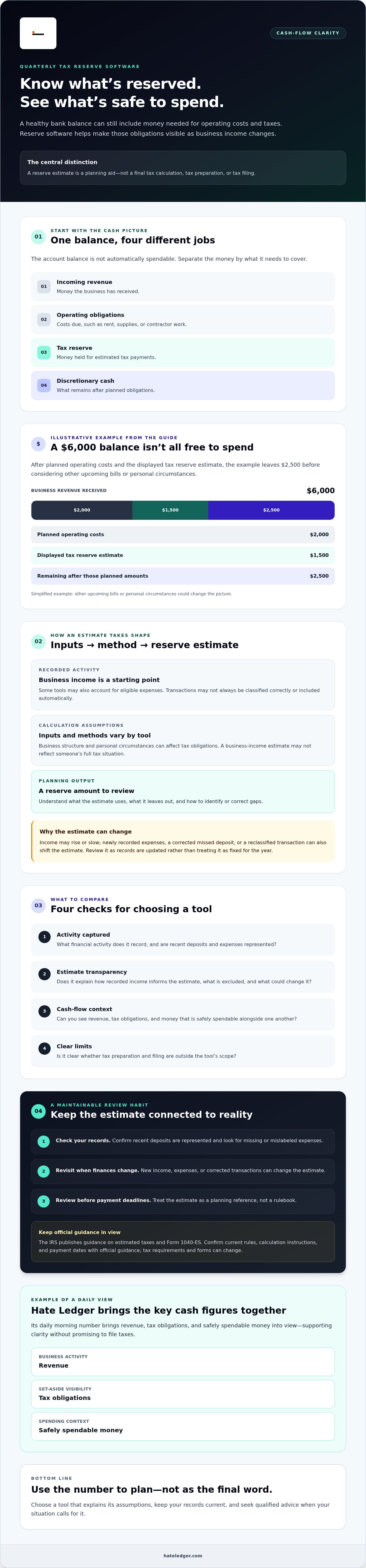
One balance can represent several different obligations. For planning, separate it mentally into four buckets:
- Incoming revenue: money the business has received.
- Operating obligations: costs due for items such as rent, supplies, or contractor work.
- Tax reserve: money you’re holding for estimated tax payments.
- Discretionary cash: what remains after planned obligations.
For example, imagine a business receives $6,000. It expects $2,000 in operating costs, and its software displays a $1,500 tax reserve estimate. The account still shows $6,000 before those payments are made, but the full balance isn’t free to spend. In this simplified example, $2,500 remains after those two planned amounts. Other upcoming bills or personal circumstances could change the picture.
That’s the cash-visibility problem: money can sit in one account while serving different purposes. A clear reserve view can help you avoid treating all of it as available. For more on building this habit, see automated tax reserves for self-employed owners.
How quarterly tax reserve software estimates and updates your tax cushion
An estimate is only as useful as the information behind it. Quarterly tax reserve software generally starts with recorded business activity, applies a calculation method, and displays an estimated amount to reserve. Inputs and assumptions vary by tool. Look for an explanation of what the estimate uses, what it leaves out, and how to spot or correct gaps.
What information can affect an estimated tax reserve?
Recorded business income is a starting point. Some tools may also account for eligible expenses, but don’t assume every transaction is classified correctly or included automatically. Business structure and personal circumstances can affect tax obligations, too. A business-income estimate may not reflect someone’s full tax situation.
The IRS publishes guidance on estimated taxes and Form 1040-ES. Check the current IRS guide to estimated taxes for applicable rules, calculation instructions, and payment dates. Tax requirements and forms can change, so confirm current official guidance rather than relying on an app’s general estimate as a rulebook.
Before relying on the number, check whether recent deposits are represented, whether expenses are missing or mislabeled, and which personal details the tool doesn’t include. These checks help you assess transparency without assuming every product calculates reserves the same way.
Why can an estimate change between quarterly payments?
Business activity changes. A strong stretch of income can push the estimate up, while a slower period or newly recorded expenses may shift it down. Correcting a missed deposit or reclassifying a transaction can also change the picture. Review the estimate as records are updated instead of treating it as a fixed number for the year.
For example, a contractor may have uneven income. If new client payments arrive after an earlier review, the estimate may change when that income is recorded. If transactions are missing or categorized incorrectly, the displayed reserve may be less useful until the records are corrected. Automated updates can reduce repetitive tracking, but they can’t make incomplete inputs accurate.
A software estimate is a planning signal, not a guaranteed tax bill. It can help you monitor a reserve, but it isn’t personalized advice from a tax professional. If your circumstances are complex or the estimate doesn’t make sense, verify the inputs and consult a qualified professional.
For a running view of recorded bank activity and estimated reserves, explore Hate Ledger’s cash-visibility tools. Its estimates are for planning, not tax preparation or filing.
Compare quarterly tax reserve software by visibility, inputs, and limits
Don’t choose a tool because it promises effortless taxes. Instead, check whether you can see what information informs the reserve estimate, review that information, and understand what the tool doesn’t do. This makes it easier to compare quarterly tax reserve software by fit and transparency, rather than assuming one option is right for everyone.
Which software features make a reserve estimate easier to trust?
Start with the workflow. Check whether the tool captures income through bank syncing, displays transactions clearly, and lets you review or correct records that may affect the estimate. Look for plain-language explanations of the estimated obligation and any assumptions. Automation can reduce repetitive work, but it can’t guarantee an exact estimate, especially if transactions are missing or categorized incorrectly.
| What to compare | What to check |
|---|---|
| Income capture | Can you see which income records are included? Can you identify missing or duplicated transactions? |
| Estimate visibility | Does the tool show the reserve estimate clearly and explain what information or assumptions inform it? |
| Cash-flow context | Can you view estimated tax obligations alongside revenue and money that may be available to spend? |
| Tax filing | Does the product clearly state whether filing is included or handled elsewhere? |
These are separate jobs, not interchangeable labels. Bookkeeping generally involves recording and organizing financial activity. Reserve tracking helps you set money aside as a planning habit. Tax estimation projects a possible obligation from available information. Tax preparation and filing involve completing and submitting a return. A product may support one or more steps, so check its actual scope rather than assuming “tax software” does everything.
Does reserve software replace tax preparation or professional advice?
No. Reserve tracking doesn’t itself prepare or submit a tax return. The IRS explains federal estimated-tax guidance in its guidelines on estimated taxes. Check current official instructions for rules and payment details. A tax professional may help assess circumstances a general software estimate can’t fully account for, such as a change in your business or personal situation.
Use the comparison to find a tool that fits your routine, then verify its limits before relying on its numbers. For a broader framework on choosing a manageable tool, explore accounting software for people who hate accounting.
Set up a quarterly tax reserve workflow you can actually maintain
A reserve routine works only if you keep doing it. Use quarterly tax reserve software to make reviews easier, but don’t skip the basic checks. Start with reliable records, then review the estimate and your cash position before deciding what’s available to spend.
- 1. Connect and check your records. Confirm the tool is connected to the accounts you use for business activity. Review recent income transactions for missing, duplicated, or miscategorized entries. A connection can reduce manual entry, but you still need to catch gaps.
- 2. Review unusual activity. Look at refunds, large or unusual expenses, and sharp changes in income. Check that transactions are categorized sensibly and understand whether they affect the estimate. Don’t assume the software has interpreted every item correctly.
- 3. Inspect the estimate. Note when it was calculated and review any assumptions or inputs the software shows. If the estimate has changed, look for the records or business changes behind that movement. If you can’t tell what it reflects, treat it as a prompt to investigate, not a number to follow blindly.
- 4. Compare cash with obligations. Compare the reserve estimate with upcoming operating costs and other planned payments. Keep tax reserve money distinct in your cash plan, even if you don’t hold it in a separate account. Avoid counting the same dollars as both tax money and spendable cash.
- 5. Set your next review. Choose a regular cadence that matches how often your income changes. If revenue is uneven, check records more often than you would with steady income. Add a review before each applicable payment deadline, and verify current federal and state due dates with the relevant tax authority.
Make the review repeatable
Keep the process short enough to repeat. A calendar reminder can turn a vague intention into a routine. After each review, note anything unresolved, such as a missing transaction or a changed estimate, and follow up rather than trusting a number you haven’t checked.
Checklist: Confirm records, review the estimate, compare it with cash and upcoming obligations, then set the next review date.
A significant change, such as a major shift in income, business structure, or personal circumstances, may affect more than the software can assess. Consider asking a qualified tax professional to review your situation. The app helps you keep a running view; it doesn’t provide personalized tax advice or file a return.
For a simpler way to keep reserves and cash position in view, explore Hate Ledger’s cash-visibility tools.
Use Hate Ledger for a clearer view of tax reserves and safe-to-spend cash
Once you know what to look for in a reserve tool, the goal is less manual tracking and more visibility into what your business can safely use. Hate Ledger is plain-English accounting software for small-business owners, self-employed professionals, and contractors. It syncs bank activity, calculates automated tax reserves, and brings key cash figures together in a daily morning number.
How does the morning number connect reserves with spendable cash?
The morning number brings revenue, tax obligations, and safely spendable money into one daily view. Rather than looking at a bank balance and mentally subtracting future obligations, you can see those figures together and use them to inform day-to-day choices, such as whether the business can absorb a planned expense.
It’s a clearer starting point, not a command. The number doesn’t guarantee a particular tax outcome or decide what you should spend. Estimates depend on the financial information and assumptions behind them, so review your records and seek professional guidance if your situation calls for it.
Who may benefit from Hate Ledger’s reserve tools?
If you’re self-employed, work as a contractor, or run a small business and don’t want to track every reserve manually, automated bank syncing and reserve calculations can make the routine easier to maintain. The value is ongoing visibility: bank activity feeds into a view connecting business revenue, estimated tax obligations, and cash that may be available to spend.
Keep the boundaries clear. Hate Ledger doesn’t provide human bookkeeping or prepare, file, or submit tax returns. It helps make financial activity and estimated reserves easier to see; it isn’t a replacement for tax filing or personalized tax advice. Confirm your records are complete and understand the estimate before relying on it for planning.
If that kind of cash visibility fits your workflow, explore Hate Ledger’s free tier. It’s available without a credit card, so you can see whether the approach works for you without treating reserve tracking as tax filing.
Make tax reserves part of your regular cash routine
The right quarterly tax reserve software makes an estimate visible, not infallible. Choose a tool that shows what informs its estimate, check your records regularly, and review the number alongside operating costs and cash you may be able to spend. A reserve estimate supports planning. It doesn’t replace tax advice or filing.
Hate Ledger combines bank syncing and automated tax reserve calculations in an ongoing view of business cash. Its daily morning number brings revenue, tax obligations, and safely spendable money together, giving you more context for day-to-day decisions. It doesn’t provide human bookkeeping or file taxes, and its estimates are planning tools, not guarantees.
To see whether that approach fits your workflow, explore Hate Ledger’s free tier, available without a credit card. Build a reserve habit you can maintain and keep a clearer view of cash as the next tax deadline approaches.
Frequently Asked Questions
What is quarterly tax reserve software?
Quarterly tax reserve software helps business owners track income and set aside money for estimated tax obligations during the year. It can make a reserve visible between payment dates instead of leaving you to guess from your bank balance. The software’s estimate is for planning, not automatically a final tax calculation. Check what information it uses and whether it prepares or files returns, because reserve tracking alone doesn’t mean filing is included.
Can quarterly tax reserve software calculate exactly what I owe?
No. A software estimate isn’t a guaranteed final tax bill. The result depends on available records and details, the product’s calculation method, and personal circumstances it may not know. Keep your financial information current and review the estimate’s assumptions. If you need to understand how your specific situation affects your taxes, ask a qualified tax professional. Reserve software can support planning, but it doesn’t replace individualized tax advice or tax filing.
How much should I set aside for quarterly taxes?
There isn’t one amount that fits every self-employed person. Tax obligations can depend on income, expenses, business structure, and individual circumstances, so a generic percentage may not suit your situation. Review current IRS guidance or consult a qualified tax professional to understand what applies to you. Software may help track an estimate and keep a reserve visible, but don’t treat a general rule of thumb as a personalized calculation.
Does quarterly tax reserve software file estimated taxes for me?
Not necessarily. Some tools estimate obligations and help you track money set aside, while preparing a return or submitting a payment may be a separate task or service. Check the product’s stated capabilities before relying on it. Hate Ledger provides accounting software and automated tax reserve calculations, but it doesn’t prepare, file, or submit tax returns or tax payments. An estimate helps with planning; it doesn’t complete the required next steps.
When should I update my quarterly tax reserve estimate?
Review it regularly, especially after income changes or when you update financial records. Newly recorded information may shift an earlier estimate, but the result still depends on the software’s inputs and method. Before making a payment, check current dates and requirements with the IRS and any relevant tax authority. If a major change affects your income, business, or personal circumstances, ask a qualified tax professional whether your plan needs attention.
Can accounting software track quarterly tax reserves automatically?
Some accounting platforms use connected or recorded financial activity to update reserve estimates, which can reduce manual tracking. Automation isn’t a substitute for checking that transactions are complete and categorized sensibly or understanding how the estimate is produced. Before choosing a tool, confirm which financial inputs it supports and whether it tracks reserves only or also offers separate tax-preparation features. You’re still responsible for meeting applicable payment requirements.
Is quarterly tax reserve software the same as tax preparation software?
No. Reserve software focuses on tracking estimated obligations and helping you set aside cash over time. Tax-preparation software is designed to help prepare a tax return, and some products may also support submission. Features vary, so confirm exactly what a product includes. If you need help filing or advice tailored to your circumstances, use an appropriate filing service or consult a qualified tax professional rather than assuming a reserve tool covers those needs.
Frequently Asked Questions
In plain English, quarterly tax reserve software tracks business income and displays an estimate of how much to hold aside for taxes. Depending on the tool, it may use recorded financial activity to update that estimate as your business changes. The key word is estimate. It supports planning, but doesn’t calculate your final tax bill or prepare, file, or submit a return. The distinction matters because tax obligations depend on more than business deposits. The broader Taxation in the United States overview describes estimated payments as part of the system for taxpayers whose taxes aren’t fully covered through withholding. A reserve tool can help you plan for money to set aside, but it doesn’t replace tax guidance or filing software. Definition: Quarterly tax reserve software tracks business income and shows an estimated amount to set aside for taxes. It can support cash planning, but it can’t determine your final tax bill or file your tax return.
One balance can represent several different obligations. For planning, separate it mentally into four buckets: For example, imagine a business receives $6,000. It expects $2,000 in operating costs, and its software displays a $1,500 tax reserve estimate. The account still shows $6,000 before those payments are made, but the full balance isn’t free to spend. In this simplified example, $2,500 remains after those two planned amounts. Other upcoming bills or personal circumstances could change the picture. That’s the cash-visibility problem: money can sit in one account while serving different purposes. A clear reserve view can help you avoid treating all of it as available. For more on building this habit, see automated tax reserves for self-employed owners. An estimate is only as useful as the information behind it. Quarterly tax reserve software generally starts with recorded business activity, applies a calculation method, and displays an estimated amount to reserve. Inputs and assumptions vary by tool. Look for an explanation of what the estimate uses, what it leaves out, and how to spot or correct gaps.
Recorded business income is a starting point. Some tools may also account for eligible expenses, but don’t assume every transaction is classified correctly or included automatically. Business structure and personal circumstances can affect tax obligations, too. A business-income estimate may not reflect someone’s full tax situation. The IRS publishes guidance on estimated taxes and Form 1040-ES. Check the current IRS guide to estimated taxes for applicable rules, calculation instructions, and payment dates. Tax requirements and forms can change, so confirm current official guidance rather than relying on an app’s general estimate as a rulebook. Before relying on the number, check whether recent deposits are represented, whether expenses are missing or mislabeled, and which personal details the tool doesn’t include. These checks help you assess transparency without assuming every product calculates reserves the same way.
Business activity changes. A strong stretch of income can push the estimate up, while a slower period or newly recorded expenses may shift it down. Correcting a missed deposit or reclassifying a transaction can also change the picture. Review the estimate as records are updated instead of treating it as a fixed number for the year. For example, a contractor may have uneven income. If new client payments arrive after an earlier review, the estimate may change when that income is recorded. If transactions are missing or categorized incorrectly, the displayed reserve may be less useful until the records are corrected. Automated updates can reduce repetitive tracking, but they can’t make incomplete inputs accurate. A software estimate is a planning signal, not a guaranteed tax bill. It can help you monitor a reserve, but it isn’t personalized advice from a tax professional. If your circumstances are complex or the estimate doesn’t make sense, verify the inputs and consult a qualified professional. For a running view of recorded bank activity and estimated reserves, explore Hate Ledger’s cash-visibility tools. Its estimates are for planning, not tax preparation or filing. Don’t choose a tool because it promises effortless taxes. Instead, check whether you can see what information informs the reserve estimate, review that information, and understand what the tool doesn’t do. This makes it easier to compare quarterly tax reserve software by fit and transparency, rather than assuming one option is right for everyone.
Start with the workflow. Check whether the tool captures income through bank syncing, displays transactions clearly, and lets you review or correct records that may affect the estimate. Look for plain-language explanations of the estimated obligation and any assumptions. Automation can reduce repetitive work, but it can’t guarantee an exact estimate, especially if transactions are missing or categorized incorrectly. These are separate jobs, not interchangeable labels. Bookkeeping generally involves recording and organizing financial activity. Reserve tracking helps you set money aside as a planning habit. Tax estimation projects a possible obligation from available information. Tax preparation and filing involve completing and submitting a return. A product may support one or more steps, so check its actual scope rather than assuming “tax software” does everything.
No. Reserve tracking doesn’t itself prepare or submit a tax return. The IRS explains federal estimated-tax guidance in its guidelines on estimated taxes. Check current official instructions for rules and payment details. A tax professional may help assess circumstances a general software estimate can’t fully account for, such as a change in your business or personal situation. Use the comparison to find a tool that fits your routine, then verify its limits before relying on its numbers. For a broader framework on choosing a manageable tool, explore accounting software for people who hate accounting. A reserve routine works only if you keep doing it. Use quarterly tax reserve software to make reviews easier, but don’t skip the basic checks. Start with reliable records, then review the estimate and your cash position before deciding what’s available to spend.
The morning number brings revenue, tax obligations, and safely spendable money into one daily view. Rather than looking at a bank balance and mentally subtracting future obligations, you can see those figures together and use them to inform day-to-day choices, such as whether the business can absorb a planned expense. It’s a clearer starting point, not a command. The number doesn’t guarantee a particular tax outcome or decide what you should spend. Estimates depend on the financial information and assumptions behind them, so review your records and seek professional guidance if your situation calls for it.
If you’re self-employed, work as a contractor, or run a small business and don’t want to track every reserve manually, automated bank syncing and reserve calculations can make the routine easier to maintain. The value is ongoing visibility: bank activity feeds into a view connecting business revenue, estimated tax obligations, and cash that may be available to spend. Keep the boundaries clear. Hate Ledger doesn’t provide human bookkeeping or prepare, file, or submit tax returns. It helps make financial activity and estimated reserves easier to see; it isn’t a replacement for tax filing or personalized tax advice. Confirm your records are complete and understand the estimate before relying on it for planning. If that kind of cash visibility fits your workflow, explore Hate Ledger’s free tier. It’s available without a credit card, so you can see whether the approach works for you without treating reserve tracking as tax filing. The right quarterly tax reserve software makes an estimate visible, not infallible. Choose a tool that shows what informs its estimate, check your records regularly, and review the number alongside operating costs and cash you may be able to spend. A reserve estimate supports planning. It doesn’t replace tax advice or filing. Hate Ledger combines bank syncing and automated tax reserve calculations in an ongoing view of business cash. Its daily morning number brings revenue, tax obligations, and safely spendable money together, giving you more context for day-to-day decisions. It doesn’t provide human bookkeeping or file taxes, and its estimates are planning tools, not guarantees. To see whether that approach fits your workflow, explore Hate Ledger’s free tier, available without a credit card. Build a reserve habit you can maintain and keep a clearer view of cash as the next tax deadline approaches.
Quarterly tax reserve software helps business owners track income and set aside money for estimated tax obligations during the year. It can make a reserve visible between payment dates instead of leaving you to guess from your bank balance. The software’s estimate is for planning, not automatically a final tax calculation. Check what information it uses and whether it prepares or files returns, because reserve tracking alone doesn’t mean filing is included.
No. A software estimate isn’t a guaranteed final tax bill. The result depends on available records and details, the product’s calculation method, and personal circumstances it may not know. Keep your financial information current and review the estimate’s assumptions. If you need to understand how your specific situation affects your taxes, ask a qualified tax professional. Reserve software can support planning, but it doesn’t replace individualized tax advice or tax filing.
There isn’t one amount that fits every self-employed person. Tax obligations can depend on income, expenses, business structure, and individual circumstances, so a generic percentage may not suit your situation. Review current IRS guidance or consult a qualified tax professional to understand what applies to you. Software may help track an estimate and keep a reserve visible, but don’t treat a general rule of thumb as a personalized calculation.
Not necessarily. Some tools estimate obligations and help you track money set aside, while preparing a return or submitting a payment may be a separate task or service. Check the product’s stated capabilities before relying on it. Hate Ledger provides accounting software and automated tax reserve calculations, but it doesn’t prepare, file, or submit tax returns or tax payments. An estimate helps with planning; it doesn’t complete the required next steps.
Review it regularly, especially after income changes or when you update financial records. Newly recorded information may shift an earlier estimate, but the result still depends on the software’s inputs and method. Before making a payment, check current dates and requirements with the IRS and any relevant tax authority. If a major change affects your income, business, or personal circumstances, ask a qualified tax professional whether your plan needs attention.
Some accounting platforms use connected or recorded financial activity to update reserve estimates, which can reduce manual tracking. Automation isn’t a substitute for checking that transactions are complete and categorized sensibly or understanding how the estimate is produced. Before choosing a tool, confirm which financial inputs it supports and whether it tracks reserves only or also offers separate tax-preparation features. You’re still responsible for meeting applicable payment requirements.
No. Reserve software focuses on tracking estimated obligations and helping you set aside cash over time. Tax-preparation software is designed to help prepare a tax return, and some products may also support submission. Features vary, so confirm exactly what a product includes. If you need help filing or advice tailored to your circumstances, use an appropriate filing service or consult a qualified tax professional rather than assuming a reserve tool covers those needs.