
Bookkeeping Without Debits and Credits: A Plain-English Guide
October 9, 2026 · 15 min read
You don’t need to learn debits and credits to keep useful, accurate business records. Bookkeeping without debits and credits is possible when the accounting mechanics happen behind the scenes instead of taking over your workday.
If accounting jargon makes a basic money task feel like a test, you’re not alone. And entering every transaction by hand takes time you could spend earning. You need one clear place to organize income and expenses, plus a straightforward way to see what’s coming in and going out.
This guide explains what bookkeeping software can handle automatically, what you still need to review, and how to get a clearer picture of your finances. Hate Ledger keeps double-entry accounting behind the scenes. Bank syncing, tax-reserve calculations, and a daily morning number help make the information easier to understand. Less jargon, less manual entry, more clarity.
Key Takeaways
- Bookkeeping without debits and credits means tracking business money clearly without manually using accounting terminology.
- Simple bookkeeping still means recording income, expenses, and transactions accurately.
- Single-entry and double-entry approaches organize records differently. The right fit depends on the financial picture you need.
- A short routine for capturing transactions and reviewing details can help you stay on top of your records.
- Bookkeeping software can organize information automatically, but you still need to review transaction details.
Bookkeeping without debits and credits: what does it actually mean?
Bookkeeping without debits and credits means recording your business’s money activity without manually entering transactions in debit-and-credit language. You still track what came in, what went out, and what each transaction was for. The difference is where the accounting mechanics happen: software can organize information behind the scenes while you review it in a simpler interface.
Jargon-free bookkeeping is not record-free bookkeeping. It changes how you work with financial information, not whether you keep it. A delivery driver still needs to distinguish gig payouts from work expenses. A freelancer still needs a useful record of client payments and software costs. Clear records matter; memorizing accounting labels doesn’t have to be part of your daily routine.
Does bookkeeping still count if you never enter a journal entry?
Yes. You may not need to create journal entries yourself. You can provide or review details such as the amount, date, and purpose of a transaction while the software applies its bookkeeping structure. That separates the task of recognizing what happened from learning which accounting labels belong on each side of an entry.
The exact steps depend on the software and setup. A tool may import transaction information, or it may ask you to enter or confirm details. Either way, not seeing journal entries on your screen doesn’t automatically mean the records lack structure. The owner-facing task and the underlying accounting process can be separate.
What information still needs to be organized?
Keep the basics together: business income, expenses, dates, amounts, and enough detail to understand each transaction. A rideshare payout, a freelance client payment, and a work-related purchase should be recognizable in your records, not lost in a pile of bank activity.
Those details help you make sense of business activity over time. You can review where money came from, identify expenses connected to your work, and build a clearer picture of your finances. Your records don’t need to be full of accounting language. They need to be clear enough for you to identify and review each transaction.
A simple-looking record and a simple underlying method aren’t always the same thing. Single-entry bookkeeping records transactions without explicitly showing the paired entries used in double-entry accounting. By contrast, software can keep double-entry mechanics behind the scenes while presenting information in plain language. One term describes how records are structured; the other describes what the business owner sees.
The practical test isn’t whether you can recite accounting terms. It’s whether your records let you identify income, expenses, and the activity behind them. You can avoid manual debit-and-credit work without abandoning organized bookkeeping.
How bookkeeping software can handle debits and credits behind the scenes
Accounting software can take transaction information and organize it using bookkeeping rules without asking you to work through those rules yourself. The system maintains the record structure; you focus on what happened and whether the details look right. That’s the difference between invisible accounting mechanics and an incomplete record.
A simple interface can sit on top of double-entry bookkeeping, keeping the accounting structure intact while leaving debit-and-credit language out of your everyday workflow. You review useful information about your business while the software handles the framework behind it.
What happens when a business transaction is recorded?
Picture a freelancer paying for a work-related software subscription. Money leaves the business account for a service used in the work. Bookkeeping software records the transaction within its structure, while you can focus on familiar details such as the date, amount, and business purpose.
The practical flow is straightforward:
- Capture: Enter the transaction or bring it in through a connected account.
- Review: Check that the date and amount match what happened.
- Organize: Make sure the transaction has a clear business context, such as a software subscription.
The software’s underlying structure can connect the transaction to the rest of your financial records without asking you to choose accounting labels. The steps vary by tool, but recording a business event and understanding its accounting mechanics are separate tasks.
What can bank syncing automate, and what still needs attention?
Bank syncing can bring account activity into bookkeeping software, reducing the need to type every transaction by hand. That saves repetitive work, but review still matters. A bank description may show where money moved without explaining the business reason. Payment platform activity may also need context before it becomes a useful business record.
For example, you may recognize the merchant on an online service charge but still need to confirm that it relates to your work and that the transaction details are accurate. Review imported activity for missing context, unfamiliar items, and possible duplicates. Correct what you know, and don’t assume a connected feed has classified everything perfectly.
That’s how bookkeeping without debits and credits can save effort without asking you to stop paying attention. Let software handle the structure while you check the real-world details. Hate Ledger uses invisible double-entry and bank syncing to help gig workers and freelancers organize business transactions. The Hate Ledger accounting software uses a plain-English approach to managing them.
Single-entry versus invisible double-entry: what changes for the business owner?
These terms describe different things. Single-entry is a way of recording transactions, usually as one entry for each item. Double-entry records each transaction in connected parts, creating a fuller underlying structure. Invisible double-entry means software handles that structure without making you work directly with debit-and-credit labels. It describes the experience, not a separate bookkeeping method.
Here’s how the approaches can feel from the owner’s side:
| Approach | Visible work | Record structure | Reader effort |
|---|---|---|---|
| Single-entry | Record each transaction once in a simple list or ledger. | Each item is captured as a standalone record. | Can feel straightforward, though you still need clear details and regular review. |
| Visible double-entry | Work with paired entries and accounting labels. | Each transaction is reflected in connected parts of the records. | Requires more familiarity with bookkeeping mechanics. |
| Invisible double-entry | Review business activity through a simpler interface. | Software maintains the double-entry structure behind the scenes. | Less focus on accounting labels, but transaction details still need attention. |
Is invisible double-entry the same as single-entry bookkeeping?
No. Single-entry describes how transactions are recorded. Invisible double-entry describes how the underlying method is presented to the user. A plain-English screen doesn’t tell you whether a system uses single-entry or double-entry. The mechanics may be out of view while the records still use a structured, double-entry system.
What trade-offs should a small-business owner understand?
A simpler workflow can reduce the accounting terminology you face and make routine reviews less intimidating. But ease of use doesn’t replace accurate information. You still need to recognize what a transaction was for, notice details that look wrong, and keep business activity organized. Software can simplify how you interact with your books, but a transaction label alone may not provide every real-world detail.
Record structure also affects what information is available to review. A single-entry list can make individual transactions easy to scan. A double-entry system organizes activity in connected parts behind each transaction. Whether that added structure matters depends on your business and the financial picture you need. No one method is automatically right for every business or reporting need.
Don’t choose based on which term sounds more professional. Focus on whether you can find the transactions you need, understand their business purpose, and review your financial activity with confidence. For bookkeeping without debits and credits, the goal isn’t to erase the accounting system. It’s to use a clear interface and dependable records without making unfamiliar labels the price of getting organized.
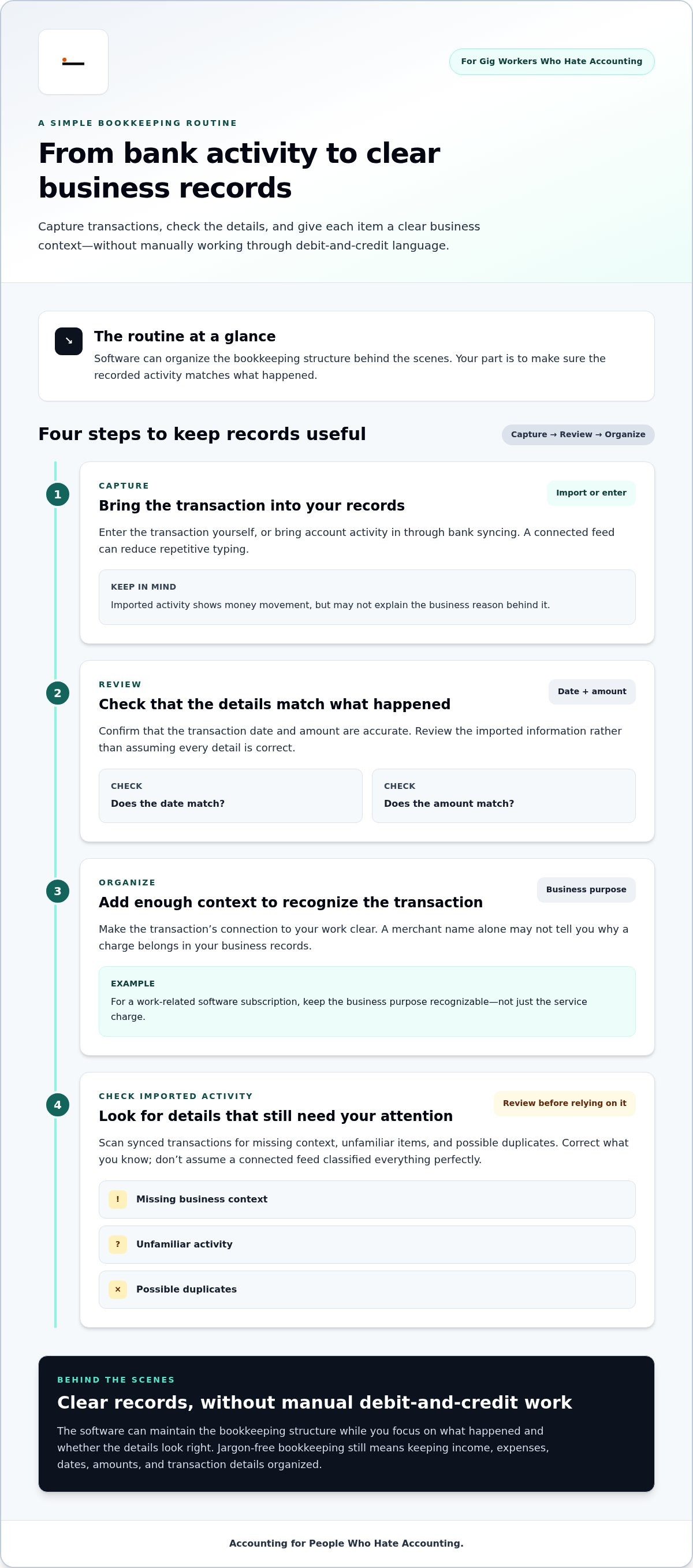
A simple routine for keeping books without learning accounting jargon
A useful bookkeeping routine doesn’t need to start with accounting terms. It should help you capture what happened, check the details, organize business activity, and understand where your finances stand. Repeat those steps regularly, and transactions are less likely to pile up into a confusing catch-up job.
- Capture: Make sure new income and spending appear in your records.
- Review: Check dates, amounts, and descriptions for accuracy.
- Organize: Add enough context to recognize the business purpose of each item.
- Check: Look over your financial picture and note anything that needs attention.
How to review income and expenses in plain English
Start with what you recognize: a client payment, a payout from a gig platform, or a purchase made for work. Ask simple questions. Is the amount right? Is the date right? Do you know what the transaction was for? If a description is unclear, add context you’ll understand later, such as the client or project connected to a payment, or the work purpose of a purchase. You’re organizing the facts, not deciding a tax treatment.
Keep income and expenses easy to distinguish, and make a note when you can’t identify an item right away. That’s more useful than guessing. It gives you a clear prompt to investigate while the transaction is still familiar.
How to make the routine easier to maintain
Choose a recurring time to review your records and stick with a pace that suits your work. A short, regular check-in can be easier than a backlog of transactions you barely remember. Keep records together in one organized financial workspace instead of splitting information across bank activity, payment apps, scattered notes, and loose receipts. One place makes it easier to see what’s been reviewed and what still needs context.
Regular transaction reviews keep your financial records useful by catching unclear details while they’re still easy to recognize. That review is separate from setting aside money for taxes. A tax reserve helps you account for money that may need to be set aside; it doesn’t replace recording and organizing income or expenses. The automated tax reserve guide explains how that separate piece can fit into your money routine.
Your bookkeeping tool also affects how easy it is to keep everything in one place. Look for a workflow that makes transactions simple to review and your finances easier to understand, rather than one that adds more labels to decode. The accounting software guide for people who hate accounting offers broader context on a plain-English approach.
Hate Ledger brings gig-work finances together in one place: organize your records with Hate Ledger.
How Hate Ledger makes bookkeeping without debits and credits practical
You can keep organized business records without turning every transaction into an accounting lesson. Hate Ledger uses invisible double-entry, so the traditional bookkeeping structure works behind the scenes while the experience stays in plain English. You can focus on understanding your business activity instead of manually working through debit-and-credit labels.
That matters when your income comes from different places or changes from week to week. Client payments, platform payouts, and work expenses all contribute to your financial picture. Hate Ledger brings together tools for organizing transactions and tracking expenses, helping you stay on top of your finances in one place.
What the Hate Ledger workflow puts in one place
Automated bank syncing brings bank activity into the software to help organize financial information. Tax-reserve calculations give you a separate view of money to account for when thinking about taxes. Together, these tools can make it easier to review business finances without requiring you to build the underlying accounting structure yourself.
The daily morning number brings key information into a concise summary: revenue, tax obligations, and money that can be safely spent. It’s a practical starting point for understanding where your finances stand, not a substitute for checking transaction details or considering your business context.
Hate Ledger helps organize financial information and calculate tax reserves. Keep tax filing and submission as separate steps in your tax process, and review the figures in light of your situation.
How to take the next step without an accounting learning curve
Start with the money information you already manage: business income, expenses, and the transactions that explain them. You don’t need to master accounting vocabulary before organizing those records. Review details in plain English, correct anything that needs attention, and use the available financial summary to get a clearer view.
Hate Ledger’s Free Forever Tier lets you explore simpler bookkeeping without a credit-card requirement. The goal isn’t to make you an accountant. It’s to make everyday financial information easier to organize and understand, with the bookkeeping mechanics handled in the background.
Hate Ledger offers bookkeeping built for people who hate accounting.
Make your next money check-in simpler
Your records should help you make your next business decision, not make you feel like you need an accounting degree first. Start with one small step: review transactions regularly, keep work-related details together, or take a moment to check where your business stands. Small, repeatable habits make bookkeeping feel more manageable.
That’s the point of bookkeeping without debits and credits. You can focus on information that helps you run your work without letting unfamiliar terminology block you from getting started. Build a routine that fits the way you earn, and adjust it as your business changes.
You don’t have to love accounting to feel more in control. Explore Hate Ledger’s bookkeeping tools and take a first step toward clearer financial records.
Frequently Asked Questions
Can I do bookkeeping without knowing what debits and credits mean?
Yes. You can record and review business activity without learning the accounting labels behind it. For example, you can check whether a client payment arrived, match it to the right project, and note related spending in plain language. Bookkeeping without debits and credits should make your records understandable and useful, not require you to memorize technical terms before tracking your work.
Does bookkeeping without debits and credits still use double-entry accounting?
It can. Some accounting software uses double-entry rules in its underlying record system while showing the business owner a simpler view. What appears on your screen depends on the software and setup. You might work with transaction descriptions and financial summaries rather than accounting labels. A jargon-free experience can still be supported by a structured accounting system working out of sight.
Is single-entry bookkeeping the same as software that hides debits and credits?
No. Single-entry refers to a way of recording transactions, while hidden debits and credits describe what the software chooses to show you. A simple-looking screen alone doesn’t reveal how records are structured underneath. When comparing bookkeeping tools, focus on whether you can follow your transactions and review the information you need. An uncluttered interface doesn’t necessarily mean the system uses single-entry.
Can a spreadsheet work for bookkeeping if I do not use accounting software?
Yes, a spreadsheet can help you list business income and spending if you update it consistently. You might use columns for the date, amount, source or merchant, and a short note about the business purpose. The trade-off is that you’re responsible for entering information, keeping it organized, and checking it against your account activity. As transactions grow or become harder to track, that manual routine may take more attention.
What business records should freelancers keep organized?
Keep records that help explain your business activity: client invoices or payment details, platform payout information, work-related purchase receipts, and notes that identify what a transaction was for. For example, a bank entry might show a payment processor but not which client or project paid you. Adding that context can make later reviews clearer. Organize the information so you can find it when you need to understand a transaction.
Can bank syncing record every business transaction accurately without review?
No. Bank syncing can bring account activity into software, but an imported description may not explain the transaction’s business purpose. A payment might need context, and an unfamiliar charge may need investigation. Review synced activity for errors, missing details, or items you don’t recognize. Treat syncing as a way to reduce repetitive entry, not as proof that every transaction has been identified and organized correctly.
Does bookkeeping software file taxes for me?
Bookkeeping software can help organize financial activity or calculate tax-related amounts. Those tasks are separate from preparing and submitting a tax filing. Hate Ledger provides tax-reserve calculations and 1099 tax calculation. Use the financial information to help stay organized, and keep filing and submission as distinct steps in your tax process.
Frequently Asked Questions
Yes. You may not need to create journal entries yourself. You can provide or review details such as the amount, date, and purpose of a transaction while the software applies its bookkeeping structure. That separates the task of recognizing what happened from learning which accounting labels belong on each side of an entry. The exact steps depend on the software and setup. A tool may import transaction information, or it may ask you to enter or confirm details. Either way, not seeing journal entries on your screen doesn’t automatically mean the records lack structure. The owner-facing task and the underlying accounting process can be separate.
Keep the basics together: business income, expenses, dates, amounts, and enough detail to understand each transaction. A rideshare payout, a freelance client payment, and a work-related purchase should be recognizable in your records, not lost in a pile of bank activity. Those details help you make sense of business activity over time. You can review where money came from, identify expenses connected to your work, and build a clearer picture of your finances. Your records don’t need to be full of accounting language. They need to be clear enough for you to identify and review each transaction. A simple-looking record and a simple underlying method aren’t always the same thing. Single-entry bookkeeping records transactions without explicitly showing the paired entries used in double-entry accounting. By contrast, software can keep double-entry mechanics behind the scenes while presenting information in plain language. One term describes how records are structured; the other describes what the business owner sees. The practical test isn’t whether you can recite accounting terms. It’s whether your records let you identify income, expenses, and the activity behind them. You can avoid manual debit-and-credit work without abandoning organized bookkeeping. Accounting software can take transaction information and organize it using bookkeeping rules without asking you to work through those rules yourself. The system maintains the record structure; you focus on what happened and whether the details look right. That’s the difference between invisible accounting mechanics and an incomplete record. A simple interface can sit on top of double-entry bookkeeping, keeping the accounting structure intact while leaving debit-and-credit language out of your everyday workflow. You review useful information about your business while the software handles the framework behind it.
Picture a freelancer paying for a work-related software subscription. Money leaves the business account for a service used in the work. Bookkeeping software records the transaction within its structure, while you can focus on familiar details such as the date, amount, and business purpose. The practical flow is straightforward: The software’s underlying structure can connect the transaction to the rest of your financial records without asking you to choose accounting labels. The steps vary by tool, but recording a business event and understanding its accounting mechanics are separate tasks.
Bank syncing can bring account activity into bookkeeping software, reducing the need to type every transaction by hand. That saves repetitive work, but review still matters. A bank description may show where money moved without explaining the business reason. Payment platform activity may also need context before it becomes a useful business record. For example, you may recognize the merchant on an online service charge but still need to confirm that it relates to your work and that the transaction details are accurate. Review imported activity for missing context, unfamiliar items, and possible duplicates. Correct what you know, and don’t assume a connected feed has classified everything perfectly. That’s how bookkeeping without debits and credits can save effort without asking you to stop paying attention. Let software handle the structure while you check the real-world details. Hate Ledger uses invisible double-entry and bank syncing to help gig workers and freelancers organize business transactions. The Hate Ledger accounting software uses a plain-English approach to managing them. These terms describe different things. Single-entry is a way of recording transactions, usually as one entry for each item. Double-entry records each transaction in connected parts, creating a fuller underlying structure. Invisible double-entry means software handles that structure without making you work directly with debit-and-credit labels. It describes the experience, not a separate bookkeeping method. Here’s how the approaches can feel from the owner’s side:
No. Single-entry describes how transactions are recorded. Invisible double-entry describes how the underlying method is presented to the user. A plain-English screen doesn’t tell you whether a system uses single-entry or double-entry. The mechanics may be out of view while the records still use a structured, double-entry system.
A simpler workflow can reduce the accounting terminology you face and make routine reviews less intimidating. But ease of use doesn’t replace accurate information. You still need to recognize what a transaction was for, notice details that look wrong, and keep business activity organized. Software can simplify how you interact with your books, but a transaction label alone may not provide every real-world detail. Record structure also affects what information is available to review. A single-entry list can make individual transactions easy to scan. A double-entry system organizes activity in connected parts behind each transaction. Whether that added structure matters depends on your business and the financial picture you need. No one method is automatically right for every business or reporting need. Don’t choose based on which term sounds more professional. Focus on whether you can find the transactions you need, understand their business purpose, and review your financial activity with confidence. For bookkeeping without debits and credits, the goal isn’t to erase the accounting system. It’s to use a clear interface and dependable records without making unfamiliar labels the price of getting organized. A useful bookkeeping routine doesn’t need to start with accounting terms. It should help you capture what happened, check the details, organize business activity, and understand where your finances stand. Repeat those steps regularly, and transactions are less likely to pile up into a confusing catch-up job.
Yes. You can record and review business activity without learning the accounting labels behind it. For example, you can check whether a client payment arrived, match it to the right project, and note related spending in plain language. Bookkeeping without debits and credits should make your records understandable and useful, not require you to memorize technical terms before tracking your work.
It can. Some accounting software uses double-entry rules in its underlying record system while showing the business owner a simpler view. What appears on your screen depends on the software and setup. You might work with transaction descriptions and financial summaries rather than accounting labels. A jargon-free experience can still be supported by a structured accounting system working out of sight.
No. Single-entry refers to a way of recording transactions, while hidden debits and credits describe what the software chooses to show you. A simple-looking screen alone doesn’t reveal how records are structured underneath. When comparing bookkeeping tools, focus on whether you can follow your transactions and review the information you need. An uncluttered interface doesn’t necessarily mean the system uses single-entry.
Yes, a spreadsheet can help you list business income and spending if you update it consistently. You might use columns for the date, amount, source or merchant, and a short note about the business purpose. The trade-off is that you’re responsible for entering information, keeping it organized, and checking it against your account activity. As transactions grow or become harder to track, that manual routine may take more attention.
Keep records that help explain your business activity: client invoices or payment details, platform payout information, work-related purchase receipts, and notes that identify what a transaction was for. For example, a bank entry might show a payment processor but not which client or project paid you. Adding that context can make later reviews clearer. Organize the information so you can find it when you need to understand a transaction.
No. Bank syncing can bring account activity into software, but an imported description may not explain the transaction’s business purpose. A payment might need context, and an unfamiliar charge may need investigation. Review synced activity for errors, missing details, or items you don’t recognize. Treat syncing as a way to reduce repetitive entry, not as proof that every transaction has been identified and organized correctly.
Bookkeeping software can help organize financial activity or calculate tax-related amounts. Those tasks are separate from preparing and submitting a tax filing. Hate Ledger provides tax-reserve calculations and 1099 tax calculation. Use the financial information to help stay organized, and keep filing and submission as distinct steps in your tax process.