
Why Excel Is Bad for Bookkeeping, and What Works Better
October 6, 2026 · 14 min read
Excel isn’t automatically bad for bookkeeping. The trouble starts when your books depend on you remembering every entry. If you’ve wondered why excel is bad for bookkeeping, it’s usually not because a spreadsheet can’t add. It’s because missed transactions, scattered tabs, and a balance that doesn’t show what’s safe to spend leave too much room for guesswork.
Excel can still be enough. If your income and expenses are simple and you keep one sheet up to date, there’s no need to ditch it just because spreadsheets are called outdated. But when gig-work payments, business expenses, and tax reserves live in different places, keeping everything straight can become another job.
This guide explains where spreadsheets create blind spots, when Excel still works, and what to use when manual upkeep gets old. You’ll also see how Hate Ledger brings transaction organization, expense tracking, and tax reserves together, with a daily morning number that shows more than your account balance.
Key Takeaways
- Excel can work for simple, low-volume bookkeeping when you review and update it consistently.
- Understand why excel is bad for bookkeeping when manual entries, missed transactions, or formula errors make your totals unreliable.
- Compare spreadsheets and bookkeeping software by the work they require and the financial picture they provide, not just by their labels.
- Move to a new system in manageable steps: gather your records, choose a start date, and keep your spreadsheet as a reference.
- Hate Ledger helps gig workers and freelancers organize transactions and track business expenses in one place, with less spreadsheet upkeep.
Why Excel can feel like enough for bookkeeping, until the gaps show
Excel can record bookkeeping data, but it stays useful only when someone maintains it. You enter or import transactions, sort them into categories, update formulas, and check that the totals make sense. That’s a reasonable trade-off when your finances are simple and you review the sheet consistently: Excel gives you flexibility, and you provide the upkeep.
A visible total isn’t automatically a complete or current picture of your finances. It shows what’s in the spreadsheet, not necessarily every transaction that has happened or how much you can safely spend. A spreadsheet stores information; a bookkeeping system may organize records and automate parts of the work, depending on the product. For a general overview, see accounting software.
What Excel does well when your books are simple
For a small number of transactions, a basic income-and-expense list may be enough. You can choose your own columns, categories, and formulas, then shape the sheet around how you earn and spend. A freelancer with one main income source and a handful of regular expenses may find that setup easy to review. Using a spreadsheet doesn’t mean you’re disorganized; it can be a sensible fit when your records stay manageable.
When bookkeeping starts asking more of a spreadsheet
The workload changes as transactions increase, payments come from different sources, or recurring expenses need regular updates. Tax reserves add another task: you need to set money aside and track it, not just list income and expenses. Your spreadsheet then needs more frequent attention, and you may need extra checks to confirm that its totals reflect recent activity.
Recording transactions tells you what came in and went out. Understanding available money tells you what’s left after obligations and reserves. That distinction matters when an account balance looks healthy but some of that money is already set aside for taxes or upcoming costs. It’s one reason why excel is bad for bookkeeping when a growing workload depends on manual updates: a sheet can calculate what you entered, but it can’t include a transaction you left out.
Why Excel bookkeeping breaks down: manual work, errors, and missing context
A spreadsheet doesn’t know when a transaction happens. Someone has to bring it in, assign a category, and check that it’s recorded correctly. That routine may feel easy at first. It gets harder when it depends on finding time and remembering every step.
Manual entry creates extra steps and opportunities for omissions
Take a payment from a delivery app. You need to find it in your bank activity, enter or import it into your spreadsheet, and label it as income. Then you repeat the process for expenses and check that nothing was skipped. If you update the sheet days later, it may not reflect everything that has happened in your account.
When recordkeeping relies on memory, every transaction waits for you to notice it, enter it, categorize it, and check it. Forgetting an entry doesn’t mean you’ve failed; it means the spreadsheet can only reflect the information it contains. Citrin Cooperman explains how manual entry and spreadsheet limitations can affect financial reporting in Excel's Limitations in Financial Reporting.
Formulas and separate files can hide the real picture
Spreadsheets also depend on formulas being set up and maintained correctly. If you copy a row without carrying over the right formula, or change a formula while adjusting the sheet, a total may leave out transactions or calculate them incorrectly. The result can look tidy and still be misleading. That’s one practical answer to why excel is bad for bookkeeping: a sheet won’t necessarily flag a mistake just because the numbers look plausible.
The picture gets harder to follow when income lives on one tab, expenses on another, and tax planning in a separate file. You have to bring the information together before deciding what the totals mean. A bank balance is the cash in the account at that moment. It doesn’t separate business income from expenses or show what you’ve set aside for taxes. A balance can be accurate and still not tell you how much is available to spend.
If manual updates are becoming a chore, automated transaction tracking can help keep activity and expenses organized in one place.
Excel vs. bookkeeping software: compare the work, not the labels
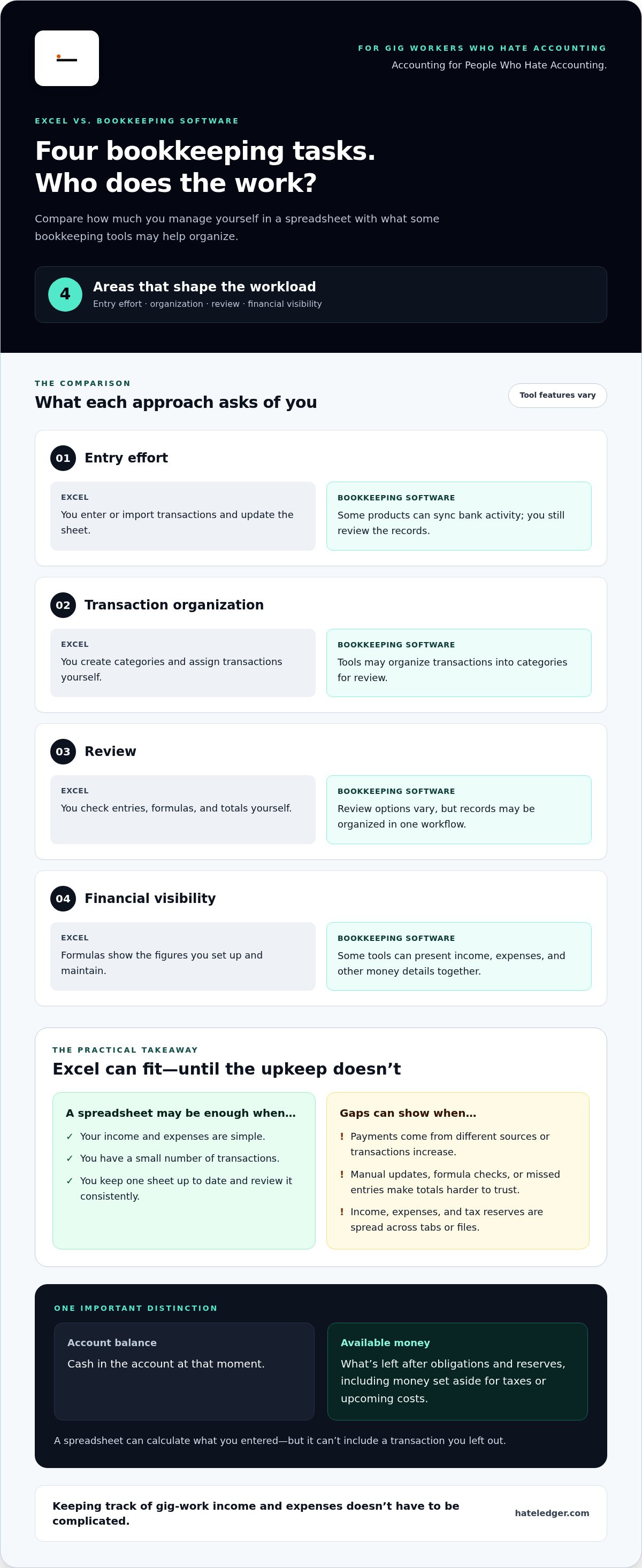
The useful comparison isn’t “old spreadsheet” versus “modern app.” It’s how much work you must do to keep records current, organized, and useful. Excel leaves the workflow in your hands. Bookkeeping software may handle some steps, but features vary, so focus on what a particular tool actually does.
| Task | Excel | Bookkeeping software |
|---|---|---|
| Entry effort | You enter or import transactions and update the sheet. | Some products can sync bank activity; you still review the records. |
| Transaction organization | You create categories and assign transactions yourself. | Tools may organize transactions into categories for review. |
| Review | You check entries, formulas, and totals yourself. | Review options vary, but records may be organized in one workflow. |
| Financial visibility | Formulas show the figures you set up and maintain. | Some tools can present income, expenses, and other money details together. |
Which bookkeeping tasks stay manual in a spreadsheet?
In Excel, you’re responsible for updating transactions, labeling income and expenses, and checking totals. Formulas can save calculation time, but you still need to set them up correctly and make sure they cover the right entries. You also need to reconcile your records by comparing them with account activity and looking for missing or mismatched transactions. The spreadsheet helps you do the work; it doesn’t review the records for you.
What changes when bookkeeping is organized in one system?
Bank syncing can bring transaction activity into a bookkeeping workflow, reducing the need to enter every item from scratch. Organized records can also make income and expenses easier to review together. That doesn’t mean every bookkeeping tool automates everything or that every imported transaction is correct. You still need to check the activity and categories. The difference is that the work can happen in one system instead of being spread across manual steps and files.
For gig workers and freelancers, why excel is bad for bookkeeping often comes down to the effort required to keep records current and turn them into a useful picture. Hate Ledger brings automated bank syncing, transaction organization, and expense tracking together. Compare tools based on how complex your records are, how consistently you can update them, and what you need to know before making spending decisions. For a plain-English overview, explore accounting software for people who hate accounting.
How to move beyond Excel bookkeeping without making a mess
Switching systems doesn’t mean starting from scratch or throwing out your spreadsheet. Keep it as a reference, then move into a new workflow in a few clear steps: gather your records, sort out your categories, choose a start date, and review what’s recorded from that point on. A clean transition is more useful than trying to perfect every old entry before you begin.
Prepare your income and expense records first
Before changing tools, bring together the records you already use. Separate business income, business expenses, and personal transactions where applicable. Make a short list of recurring categories, such as platform payments or supplies, and flag transactions you can’t confidently identify. You can review those later instead of guessing. Keep your spreadsheet unchanged as a reference while you establish the new process.
Build a repeatable routine for reviewing your books
Choose a review rhythm that fits your work. The goal isn’t to follow someone else’s schedule; it’s to check often enough that transactions don’t pile up. Confirm that new activity appears in your records, categories make sense, and entries match the account information available to you. If you use bank syncing, review the activity it brings in rather than assuming every item is correct.
Keep tax obligations distinct from spendable money, too. A separate reserve can help you avoid treating every dollar in your account as available. For more on that idea, see automated tax reserve for self-employed.
Know when keeping Excel is still a sensible choice
Excel can remain a good fit if your records are simple, current, and easy to verify. Reconsider your setup if updates keep getting delayed, you’re checking multiple tabs to find basic figures, or you can’t tell what money is available without extra calculations. Those are practical signs that the spreadsheet is asking more of you than it saves.
That’s the real answer to why excel is bad for bookkeeping for some people: spreadsheets aren’t always the problem, but manual upkeep can stop matching the way you work. Hate Ledger’s Free Forever Tier helps organize transactions, track expenses, and keep finances together. Explore the Free Forever Tier to see how it fits your bookkeeping routine.
A simpler alternative to Excel bookkeeping for people who hate accounting
You don’t need to love spreadsheets to keep your finances in order. Hate Ledger is accounting for people who hate accounting, including gig workers and freelancers who want their records organized without building and maintaining every part of the process themselves.
Automated bank syncing brings transaction activity into the bookkeeping workflow, while expense tracking and transaction organization keep the details together in one place. That means less manual spreadsheet upkeep, not zero need to review your records. Check that transactions and categories make sense.
How Hate Ledger reduces spreadsheet busywork
Instead of copying each bank transaction into a sheet, bank syncing helps bring activity into your records. Expense tracking keeps business costs organized alongside that activity. Hate Ledger also handles double-entry bookkeeping in the background, so you don’t have to manage the underlying accounting method yourself.
Tax reserves are part of the picture, too. Automated tax reserves help keep tax obligations visible, rather than leaving you to remember a separate calculation or rely on a number in another tab. The point isn’t to make taxes disappear. It’s to make the money you’re setting aside easier to account for.
Start with a clearer view of your business money
Organized transactions and expense tracking give you a more current view of what’s coming in and going out. Hate Ledger’s daily morning number brings together revenue, tax obligations, and safely spendable money. So when you ask, “What can I spend?”, you’re looking beyond your bank balance alone.
This is the practical difference behind why excel is bad for bookkeeping for some gig workers: a spreadsheet can hold your entries, but keeping income, expenses, and reserves current takes your attention. A bookkeeping system can bring those parts together and make the picture easier to read. For a plain-English introduction, explore simple bookkeeping for people who hate accounting.
Keeping track of gig-work income and expenses doesn’t have to be complicated. Hate Ledger’s Free Forever Tier helps you organize transactions and track business expenses in one place.
Choose a clearer way to track your money
Excel can work when your records are simple and you keep them current. The trouble starts when bookkeeping depends on repeated manual updates, formulas, or scattered tabs. The practical answer to why excel is bad for bookkeeping is that a spreadsheet only shows what you’ve entered, while keeping it complete stays your responsibility.
If you want less spreadsheet upkeep, Hate Ledger brings automated bank syncing and expense tracking together to help organize your finances in one place. Its daily morning number summarizes revenue, tax obligations, and safely spendable money, giving you more context than an account balance alone.
You can start with the Free Forever Tier, with no credit-card requirement. Start with Hate Ledger’s Free Forever Tier and take one simple step toward staying on top of your finances. Bookkeeping doesn’t need to be complicated to be useful.
Frequently Asked Questions
Is Excel bad for bookkeeping?
No. Excel can work for simple bookkeeping if you enter transactions consistently, keep categories clear, and review your totals. It becomes less practical when your records grow or updates get delayed. A spreadsheet only reflects the information and formulas it contains, so you’re responsible for keeping it complete and current. The right choice depends on how much activity you track and how much manual upkeep you can manage.
Can I use Excel to track business income and expenses?
Yes. Set up columns for dates, descriptions, income, expenses, and categories, then use formulas to calculate totals. For a small number of transactions, this can be straightforward. Keep business and personal transactions distinguishable, and compare your entries with available account activity to spot missing or duplicated items. If you’re tracking tax reserves too, record them clearly rather than treating your account balance as fully available money.
What are the main problems with using Excel for bookkeeping?
The main reasons why excel is bad for bookkeeping are the manual work and oversight it requires. You have to enter or import transactions, categorize them, maintain formulas, and check totals yourself. A missed entry can leave the records incomplete; a changed formula can make a total misleading. Information split across tabs or files can also make it harder to see income, expenses, tax reserves, and money available to spend together.
When should I stop using Excel for bookkeeping?
Consider changing your system when you regularly fall behind on entries, have trouble checking totals, or need to search multiple tabs to understand your finances. Another sign is that your spreadsheet shows a balance but doesn’t make tax reserves or available spending money clear. If your records are simple, current, and easy to verify, Excel may still suit you. Switch when the upkeep no longer fits your work.
Is bookkeeping software easier than Excel for freelancers?
It can be, especially if the software reduces repetitive entry and keeps transactions and expenses organized together. Capabilities vary, so software won’t necessarily automate every task or remove the need to review records. Hate Ledger offers automated bank syncing and expense tracking, plus a daily morning number showing revenue, tax obligations, and safely spendable money. That can give freelancers a clearer view than a bank balance alone.
How do I switch from Excel to bookkeeping software?
Start by gathering your spreadsheet and available account records. Separate business income, expenses, and personal transactions where applicable, then note your categories and any unclear entries. Choose a start date for the new workflow, preserve your spreadsheet as a reference, and check that new or imported transactions match your account activity. You don’t need to resolve every old uncertainty before beginning; flag it for review rather than guessing.
Can Excel tell me how much money is safe to spend?
Excel can calculate a figure from the information and formulas you give it, but it can’t account for activity you haven’t entered or reserves you haven’t recorded. Your bank balance also doesn’t automatically separate tax obligations from money available to spend. Hate Ledger’s daily morning number summarizes revenue, tax obligations, and safely spendable money, offering more context for that everyday spending decision.
Frequently Asked Questions
In Excel, you’re responsible for updating transactions, labeling income and expenses, and checking totals. Formulas can save calculation time, but you still need to set them up correctly and make sure they cover the right entries. You also need to reconcile your records by comparing them with account activity and looking for missing or mismatched transactions. The spreadsheet helps you do the work; it doesn’t review the records for you.
Bank syncing can bring transaction activity into a bookkeeping workflow, reducing the need to enter every item from scratch. Organized records can also make income and expenses easier to review together. That doesn’t mean every bookkeeping tool automates everything or that every imported transaction is correct. You still need to check the activity and categories. The difference is that the work can happen in one system instead of being spread across manual steps and files. For gig workers and freelancers, why excel is bad for bookkeeping often comes down to the effort required to keep records current and turn them into a useful picture. Hate Ledger brings automated bank syncing, transaction organization, and expense tracking together. Compare tools based on how complex your records are, how consistently you can update them, and what you need to know before making spending decisions. For a plain-English overview, explore accounting software for people who hate accounting. Switching systems doesn’t mean starting from scratch or throwing out your spreadsheet. Keep it as a reference, then move into a new workflow in a few clear steps: gather your records, sort out your categories, choose a start date, and review what’s recorded from that point on. A clean transition is more useful than trying to perfect every old entry before you begin.
No. Excel can work for simple bookkeeping if you enter transactions consistently, keep categories clear, and review your totals. It becomes less practical when your records grow or updates get delayed. A spreadsheet only reflects the information and formulas it contains, so you’re responsible for keeping it complete and current. The right choice depends on how much activity you track and how much manual upkeep you can manage.
Yes. Set up columns for dates, descriptions, income, expenses, and categories, then use formulas to calculate totals. For a small number of transactions, this can be straightforward. Keep business and personal transactions distinguishable, and compare your entries with available account activity to spot missing or duplicated items. If you’re tracking tax reserves too, record them clearly rather than treating your account balance as fully available money.
The main reasons why excel is bad for bookkeeping are the manual work and oversight it requires. You have to enter or import transactions, categorize them, maintain formulas, and check totals yourself. A missed entry can leave the records incomplete; a changed formula can make a total misleading. Information split across tabs or files can also make it harder to see income, expenses, tax reserves, and money available to spend together.
Consider changing your system when you regularly fall behind on entries, have trouble checking totals, or need to search multiple tabs to understand your finances. Another sign is that your spreadsheet shows a balance but doesn’t make tax reserves or available spending money clear. If your records are simple, current, and easy to verify, Excel may still suit you. Switch when the upkeep no longer fits your work.
It can be, especially if the software reduces repetitive entry and keeps transactions and expenses organized together. Capabilities vary, so software won’t necessarily automate every task or remove the need to review records. Hate Ledger offers automated bank syncing and expense tracking, plus a daily morning number showing revenue, tax obligations, and safely spendable money. That can give freelancers a clearer view than a bank balance alone.
Start by gathering your spreadsheet and available account records. Separate business income, expenses, and personal transactions where applicable, then note your categories and any unclear entries. Choose a start date for the new workflow, preserve your spreadsheet as a reference, and check that new or imported transactions match your account activity. You don’t need to resolve every old uncertainty before beginning; flag it for review rather than guessing.
Excel can calculate a figure from the information and formulas you give it, but it can’t account for activity you haven’t entered or reserves you haven’t recorded. Your bank balance also doesn’t automatically separate tax obligations from money available to spend. Hate Ledger’s daily morning number summarizes revenue, tax obligations, and safely spendable money, offering more context for that everyday spending decision.