
No-Jargon Accounting Software: How to Find a Tool That Makes Sense
October 8, 2026 · 16 min read
What if your accounting software showed you what money is safe to spend instead of making you decode a screen full of accounting terms? That’s what no-jargon accounting software should do. If routine money tasks leave you second-guessing your records, you’re not the problem. The tools are often harder to understand than they need to be.
For gig workers, freelancers, and self-employed people, tracking transactions manually can add work to an already busy day. When you can’t easily see what came in, what went out, or what needs to be set aside, deciding what you can spend gets harder. You shouldn’t need an accounting vocabulary to understand your own finances.
This guide explains what no-jargon accounting software should handle, how to compare your options, and how to make everyday money decisions with more confidence. We’ll focus on the essentials: organizing income and expenses in one place, reducing manual work, and turning financial records into clear answers. Hate Ledger’s daily morning number summarizes revenue, tax obligations, and money that can be safely spent. Less decoding, more clarity.
Key Takeaways
- No-jargon accounting software should make financial records easier to understand without hiding useful details.
- Look for tools that organize transactions and turn them into clear information you can use.
- Compare clarity, transaction organization, automation, and decision support. Choose features that fit your work.
- Start with the money questions you want answered regularly, then set up your records around your income patterns.
- Hate Ledger combines automated bank syncing and behind-the-scenes recordkeeping to help reduce manual financial admin.
No-jargon accounting software: what it should make easier
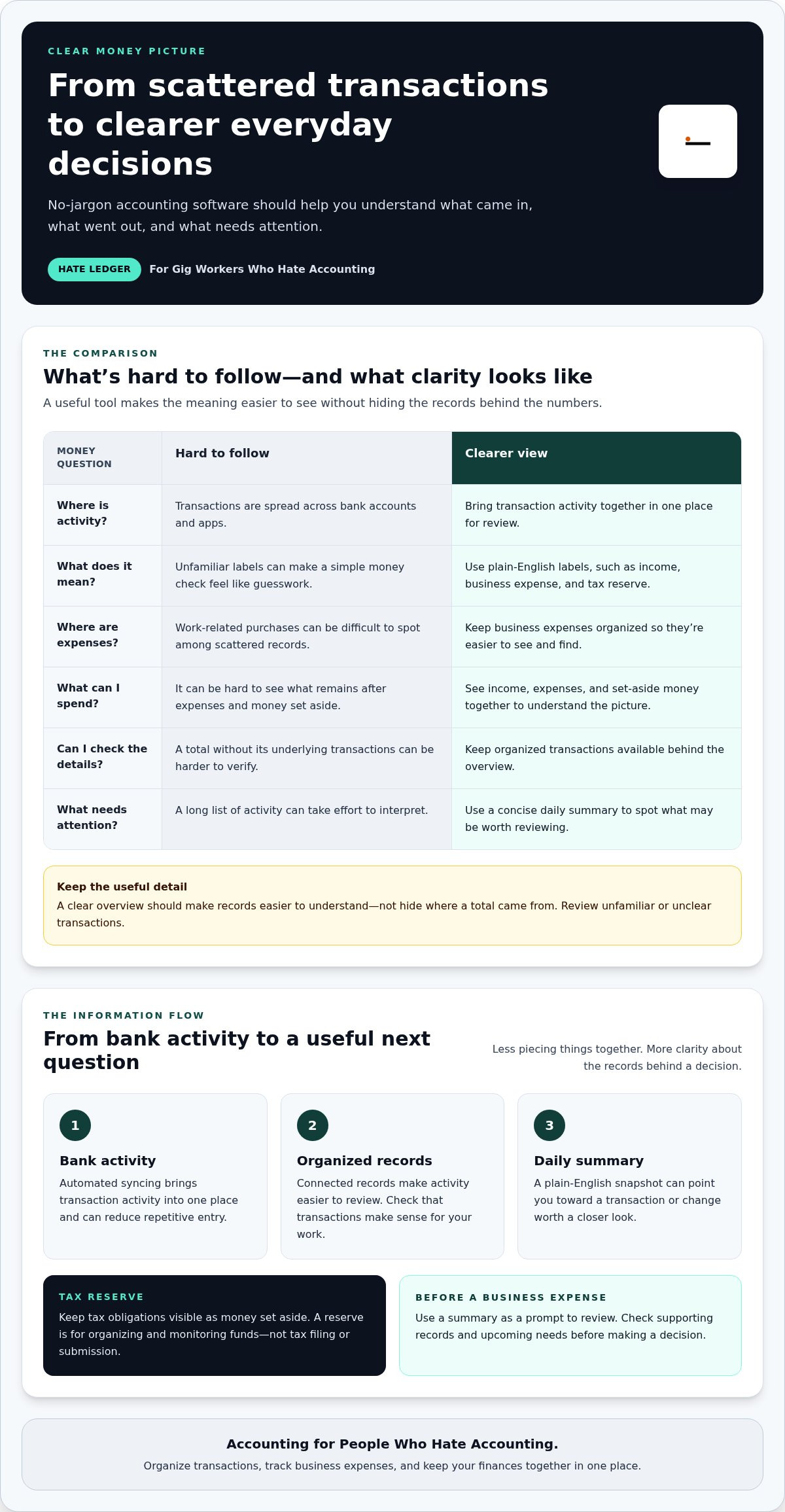
Confusing labels can turn a simple money check into a guessing game. Transactions may be spread across bank accounts and apps. You see income come in, but aren’t sure what’s available after expenses and money set aside for taxes. Software should make these details easier to follow, not give you another pile of unfamiliar terms to decode.
No-jargon accounting software organizes business money and explains what the numbers mean, so you can understand your finances without learning accounting language. The everyday problem it solves isn’t a lack of financial information. It’s the difficulty of making sense of that information.
What does no-jargon accounting software actually mean?
Plain English makes the purpose of a number clear. Instead of leaving you to interpret a technical category, a tool might label money received as income, a purchase as a business expense, or an amount set aside as a tax reserve. Each label should help answer two practical questions: What am I looking at, and what might I need to do next?
For example, a business expense label is more useful when you can identify the purchase and find it among your other records. A tax-reserve summary should make clear that money is being set aside, not suggest that a tax return has been prepared or submitted. Simple wording gives the numbers context.
That’s different from stripping away useful detail. A clear overview should help you understand your records while keeping the underlying transactions organized and available. If a tool hides where a total came from, it hasn’t simplified your finances. It has made them harder to check. For a basic overview of the broader category, see What is accounting software?
Who benefits from a simpler way to manage business money?
Freelancers and self-employed business owners often need to make decisions without becoming accounting experts. Contractors and gig workers face the same challenge, especially when income comes from independent jobs or different platforms. The aim isn’t to master technical terms. It’s to keep the money picture clear enough to use.
A simpler system can help bring three everyday tasks together:
- Organizing transactions: Keep incoming payments and purchases from becoming a scattered trail across accounts and apps.
- Tracking business expenses: Make work-related spending easier to see and find in your records.
- Seeing finances together: Get a clearer view of income, expenses, and money set aside instead of piecing the picture together from separate places.
Clear explanations matter because a record is useful only if you can understand it and act on it. The right tool won’t make every financial task disappear. It should make routine information easier to see, follow, and manage without hiding the details behind it.
How no-jargon accounting software turns transactions into useful information
A bank transaction is a starting point, not the whole story. To make it useful, software needs to connect activity to organized records and summaries you can interpret. That connection helps you move from checking individual entries to understanding what your business activity may mean, without turning every review into a manual calculation exercise.
From bank activity to organized business records
Automated bank syncing brings transaction activity into one place, so you don’t have to rebuild every record by hand from statements or app histories. You can review activity in the context of your business records instead of piecing it together across different sources. Syncing can reduce repetitive entry, but it doesn’t guarantee every transaction is categorized correctly. Review unfamiliar or unclear entries.
Invisible double-entry supports consistent recordkeeping behind the scenes. You don’t need to manage that structure yourself to benefit from it. Think of it as a framework that helps keep records connected while you focus on whether the transactions make sense for your work. The software handles accounting mechanics, while your review keeps the information grounded in what actually happened.
From financial records to a clearer daily picture
Once records are organized, a concise daily summary can help you spot what deserves attention. Hate Ledger’s morning number gives you a regular snapshot of your finances in plain English, so you can start with an overview instead of interpreting a long list of activity. Look more closely when a change or unfamiliar transaction raises a question.
A useful daily summary helps you decide what to review before you commit to a business expense. It doesn’t make the decision for you. Check the supporting records and consider upcoming needs before acting on any summary.
Automated tax reserves can keep tax obligations visible within your financial picture, instead of leaving you to remember them while reviewing other funds. Treat a reserve as a way to organize and monitor money set aside, not as tax filing or submission. That distinction helps you use software for what it does: make financial information easier to follow.
The practical flow is simple: bank activity feeds into organized records, the records become easier to review, and a summary points you toward the next useful question. For freelancers, contractors, and gig workers, that can mean less time reconstructing activity and more time understanding the records behind a decision. See how Hate Ledger simplifies everyday financial tracking with connected records and plain-English visibility.
How to compare no-jargon accounting software without sacrificing useful features
A clean dashboard can feel reassuring, but a simple screen isn’t enough if it leaves you guessing about your records. Compare tools by what you can understand and do with them, not by how polished they look or how many features they list.
Rule of thumb: compare what the software helps you understand, not feature counts alone. Use the questions you actually face in your work to judge whether a tool makes money clearer and reduces repetitive admin.
Clarity: Do labels and summaries explain what the numbers mean in everyday language?
Transaction organization: Can you keep income and business expenses together and review the records behind a summary?
Automation: Does the tool bring in financial activity or reduce repeated data entry, while still letting you review records?
Decision support: Does it help you make sense of finances for regular business choices, if that kind of support matters to you?
Does the software explain money in language you can use?
Test a tool against your routine questions: What income came in? Which purchases were for work? What money is set aside, and what can I use? Look for labels and summaries that answer those questions directly. “Easy to use” is only a promise. Clear explanations show you what a number represents and why it matters.
Check whether you can follow a figure back to its supporting records. A plain-language summary should reduce confusion, not leave you with a total you can’t make sense of. If the wording is simple but vague, it hasn’t done the job.
Which features matter beyond a simple dashboard?
Useful features depend on how you earn and manage money. Transaction organization helps keep activity findable. Bank syncing may reduce manual entry. Tax-reserve visibility can make set-aside money easier to distinguish from other funds. A financial summary brings details together, while decision support may help with choices such as hiring or financing. That last feature isn’t essential for everyone.
Automation should save effort, not ask you to trust every result without review. Check whether you can see and correct transaction details when needed. A tool that pulls activity into one place can still need your attention to keep records accurate and meaningful.
Also distinguish financial organization from other financial work. Accounting software can help maintain records and show summaries, but it doesn’t automatically replace tax filing or human bookkeeping. Choose based on the tasks you want the software to make easier, and be clear about what still requires your attention. A good comparison starts with usefulness, not the longest feature list.
How to choose and set up no-jargon accounting software around your work
The right setup starts with your work, not a perfect bookkeeping system. A freelancer paid by project may need to follow income and expenses across client work. A gig worker may want a clearer view of activity from independent jobs. Start with what you need to understand, then build a routine that’s easy to keep.
- Write down the money questions you ask repeatedly. What income came in? What did you spend on work? What money is set aside for tax obligations? How much is available for other use? List the questions that matter to your day-to-day decisions.
- Pick the uncertainty that causes the most friction. Don’t try to change every financial habit at once. If you’re unsure whether a recent payment or purchase is reflected in your records, start there. A focused first goal is easier to act on than a broad promise to “get organized.”
- Match the view to how you earn. If you work on independent projects, you may want a clear way to review incoming payments and work expenses together. If you earn through gig work, look for a view that helps you follow the activity tied to that work. Prioritize visibility that fits your actual income pattern.
- Judge the summaries by the next action. A useful summary should help answer your questions in plain language. Can you tell what needs review, what has been set aside, or what you may be able to use? If the screen presents figures without making their meaning clearer, it’s not reducing the mental load.
- Choose a small review routine. Set aside a regular moment to look over synced activity, check that income and expenses make sense, and resolve unfamiliar transactions promptly. A short, repeatable review is more manageable than waiting for a major cleanup.
Keep the routine practical. After reviewing activity, note anything you don’t recognize or can’t confidently connect to your work. Follow up while the transaction is still familiar. The goal isn’t to make every record perfect in one sitting. It’s to keep your financial picture current enough to be useful and catch questions before they pile up.
Let the routine serve your work, too. A change in projects, clients, or sources of gig income may change which questions deserve your attention. Revisit your list when your work pattern shifts, but don’t add steps just because a tool offers more features. Keep the ones that help you understand your money and make the next decision with less guesswork.
For a plain-English way to organize business finances and stay on top of transactions, explore a simpler way to organize business finances.
How Hate Ledger makes accounting easier for people who hate accounting
Hate Ledger is built for gig workers, freelancers, contractors, and small business owners who want less friction in their financial routine. Its practical tools help you spend less effort maintaining records and more time understanding your work finances.
Automated bank syncing and invisible double-entry help reduce the manual work involved in keeping records organized. Together, they support a workflow where you can focus on reviewing financial activity instead of entering and structuring everything yourself. You still have a role: check records that look unfamiliar or don’t match what you remember.
A financial picture built for practical decisions
Hate Ledger’s daily morning number gives you a quick financial snapshot to start your review. Use it to consider the broader picture before making a business decision, rather than treating one figure as an automatic answer. It gives you a clearer starting point for your own judgment.
Other features serve different needs. Human-capital ROI insights help you understand the value of people’s contributions. The decision engine supports hiring or financing choices. These tools are separate from routine transaction organization and may be useful when those specific questions become part of running your business. They don’t promise a particular saving or business outcome.
The goal is straightforward: make financial tools easier to use without asking you to become an accounting expert. Hate Ledger’s Free Forever Tier requires no credit card, so you can explore a simpler approach to managing business finances.
A straightforward next step for getting started
You don’t need to redesign every part of your money routine before getting started. Begin with the records you want to keep organized, then use the software to make your regular review easier to follow. Small, clear steps beat a complicated system you’ll avoid opening.
Accounting for People Who Hate Accounting. Hate Ledger supports financial organization, but it doesn’t file or submit taxes. Try Hate Ledger’s Free Forever Tier and take a simpler next step with your business finances.
Make your next money decision with more clarity
You don’t need to become an accounting expert to feel more in control of your work finances. You need a system that makes important information easier to understand, so your next decision feels less like a guess. That’s the point of no-jargon accounting software: making money management fit around your work, not the other way around.
Start small. Choose one financial question you want answered more clearly, then build a routine that helps you move forward. You don’t have to fix every record or change every habit at once. Progress can begin with a clearer view and one confident next step.
Hate Ledger is built for people who hate accounting. Its Free Forever Tier offers a plain-English approach to managing business finances. Try Hate Ledger’s Free Forever Tier.
Your finances don’t have to feel like a puzzle. You can make them easier to understand, one decision at a time.
Frequently Asked Questions
Can no-jargon accounting software replace an accountant?
No. No-jargon accounting software can help you keep records organized, but it can’t provide the context and judgment an accountant may offer for a complex situation. If your work changes significantly, you’re unsure how to treat an unusual transaction, or you need advice tailored to your circumstances, use software records as a starting point for a focused conversation with a qualified professional.
Does accounting software for gig workers handle tax filing?
No. Hate Ledger doesn’t file or submit taxes. Its 1099 tax calculation is a separate function, so don’t treat a tax-related number in software as a completed return. For a practical tax-season check, list what your software tracks and what still needs to be prepared or submitted, then review the list before deadlines approach.
Can I use no-jargon accounting software if I have multiple sources of gig income?
Yes, as long as you can bring the relevant activity into your records and tell which work it belongs to. For example, keep payout notices or statements from each platform so you can compare them with recorded deposits. If a payment is unclear, note its source while the details are fresh. That makes it easier to spot missing or duplicated activity later.
How often should I review transactions in accounting software?
Set a rhythm that matches how often you receive payments and make work-related purchases. If income arrives frequently, regular reviews can help you catch missing or unfamiliar entries sooner. If projects pay less often, review around payment activity and expense recording. Use a calendar reminder if helpful, and adjust your routine if transactions start to pile up between reviews.
What happens if a transaction is categorized incorrectly?
An incorrect category can affect how the transaction appears in summaries or reports. Find the original receipt, invoice, or payment details, then correct the entry if your software allows it. Afterward, check that the updated record appears as expected. If you can’t tell which category fits, save the supporting details and flag the transaction for follow-up instead of guessing.
Is a free accounting software tier enough for a freelancer?
It may be enough if its available tools cover the tasks you need to manage now. Think about how you receive income, keep expense records, and review your finances, then compare those needs with what the tier includes. Reassess if your work changes or you find yourself relying on manual workarounds. The right fit is the one you can use consistently.
Can accounting software show how much money is safe to spend?
Some tools can provide an estimate, but treat it as a starting point rather than a final answer. Account for pending transactions, upcoming business expenses, and transfers that may not yet appear in the records. Before committing to a purchase, check that recent activity is reflected and consider near-term obligations. A software summary can inform your choice, but your current plans matter too.
Frequently Asked Questions
Plain English makes the purpose of a number clear. Instead of leaving you to interpret a technical category, a tool might label money received as income, a purchase as a business expense, or an amount set aside as a tax reserve. Each label should help answer two practical questions: What am I looking at, and what might I need to do next? For example, a business expense label is more useful when you can identify the purchase and find it among your other records. A tax-reserve summary should make clear that money is being set aside, not suggest that a tax return has been prepared or submitted. Simple wording gives the numbers context. That’s different from stripping away useful detail. A clear overview should help you understand your records while keeping the underlying transactions organized and available. If a tool hides where a total came from, it hasn’t simplified your finances. It has made them harder to check. For a basic overview of the broader category, see What is accounting software?
Freelancers and self-employed business owners often need to make decisions without becoming accounting experts. Contractors and gig workers face the same challenge, especially when income comes from independent jobs or different platforms. The aim isn’t to master technical terms. It’s to keep the money picture clear enough to use. A simpler system can help bring three everyday tasks together: Clear explanations matter because a record is useful only if you can understand it and act on it. The right tool won’t make every financial task disappear. It should make routine information easier to see, follow, and manage without hiding the details behind it. A bank transaction is a starting point, not the whole story. To make it useful, software needs to connect activity to organized records and summaries you can interpret. That connection helps you move from checking individual entries to understanding what your business activity may mean, without turning every review into a manual calculation exercise.
Test a tool against your routine questions: What income came in? Which purchases were for work? What money is set aside, and what can I use? Look for labels and summaries that answer those questions directly. “Easy to use” is only a promise. Clear explanations show you what a number represents and why it matters. Check whether you can follow a figure back to its supporting records. A plain-language summary should reduce confusion, not leave you with a total you can’t make sense of. If the wording is simple but vague, it hasn’t done the job.
Useful features depend on how you earn and manage money. Transaction organization helps keep activity findable. Bank syncing may reduce manual entry. Tax-reserve visibility can make set-aside money easier to distinguish from other funds. A financial summary brings details together, while decision support may help with choices such as hiring or financing. That last feature isn’t essential for everyone. Automation should save effort, not ask you to trust every result without review. Check whether you can see and correct transaction details when needed. A tool that pulls activity into one place can still need your attention to keep records accurate and meaningful. Also distinguish financial organization from other financial work. Accounting software can help maintain records and show summaries, but it doesn’t automatically replace tax filing or human bookkeeping. Choose based on the tasks you want the software to make easier, and be clear about what still requires your attention. A good comparison starts with usefulness, not the longest feature list. The right setup starts with your work, not a perfect bookkeeping system. A freelancer paid by project may need to follow income and expenses across client work. A gig worker may want a clearer view of activity from independent jobs. Start with what you need to understand, then build a routine that’s easy to keep. Keep the routine practical. After reviewing activity, note anything you don’t recognize or can’t confidently connect to your work. Follow up while the transaction is still familiar. The goal isn’t to make every record perfect in one sitting. It’s to keep your financial picture current enough to be useful and catch questions before they pile up. Let the routine serve your work, too. A change in projects, clients, or sources of gig income may change which questions deserve your attention. Revisit your list when your work pattern shifts, but don’t add steps just because a tool offers more features. Keep the ones that help you understand your money and make the next decision with less guesswork. For a plain-English way to organize business finances and stay on top of transactions, explore a simpler way to organize business finances. Hate Ledger is built for gig workers, freelancers, contractors, and small business owners who want less friction in their financial routine. Its practical tools help you spend less effort maintaining records and more time understanding your work finances. Automated bank syncing and invisible double-entry help reduce the manual work involved in keeping records organized. Together, they support a workflow where you can focus on reviewing financial activity instead of entering and structuring everything yourself. You still have a role: check records that look unfamiliar or don’t match what you remember.
No. No-jargon accounting software can help you keep records organized, but it can’t provide the context and judgment an accountant may offer for a complex situation. If your work changes significantly, you’re unsure how to treat an unusual transaction, or you need advice tailored to your circumstances, use software records as a starting point for a focused conversation with a qualified professional.
No. Hate Ledger doesn’t file or submit taxes. Its 1099 tax calculation is a separate function, so don’t treat a tax-related number in software as a completed return. For a practical tax-season check, list what your software tracks and what still needs to be prepared or submitted, then review the list before deadlines approach.
Yes, as long as you can bring the relevant activity into your records and tell which work it belongs to. For example, keep payout notices or statements from each platform so you can compare them with recorded deposits. If a payment is unclear, note its source while the details are fresh. That makes it easier to spot missing or duplicated activity later.
Set a rhythm that matches how often you receive payments and make work-related purchases. If income arrives frequently, regular reviews can help you catch missing or unfamiliar entries sooner. If projects pay less often, review around payment activity and expense recording. Use a calendar reminder if helpful, and adjust your routine if transactions start to pile up between reviews.
An incorrect category can affect how the transaction appears in summaries or reports. Find the original receipt, invoice, or payment details, then correct the entry if your software allows it. Afterward, check that the updated record appears as expected. If you can’t tell which category fits, save the supporting details and flag the transaction for follow-up instead of guessing.
It may be enough if its available tools cover the tasks you need to manage now. Think about how you receive income, keep expense records, and review your finances, then compare those needs with what the tier includes. Reassess if your work changes or you find yourself relying on manual workarounds. The right fit is the one you can use consistently.
Some tools can provide an estimate, but treat it as a starting point rather than a final answer. Account for pending transactions, upcoming business expenses, and transfers that may not yet appear in the records. Before committing to a purchase, check that recent activity is reflected and consider near-term obligations. A software summary can inform your choice, but your current plans matter too.