Spreadsheet Accounting Alternatives: 5 Options for Small Businesses in 2026
October 7, 2026 · 15 min read
The best spreadsheet accounting alternative might not be accounting software. It’s the lightest system that reliably shows what you can spend. If manual entry is eating your time and a bank balance leaves you guessing about taxes and upcoming obligations, you don’t need more financial jargon. You need a clearer way to keep track.
Choosing among spreadsheet accounting alternatives comes down to how much activity you manage, how comfortable you are with bookkeeping, and what you need to see at a glance. A spreadsheet can work when transactions are simple. As they pile up, missed entries and extra checking can turn a quick task into a constant chore.
This guide compares spreadsheets, databases, planning platforms, bookkeeping services, and accounting software, so you can find an approach that fits your work without making money management harder. You’ll see what each option organizes, where it may fall short, and how to choose based on your transaction volume and confidence with the numbers. For gig workers who want less manual tracking, Hate Ledger brings financial activity together in one place and provides a daily view of revenue, tax obligations, and safely spendable money.
Key Takeaways
- A spreadsheet can be enough when transactions are few and records stay current. Repeated entry, inconsistent categories, fragile formulas, and scattered versions are signs to reassess.
- Spreadsheet accounting alternatives range from improved templates and no-code databases to accounting software, planning platforms, and bookkeeping services. Compare the job each does with the trade-off it brings.
- Use setup effort, transaction organization, automation, decision support, and your own workload to compare options. No single system fits every business.
- Choose in four steps: list the money questions you need answered, assess transaction volume, decide how involved you want to be, then compare the fit.
- Hate Ledger offers plain-English accounting software with a daily view of revenue, tax obligations, and safely spendable money.
Spreadsheet accounting alternatives: when is it time to move on?
A spreadsheet can work well when you have few transactions and keep your records current. It’s flexible, familiar, and easy to start using. There’s no new system to learn. But as your work grows, the bookkeeping around the spreadsheet can start taking more time than the spreadsheet saves.
Repeatedly entering transactions, choosing categories, checking formulas, and figuring out which file is current all add friction. That doesn’t mean your spreadsheet is automatically wrong. It means it’s worth checking whether it still answers the questions you need answered. A transaction list records activity, but it may not show what you’ve set aside for taxes or what’s safely available to spend.
What spreadsheets do well, and where the work starts piling up
Spreadsheets give you control over how you organize income and expenses. You can keep the setup simple and adjust it as your work changes. For a freelancer with occasional invoices and a manageable number of costs, that may be enough.
Hypothetical example: A freelance designer records each client payment and software purchase in a spreadsheet. At first, updating it once a week is quick. Later, they’re also fixing a formula, deciding how to categorize a new expense, and checking multiple copies saved in different folders. The issue isn’t that spreadsheets can’t work. It’s that maintaining the system is becoming a job of its own.
Which signals show your bookkeeping method no longer fits?
Look beyond transaction count. You may have only a few transactions but still spend too long entering them, miss updates during busy weeks, or struggle to separate business purchases from personal ones. You may also have clean records and still feel unsure about taxes or available cash. That uncertainty matters.
A recorded balance tells you what’s in the account; a reliable spendable amount also accounts for obligations and money set aside. If your spreadsheet doesn’t help you see that difference, it may be time to compare spreadsheet accounting alternatives. Accounting software is one option for organizing financial activity; this Accounting Software Overview explains the category in general.
Try this simple test: name the bookkeeping task that takes the most time, then name the money question you still can’t answer confidently. If both point to the same gap, you have a clear reason to explore another setup. For a plain-English look at one approach, read this guide to accounting software for people who hate accounting.
Five spreadsheet accounting alternatives, from simple trackers to software
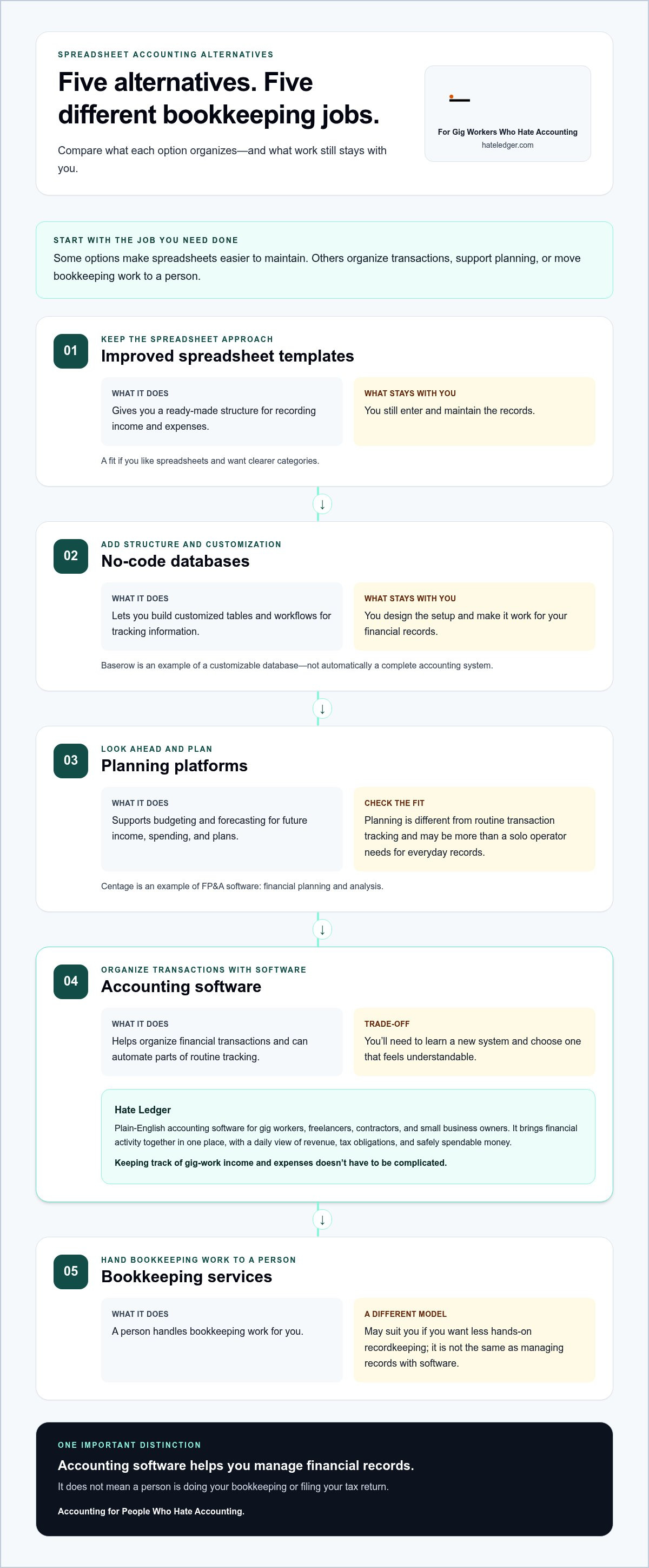
There’s no single upgrade that fits every freelancer. Some options make a spreadsheet easier to maintain. Others organize transactions, support financial planning, or shift bookkeeping work to a person. These spreadsheet accounting alternatives solve different problems, so start with the job you need done.
Templates, databases, and finance-planning platforms
- Improved spreadsheet templates: Give you a ready-made structure for recording income and expenses. They suit people who like spreadsheets and want clearer categories, but you still enter and maintain the records yourself.
- No-code databases: Let you build customized tables and workflows for tracking information. A platform such as Baserow is a customizable database example, not automatically a complete accounting system. It may suit someone comfortable designing a setup, but you’re still responsible for making it work for your financial records.
- Planning platforms: Support budgeting and forecasting, helping you think about future income, spending, and plans. Centage is an example of FP&A software, a category aimed at financial planning and analysis. That’s different from routine transaction tracking, and may be more than a solo operator needs just to organize everyday income and expenses.
Templates keep the familiar spreadsheet approach. Databases add structure and customization. Planning platforms focus on what may happen next. A new interface alone doesn’t remove the work of recording and organizing transactions.
Accounting software and bookkeeping services
- Accounting software: Helps organize financial transactions and can automate parts of routine tracking. It may suit freelancers and gig workers who want fewer manual steps and a clearer view of their records. The trade-off is learning a new system and choosing one that feels understandable.
- Bookkeeping services: Use a different model: a person handles bookkeeping work for you. This may suit someone who wants less hands-on recordkeeping, but it’s not the same as managing records with software.
Accounting software helps you manage financial records; it doesn’t mean a person is doing your bookkeeping or filing your tax return. Keep those jobs separate as you compare options.
For people who want software without accounting jargon, Hate Ledger is built for gig workers, freelancers, contractors, and small business owners. It organizes financial activity and shows a daily view of revenue, tax obligations, and safely spendable money. Explore plain-English accounting software if that’s the kind of support you want.
How to compare spreadsheet accounting alternatives without overbuying
More features don’t automatically mean less work. Compare each option against the jobs you actually do: record transactions, keep categories clear, reduce repeat entry, and answer basic money questions. Use the same criteria for every system, then look at how much work still lands on you.
| Option | Setup effort | Transaction organization | Automation | Decision support | Your workload |
|---|---|---|---|---|---|
| Spreadsheet | Low if you already use one | Depends on your layout and upkeep | Usually manual | Depends on what you build | You enter and maintain records |
| Template | Low to moderate | Starts with a set structure | Still relies on your updates | Depends on included summaries | You manage entries and formulas |
| No-code database | Can take time to build | Customizable to your workflow | Depends on how it’s configured | Depends on what you create | You design and maintain the setup |
| Accounting software | Requires learning a new system | Made to organize financial activity | Varies by software; Hate Ledger includes bank syncing | Varies; Hate Ledger shows revenue, tax obligations, and safely spendable money | Varies with the system and your routine |
| Planning platform or bookkeeping service | Depends on the setup or service model | Planning tools focus on budgets and forecasts; services involve a person handling bookkeeping | Depends on the tool or service | Planning platforms focus on future scenarios | Less hands-on recordkeeping may mean a different level of involvement |
Use the table as a starting point, not a scorecard. Ask how long setup will take, whether you can find and correct a transaction easily, and how much control you’ll have over your records. Check whether summaries answer real questions or simply give you more screens to manage. Automation is useful when it cuts repeat work. Customization can help, but extra options aren’t a win if you have to build and maintain them yourself.
Which features reduce work instead of adding more?
Prioritize fewer repeated entries, clear transaction organization, and summaries that help you understand your finances. Bank syncing is a Hate Ledger feature, not a standard feature you should assume every option provides. Compare what each system actually automates with what you’ll still need to enter, review, and correct by hand.
When is a spreadsheet still the right choice?
Keep your spreadsheet if your transaction flow is manageable, you update it consistently, understand how its formulas work, and can correct mistakes without a headache. That’s a valid system. Review it if updates are slipping, categories are unclear, versions conflict, or the records don’t answer your money questions.
The right alternative is the one that answers essential money questions with less friction. If your spreadsheet already does that reliably, there’s no need to replace it just to use something newer. If it doesn’t, compare spreadsheet accounting alternatives by the work they remove, not the features they advertise.
Match the right accounting alternative to your work and money questions
Pick a system for the work you do and the answers you need, not for an impressive feature list. A freelancer with a few client payments may want simple, hands-on records. A contractor juggling projects may need a clearer way to sort transactions. A gig worker with frequent payouts may care most about reducing repetitive entry and seeing what’s available after obligations.
Use this four-step check to narrow your spreadsheet accounting alternatives:
- List your money questions. Do you need to find past income and expenses, keep business activity organized, understand tax obligations, or know what’s safely spendable?
- Assess your record volume. Note how often transactions arrive and how much time you spend entering and categorizing them. A few easy-to-track entries call for less structure than a steady stream of activity.
- Choose your level of involvement. Decide whether you want full manual control or software-supported organization that can reduce repetitive work.
- Compare the fit. Look for an approach that answers your priority questions without adding setup, features, or upkeep you don’t need.
Choose by workload, not by the longest feature list
If you enjoy updating records and your transaction flow is manageable, a spreadsheet may still suit you. If payments and expenses arrive often and categorizing them feels like another shift, software-supported organization may be a better fit. Planning platforms can help with detailed budgets and forecasts, but a solo operator who mainly needs to track transactions may not need that extra layer.
Choose by the financial answer you need most
Questions about past transactions are different from questions about future obligations and safe spending. A transaction list can help you review what came in and went out, but a bank balance alone doesn’t show what you may need to set aside. If tax reserves are your main concern, start with this guide to automated tax reserves.
The system you choose can shape how easily you see and use your financial information, but it can’t make every decision for you. Match the level of decision support to the questions you actually face. Hate Ledger is plain-English accounting software for organizing financial activity in one place. Explore Hate Ledger’s accounting software if you want software-supported organization without taking on every entry manually.
Hate Ledger: an accounting-software alternative to manual spreadsheets
A spreadsheet asks you to keep the system running: enter transactions, maintain categories, and check that formulas still make sense. Hate Ledger is plain-English accounting software for gig workers, freelancers, contractors, and small business owners who want financial activity organized in one place with less manual bookkeeping work.
Its daily morning number brings together three practical details: revenue, tax obligations, and safely spendable money. That gives you more context than a list of transactions or a bank balance alone. It can help you consider your finances before making a spending decision, without promising a particular financial result.
What changes when a spreadsheet gives way to Hate Ledger?
Instead of relying only on manually maintained records, Hate Ledger supports transaction organization with automated tax reserves and invisible double-entry. The aim is less repetitive bookkeeping and a clearer view of your financial activity. Hate Ledger is software, not a human bookkeeping service, and it doesn’t file tax returns.
The Free Forever Tier requires no credit card. If you’re weighing spreadsheet accounting alternatives because you want less manual work and more clarity, you can explore the software without starting with a paid plan.
A low-friction way to explore the switch
Start with what you already track. Note where your income and expenses are recorded, which updates take the most effort, and which money questions your current system leaves unanswered. If you’re moving from another accounting tool, this guide to switching from Xero alternatives can help you think through the change.
Hate Ledger also offers a 90-day setup promise. The goal is simple: move toward financial organization that feels easier to keep up with, not another complicated process to manage.
Try Hate Ledger free, with no credit card required, and see whether its plain-English approach fits the way you work.
Choose a system that makes money clearer
The right bookkeeping setup isn’t the one with the longest feature list. It’s the one you can keep up with and trust to answer your essential money questions. Spreadsheets may still work if your records are current and clear. If repeated entry or uncertainty is getting in the way, compare spreadsheet accounting alternatives by the time and effort they remove.
Hate Ledger is plain-English accounting software for small business owners and independent workers. Its Free Forever Tier requires no credit card, and its daily morning number brings revenue, tax obligations, and safely spendable money into view. A clearer picture can make it easier to stay on top of your finances, all in one place.
Try Hate Ledger free, with no credit card required. Start with the money questions your current system leaves unanswered, then choose the approach that helps you move forward with less bookkeeping friction. You don’t have to love accounting to feel more in control.
Frequently Asked Questions
Are spreadsheets good enough for small business accounting?
Yes, a spreadsheet can be enough if your transactions are manageable, you update records consistently, and you can answer your key money questions with it. It gives you flexibility and control, but you’ll need to maintain entries, categories, and formulas yourself. If updates start slipping or you’re unsure about obligations and available cash, that’s a reason to review your approach, not proof that every spreadsheet is unreliable.
What is the best alternative to an accounting spreadsheet?
There isn’t one best choice for everyone. A template suits people who want a more structured spreadsheet; a database suits those willing to build a custom tracker; and accounting software can help organize transactions and automate parts of routine tracking. Planning platforms focus on budgets and forecasts, while bookkeeping services involve a person handling bookkeeping work. Compare options by your transaction volume, desired involvement, and the money questions you need answered.
Can accounting software replace an Excel spreadsheet?
Accounting software can replace Excel as the place you organize financial transactions, especially if manual entry and upkeep are taking too much time. It won’t necessarily replace every spreadsheet you use for other tasks, such as planning or custom calculations. Before switching, list what your spreadsheet tracks and which summaries or formulas you rely on. Then compare whether the software supports those needs and makes your routine easier to manage.
Is a database builder the same as accounting software?
No. A database builder helps you create custom tables and workflows, but you have to design how it will organize your financial records. Accounting software is built to help manage financial activity and may automate parts of routine tracking. A database can be flexible, but flexibility alone doesn’t make it a ready-made accounting system. Choose based on whether you want to build and maintain a tracker or use software focused on financial records.
How do I move bookkeeping from a spreadsheet to software?
Start by listing the records you keep, the categories you use, and the questions your spreadsheet doesn’t answer. Choose software that fits your preferred level of involvement, then organize your financial activity there and check that entries make sense as you go. Avoid carrying forward confusing categories or duplicate versions without reviewing them. A deliberate transition makes it easier to see what’s useful and what can be left behind.
Does accounting software tell me how much money I can safely spend?
Some software provides a view beyond your bank balance, but this varies by product. Hate Ledger calculates a daily morning number that includes revenue, tax obligations, and safely spendable money. That summary can give you useful context for financial decisions, but it isn’t a promise about what you should spend. Consider the figures alongside your own plans and obligations, and choose a tool that addresses the money questions you actually have.
Try Hate Ledger’s Free Forever Tier and bring your gig-work income, expenses, and daily money picture together in one place.
Frequently Asked Questions
Look beyond transaction count. You may have only a few transactions but still spend too long entering them, miss updates during busy weeks, or struggle to separate business purchases from personal ones. You may also have clean records and still feel unsure about taxes or available cash. That uncertainty matters. A recorded balance tells you what’s in the account; a reliable spendable amount also accounts for obligations and money set aside. If your spreadsheet doesn’t help you see that difference, it may be time to compare spreadsheet accounting alternatives. Accounting software is one option for organizing financial activity; this Accounting Software Overview explains the category in general. Try this simple test: name the bookkeeping task that takes the most time, then name the money question you still can’t answer confidently. If both point to the same gap, you have a clear reason to explore another setup. For a plain-English look at one approach, read this guide to accounting software for people who hate accounting. There’s no single upgrade that fits every freelancer. Some options make a spreadsheet easier to maintain. Others organize transactions, support financial planning, or shift bookkeeping work to a person. These spreadsheet accounting alternatives solve different problems, so start with the job you need done.
Prioritize fewer repeated entries, clear transaction organization, and summaries that help you understand your finances. Bank syncing is a Hate Ledger feature, not a standard feature you should assume every option provides. Compare what each system actually automates with what you’ll still need to enter, review, and correct by hand.
Keep your spreadsheet if your transaction flow is manageable, you update it consistently, understand how its formulas work, and can correct mistakes without a headache. That’s a valid system. Review it if updates are slipping, categories are unclear, versions conflict, or the records don’t answer your money questions. The right alternative is the one that answers essential money questions with less friction. If your spreadsheet already does that reliably, there’s no need to replace it just to use something newer. If it doesn’t, compare spreadsheet accounting alternatives by the work they remove, not the features they advertise. Pick a system for the work you do and the answers you need, not for an impressive feature list. A freelancer with a few client payments may want simple, hands-on records. A contractor juggling projects may need a clearer way to sort transactions. A gig worker with frequent payouts may care most about reducing repetitive entry and seeing what’s available after obligations. Use this four-step check to narrow your spreadsheet accounting alternatives:
Instead of relying only on manually maintained records, Hate Ledger supports transaction organization with automated tax reserves and invisible double-entry. The aim is less repetitive bookkeeping and a clearer view of your financial activity. Hate Ledger is software, not a human bookkeeping service, and it doesn’t file tax returns. The Free Forever Tier requires no credit card. If you’re weighing spreadsheet accounting alternatives because you want less manual work and more clarity, you can explore the software without starting with a paid plan.
Yes, a spreadsheet can be enough if your transactions are manageable, you update records consistently, and you can answer your key money questions with it. It gives you flexibility and control, but you’ll need to maintain entries, categories, and formulas yourself. If updates start slipping or you’re unsure about obligations and available cash, that’s a reason to review your approach, not proof that every spreadsheet is unreliable.
There isn’t one best choice for everyone. A template suits people who want a more structured spreadsheet; a database suits those willing to build a custom tracker; and accounting software can help organize transactions and automate parts of routine tracking. Planning platforms focus on budgets and forecasts, while bookkeeping services involve a person handling bookkeeping work. Compare options by your transaction volume, desired involvement, and the money questions you need answered.
Accounting software can replace Excel as the place you organize financial transactions, especially if manual entry and upkeep are taking too much time. It won’t necessarily replace every spreadsheet you use for other tasks, such as planning or custom calculations. Before switching, list what your spreadsheet tracks and which summaries or formulas you rely on. Then compare whether the software supports those needs and makes your routine easier to manage.
No. A database builder helps you create custom tables and workflows, but you have to design how it will organize your financial records. Accounting software is built to help manage financial activity and may automate parts of routine tracking. A database can be flexible, but flexibility alone doesn’t make it a ready-made accounting system. Choose based on whether you want to build and maintain a tracker or use software focused on financial records.
Start by listing the records you keep, the categories you use, and the questions your spreadsheet doesn’t answer. Choose software that fits your preferred level of involvement, then organize your financial activity there and check that entries make sense as you go. Avoid carrying forward confusing categories or duplicate versions without reviewing them. A deliberate transition makes it easier to see what’s useful and what can be left behind.
Some software provides a view beyond your bank balance, but this varies by product. Hate Ledger calculates a daily morning number that includes revenue, tax obligations, and safely spendable money. That summary can give you useful context for financial decisions, but it isn’t a promise about what you should spend. Consider the figures alongside your own plans and obligations, and choose a tool that addresses the money questions you actually have. Try Hate Ledger’s Free Forever Tier and bring your gig-work income, expenses, and daily money picture together in one place.