
FreshBooks Alternatives: What to Compare in 2026
October 10, 2026 · 16 min read
What if the best FreshBooks alternative isn’t the one with the longest feature list, but the one that gets your money organized with less effort? If you’re moving from FreshBooks to a better alternative, you probably don’t want another round of bookkeeping busywork or a switch that leaves you scrambling for records at tax time.
That frustration makes sense. Bookkeeping takes time away from paid work, and comparing plan grids won’t tell you which tool fits how you earn, track expenses, and make money decisions. The right choice is the one that addresses your day-to-day financial headaches and gives you a clear way to move your records carefully.
This guide compares FreshBooks alternatives including Xero, Pandle, and Hate Ledger. You’ll see what to weigh beyond feature counts, how to plan a switch without turning it into another accounting project, and how a clearer view of your money can help. Hate Ledger is built for people who hate accounting, with tools to organize transactions, track business expenses, and understand finances in one place. Pick a tool that fits your work, not one that gives you more work.
Key Takeaways
- Pinpoint the bookkeeping task causing the most friction before choosing a replacement. More features won’t help if they don’t solve that problem.
- When moving from FreshBooks to a better alternative, map your current routine, gather key records, and verify transfer options before changing systems.
- Compare tools by workflow fit, financial visibility, complexity, and the kind of work you do, not by feature count alone.
- Use a simple decision process: name the pain, rank essential tasks, assess the money view, then test the routine.
- See how Hate Ledger’s behind-the-scenes bookkeeping and daily money view can make it easier to stay on top of finances.
Why move from FreshBooks to a better alternative? Start with the friction
Bookkeeping should support your business, not become another job squeezed between paid work and everything else. If managing FreshBooks leaves you repeating tasks, second-guessing your finances, or sorting through tools you barely use, it’s fair to ask whether a different setup would work better.
But don’t switch just because another app looks newer or promises more features. First, name the recurring problem. Are you spending too much time organizing transactions? Struggling to see what you’ve earned after expenses? Or finding the interface hard to work with? The difference matters: a new design may feel nicer, but it won’t necessarily fix a broken routine. Extra features won’t help if they add clutter rather than solve a real need.
A good replacement solves a specific, recurring money task with less effort while keeping the information you need easy to find.
Common signs worth investigating include:
- You repeatedly enter, sort, or check the same financial information by hand.
- You can’t quickly see your income, expenses, and overall financial position.
- You spend time on tools or steps that don’t fit how you actually work.
These are reasons to look closer, not proof that you must switch. A workflow change might fix one frustration. A different system may be a better fit if the same snag keeps returning.
Which FreshBooks frustrations are worth acting on?
Start with one question: Which task repeatedly slows me down? Be specific. “Accounting feels hard” is a real feeling, but it’s too broad to guide a software decision. “I have to check several places to understand my business expenses” gives you a concrete problem to solve.
Separate today’s workflow friction from features you imagine you might need someday. Accounting software can include a wide range of features of accounting software, but more options don’t automatically mean a better fit. Write down a short list of must-fix problems, then use it to judge alternatives. Focus on the tasks that regularly cost you time, create uncertainty, or interrupt your work.
What should a better alternative make easier?
For freelancers and gig workers, a useful system should make it easier to organize transactions, track business expenses, and see finances in one place. Simpler shouldn’t mean less visibility. You still want to understand what’s coming in and going out without chasing details across disconnected records or trying to hold every number in your head.
If accounting itself feels like the obstacle, explore what accounting software for people who hate accounting should make easier. The goal of moving from FreshBooks to a better alternative isn’t to collect more features. It’s to spend less energy managing money and more time doing the work that earns it.
How to move from FreshBooks without creating a bookkeeping mess
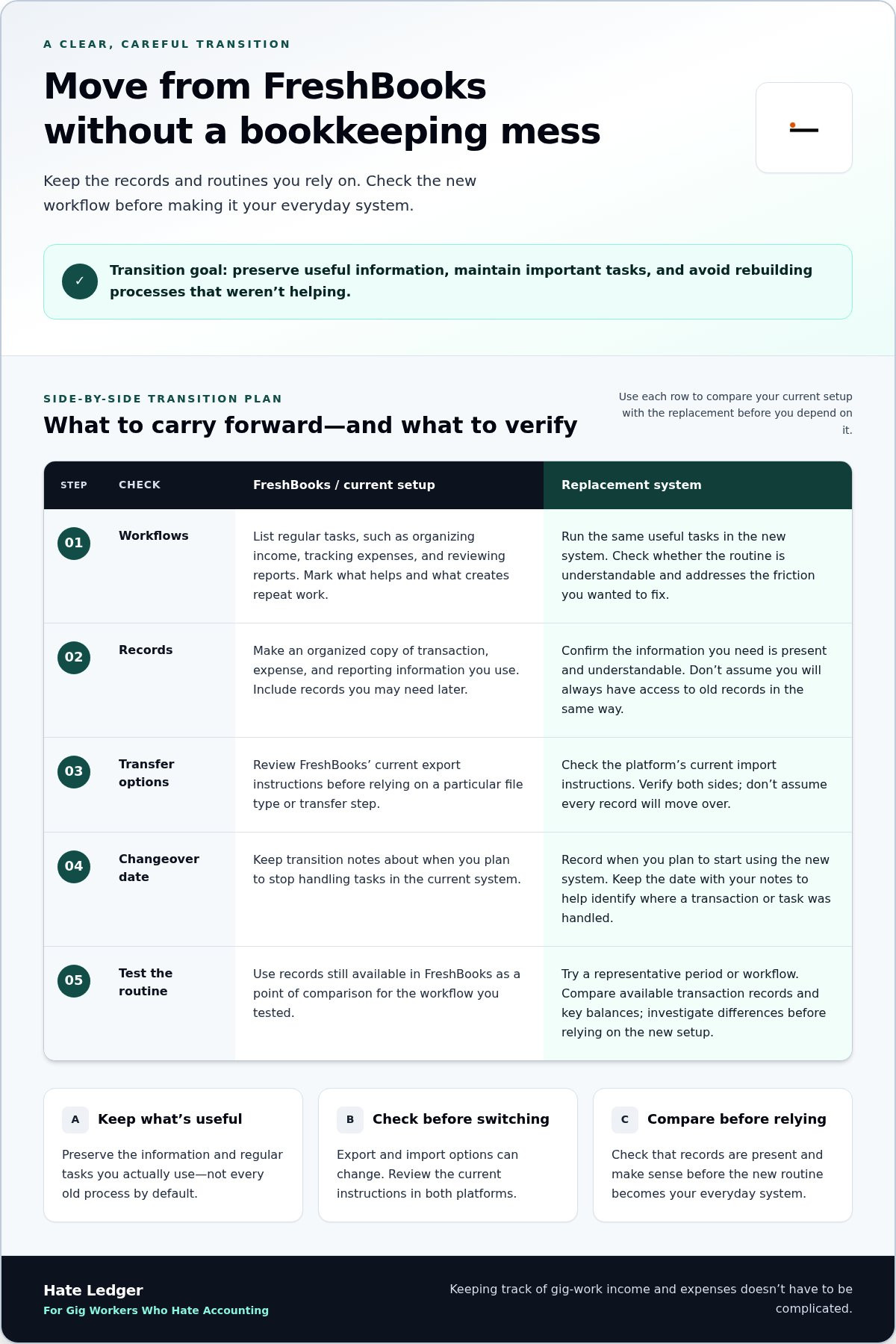
A switch doesn’t need to become a second bookkeeping project. Start by identifying what you rely on now, saving the records you may need later, and testing the new routine before making it your everyday system.
A calm switch starts with knowing which records and routines must continue. Keep the goal practical: preserve useful information, maintain important tasks, and avoid rebuilding processes that weren’t helping in the first place.
- Write down your current workflows. List regular tasks such as organizing income, tracking expenses, or reviewing reports. Note which ones are useful and which create repeat work.
- Gather the records you actively use. Make an organized copy of relevant transaction, expense, and reporting information. Include records you may need later rather than assuming you’ll always have access to them in the same way.
- Check transfer options before choosing a method. FreshBooks’ export options and another platform’s import capabilities can change. Review the current instructions in both platforms before relying on a particular file type, transfer step, or automatic import. Don’t assume every record will move over.
- Mark the changeover date. Record when you plan to start using the new system and keep that date with your transition notes. It gives you a clear reference if you later need to understand where a transaction or task was handled.
- Test the new routine before relying on it. Try a representative period or workflow, then compare available transaction records and key balances with what you can still see in FreshBooks.
Prepare your records and recurring bookkeeping tasks
Focus on the information you actually use: income entries, business expenses, and the reports you check to understand your finances. Then note recurring tasks and deadlines, such as when you usually review expenses or check income. This inventory helps prevent a useful routine from disappearing during the switch. You can also use an independent comparison of the best accounting software for small businesses to see how different tools are evaluated, but your own workflow should guide what you preserve.
Test the replacement before relying on it
Don’t try to recreate every old process at once. Run one representative workflow in the new system, then check whether the information you need is present and understandable. Compare records available in both platforms and investigate differences before depending on the new setup for routine decisions. Keep your organized copy and changeover date accessible while you test.
If your priority is a clearer, less hands-on way to organize gig-work finances, explore Hate Ledger’s accounting software. The aim of moving from FreshBooks to a better alternative is continuity with less friction, not a perfect copy of every old workflow.
FreshBooks alternatives compared: match the software to the job
A comparison only helps if it answers a practical question: which tool makes your regular money tasks easier? Treat FreshBooks as your baseline. Note what you use now, what feels cumbersome, and what you need to see clearly. Then compare those needs with each alternative, rather than relying on a brand’s reputation or a long feature list.
Capabilities can vary by plan and change over time, so review current product details before deciding. Use this workflow-first comparison to focus on what matters:
| What to compare | FreshBooks, your baseline | Xero | Pandle | Hate Ledger |
|---|---|---|---|---|
| Workflow fit | Record the tasks you already use it for, then identify what’s slow or missing. | Compare its current workflow with your must-do tasks. The Early plan has limits on monthly invoices and bills. | Compare its current transaction and expense workflows with your actual routine. | Designed to organize finances for small-business owners, contractors, and gig workers. |
| Financial visibility | Use the information you can see today as your reference point. | Check whether its current views make the numbers you rely on easy to understand. | Check how its current views support the money decisions you need to make. | A daily morning number brings revenue, tax obligations, and safely spendable money into one view. |
| Complexity | Notice how much effort your existing routine takes. | Check whether the tools and plan fit your needs without adding unnecessary steps. | Assess its current setup against the level of simplicity you want. | Uses plain-English finances, invisible double-entry, and automated tax reserves. |
| Relevant business type | Compare against your own way of earning and tracking money. | Judge fit by your workflow and the plan’s limits, not by a general label. | Judge fit against your specific work and essential bookkeeping tasks. | Relevant to freelancers, contractors, and gig workers seeking clearer day-to-day finances. |
Compare the work each platform helps you do
Separate the basics from the extras. Do you need to organize incoming transactions, track business expenses, or make income easier to review? Those are bookkeeping tasks. Tax filing is a different job: Hate Ledger calculates tax obligations and helps set aside reserves, but it doesn’t file or submit taxes. The right match depends on the work you do and how much complexity you want in your routine.
Compare visibility, simplicity, and decision support
Financial visibility means understanding revenue, tax obligations, and money available to spend. Hate Ledger’s morning number brings those three pieces into one daily view, so you can see more than a transaction list. That’s a practical kind of simplicity: less mental load without losing sight of the numbers that matter. For another freelancer-focused perspective, see this FreshBooks alternatives for freelancers comparison.
Moving from FreshBooks to a better alternative is a fit decision, not a feature-count contest. Pick the platform whose everyday workflow matches the way you earn, track expenses, and make money decisions.
Choose your FreshBooks alternative with a simple decision framework
Don’t compare every feature on every plan. That turns a practical choice into a research project. Use these four steps to focus on what your replacement needs to make easier:
- Name the pain. Identify the recurring task or uncertainty behind your decision to switch.
- Rank essential tasks. Put must-haves first, such as sorting transactions or tracking business expenses. Separate them from features you might never use.
- Assess financial visibility. Decide what information you need to make confident decisions about your business.
- Test the routine. Try a realistic workflow and notice whether it feels clear and manageable in practice.
Keep the decision tied to your work. A freelancer handling client payments may care most about recording expenses alongside income. A contractor may want a straightforward way to review business transactions. A gig worker earning through different platforms may prioritize keeping those earnings organized. The right essentials depend on how you work, not on a generic checklist of features.
| Common need | Question to ask |
|---|---|
| Too much manual work | Can I complete my regular bookkeeping tasks without unnecessary steps? |
| Hard-to-track expenses | Can I record and review business expenses in a way that fits my routine? |
| Unclear money decisions | Can I find the information I need before deciding how to use business funds? |
| Too many features | Will I use these capabilities often enough to make the added complexity worthwhile? |
If bookkeeping is the problem, prioritize a lighter workflow
For self-employed workers, a lighter workflow means fewer frustrating steps, not less control over important records. Check whether organizing transactions and tracking expenses feels manageable in one place. Don’t assume every freelancer needs the same reports or business tools. A photographer, a driver, and a consultant can have very different routines.
If uncertainty about spending is the problem, prioritize clarity
Before choosing a replacement, ask what makes you hesitate before using business money. Is it difficult to separate business activity from other spending, or do you not know which records to check? Write down the information that would help you make that decision with more confidence. If you’re exploring ways to think about available money, this guide to tax reserves for self-employed readers offers related context.
Moving from FreshBooks to a better alternative is easier to judge when you test the routine that matters to you. If you want to explore a simpler approach, take a look at Hate Ledger.
A simpler FreshBooks alternative for people who hate accounting
Accounting for people who hate accounting should make the money side of work easier to understand, not add another pile of bookkeeping steps. Hate Ledger is designed for gig workers, freelancers, contractors, and small-business owners who want to spend less time managing records and more time getting on with their work.
One difference is invisible double-entry. The accounting structure happens behind the scenes, so you don’t have to keep the method front and center as you organize your finances. It doesn’t make every financial task disappear. It lets you focus on the information you need instead of treating bookkeeping mechanics as another job.
What Hate Ledger changes about the daily money question
The morning number gives you a daily starting point for understanding your business finances. It brings revenue, tax obligations, and the amount of money you can safely spend into one view. That can make it easier to get a financial picture without piecing together separate notes and records. Use it as a reference for day-to-day decisions, rather than relying on memory or an unstructured check of your accounts.
Hate Ledger also includes a decision engine and human-capital ROI insights. These tools add decision support alongside the platform’s accounting features. They’re designed to make business information more useful, not promise a particular outcome or replace your judgment. The aim is to make financial management more approachable and less like a specialist task.
Who should consider Hate Ledger as a replacement?
Hate Ledger is for people who drive for Uber or Lyft, deliver for DoorDash, freelance, contract, or run a small business and find traditional bookkeeping difficult to keep up with. It organizes transactions and business finances in one place. That gives you a straightforward way to see and manage work-related money instead of spreading the task across disconnected notes.
Think about what you want to feel different. Do you want to spend less time working out where to start? Would a daily reference point for your business finances help? If you want a plain-English tool rather than another complex bookkeeping process, try Hate Ledger with the kind of routine you actually have.
Moving from FreshBooks to a better alternative doesn’t require you to decide everything at once. Start with the Free Forever Tier and see whether the approach feels manageable for your work. Explore Hate Ledger’s Free Forever Tier.
Make your next money decision simpler
The best bookkeeping setup is the one you can keep using when work gets busy. Make your next move small: choose one recurring money task you want to feel easier, then judge a replacement by how well it supports that task in your real routine.
That gives you a better test than chasing the perfect feature list. You’re looking for less second-guessing and more confidence in the choices you make for your business. If moving from FreshBooks to a better alternative is your next step, let clarity guide it rather than pressure to change everything at once.
Hate Ledger is built for people who want a more straightforward way to manage business finances. See how it fits your work, then decide if it’s right for you. Explore Hate Ledger’s Free Forever Tier.
You don’t need to love accounting to feel more in control of your money. You need a system that works with you.
Frequently Asked Questions
Can I switch from FreshBooks in the middle of the year?
Yes. If you have a choice, pick a point that won’t collide with a heavy invoicing or expense period. Before changing, review unpaid invoices, pending payments, and recurring charges that need attention. These items can span the changeover and may be harder to track if you’re unsure which tool shows their latest status. You can switch when it suits your workload, not just at year-end.
Will I lose access to my FreshBooks records after switching?
Access can depend on your account status and FreshBooks’ current terms, so don’t assume it will remain available indefinitely. Before ending or changing your account, review what you can retrieve and which records you can download. Look beyond summary reports: invoice details, expense receipts, and attachments may matter if you need to answer a question later. Keep important files organized where you can find them.
Can I use FreshBooks and a new accounting tool at the same time?
Yes, a brief overlap can help you get comfortable with a replacement. Make the overlap purposeful: use the new tool to try a routine while referring to FreshBooks for older activity or unresolved items. Before you stop using the old system, check that outstanding invoices and payment statuses are accounted for. Avoid letting the trial period become an open-ended second bookkeeping routine.
Is a free accounting alternative enough for a freelancer?
It may be, if the free plan supports the way you earn and the records you need to maintain. Look closely at plan limits that affect your actual work, such as invoice volume, client count, or access to features you rely on. Also consider whether paid add-ons or transaction charges apply to your workflow. A free starting point is useful only if the full setup remains practical.
Does accounting software file my taxes for me?
Not necessarily. Tax-related features can mean different things across platforms, from organizing information to estimating amounts or preparing documents. Those functions don’t automatically mean a return is submitted for you. Identify exactly what a tool handles and what remains your responsibility. If you work with a tax professional, clear, organized records can also make it easier to share the information they need.
What should I compare before leaving FreshBooks?
Compare the total cost of the setup, not just the monthly subscription. Per-user charges, payment processing, and optional add-ons can affect what you pay as your workflow changes. Then consider how quickly you can get the information you need and whether the replacement suits your work style. Moving from FreshBooks to a better alternative should feel worthwhile in everyday use, not just look good in a feature list.
Frequently Asked Questions
Start with one question: Which task repeatedly slows me down? Be specific. “Accounting feels hard” is a real feeling, but it’s too broad to guide a software decision. “I have to check several places to understand my business expenses” gives you a concrete problem to solve. Separate today’s workflow friction from features you imagine you might need someday. Accounting software can include a wide range of features of accounting software, but more options don’t automatically mean a better fit. Write down a short list of must-fix problems, then use it to judge alternatives. Focus on the tasks that regularly cost you time, create uncertainty, or interrupt your work.
For freelancers and gig workers, a useful system should make it easier to organize transactions, track business expenses, and see finances in one place. Simpler shouldn’t mean less visibility. You still want to understand what’s coming in and going out without chasing details across disconnected records or trying to hold every number in your head. If accounting itself feels like the obstacle, explore what accounting software for people who hate accounting should make easier. The goal of moving from FreshBooks to a better alternative isn’t to collect more features. It’s to spend less energy managing money and more time doing the work that earns it. A switch doesn’t need to become a second bookkeeping project. Start by identifying what you rely on now, saving the records you may need later, and testing the new routine before making it your everyday system. A calm switch starts with knowing which records and routines must continue. Keep the goal practical: preserve useful information, maintain important tasks, and avoid rebuilding processes that weren’t helping in the first place.
Hate Ledger is for people who drive for Uber or Lyft, deliver for DoorDash, freelance, contract, or run a small business and find traditional bookkeeping difficult to keep up with. It organizes transactions and business finances in one place. That gives you a straightforward way to see and manage work-related money instead of spreading the task across disconnected notes. Think about what you want to feel different. Do you want to spend less time working out where to start? Would a daily reference point for your business finances help? If you want a plain-English tool rather than another complex bookkeeping process, try Hate Ledger with the kind of routine you actually have. Moving from FreshBooks to a better alternative doesn’t require you to decide everything at once. Start with the Free Forever Tier and see whether the approach feels manageable for your work. Explore Hate Ledger’s Free Forever Tier. The best bookkeeping setup is the one you can keep using when work gets busy. Make your next move small: choose one recurring money task you want to feel easier, then judge a replacement by how well it supports that task in your real routine. That gives you a better test than chasing the perfect feature list. You’re looking for less second-guessing and more confidence in the choices you make for your business. If moving from FreshBooks to a better alternative is your next step, let clarity guide it rather than pressure to change everything at once. Hate Ledger is built for people who want a more straightforward way to manage business finances. See how it fits your work, then decide if it’s right for you. Explore Hate Ledger’s Free Forever Tier. You don’t need to love accounting to feel more in control of your money. You need a system that works with you.
Yes. If you have a choice, pick a point that won’t collide with a heavy invoicing or expense period. Before changing, review unpaid invoices, pending payments, and recurring charges that need attention. These items can span the changeover and may be harder to track if you’re unsure which tool shows their latest status. You can switch when it suits your workload, not just at year-end.
Access can depend on your account status and FreshBooks’ current terms, so don’t assume it will remain available indefinitely. Before ending or changing your account, review what you can retrieve and which records you can download. Look beyond summary reports: invoice details, expense receipts, and attachments may matter if you need to answer a question later. Keep important files organized where you can find them.
Yes, a brief overlap can help you get comfortable with a replacement. Make the overlap purposeful: use the new tool to try a routine while referring to FreshBooks for older activity or unresolved items. Before you stop using the old system, check that outstanding invoices and payment statuses are accounted for. Avoid letting the trial period become an open-ended second bookkeeping routine.
It may be, if the free plan supports the way you earn and the records you need to maintain. Look closely at plan limits that affect your actual work, such as invoice volume, client count, or access to features you rely on. Also consider whether paid add-ons or transaction charges apply to your workflow. A free starting point is useful only if the full setup remains practical.
Not necessarily. Tax-related features can mean different things across platforms, from organizing information to estimating amounts or preparing documents. Those functions don’t automatically mean a return is submitted for you. Identify exactly what a tool handles and what remains your responsibility. If you work with a tax professional, clear, organized records can also make it easier to share the information they need.
Compare the total cost of the setup, not just the monthly subscription. Per-user charges, payment processing, and optional add-ons can affect what you pay as your workflow changes. Then consider how quickly you can get the information you need and whether the replacement suits your work style. Moving from FreshBooks to a better alternative should feel worthwhile in everyday use, not just look good in a feature list.